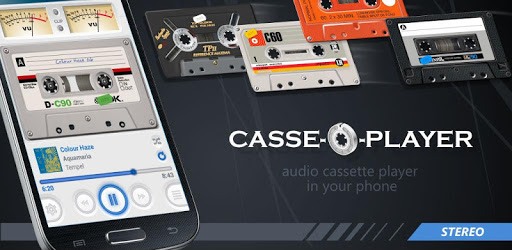
Casse-o-player for PC

Casse-o-player for PC

Published by Valentyn Vieshchunov

Updated September 7, 2025

Stylish cassette player in your phone!

What's New

Version3.3.0
Size61.0 MB
What's New+ Grouping by Artist or Album Artist in the media library+ Other fixes and improvements

Casse-o-player Screenshots

Casse-o-player PC screenshot

About Casse-o-player For PC

Casse-o-player is an Android app developed and published by Valentyn Vieshchunov at Google Play Store on Oct 1, 2015 for Android users. Casse-o-player is so popular that it has gained 1000000 installs so far and growing.

Casse-O-Player: Revive Nostalgia with a Modern Twist

Remember the good old days of cassette tapes and Walkmans? Casse-o-player brings back those cherished memories right at your fingertips. This app transforms your smartphone into a retro cassette player, complete with dynamic cassette skins and realistic tape movements. If you have a passion for vintage audio equipment, Casse-o-player will be a delightful addition to your digital collection.

Realistic Tape Graphics and Sound

The charm of Casse-o-player lies in its authentic cassette tape graphics and sound. It's like having a virtual Walkman on your phone! The app presents a variety of visual delights, including animated compact cassettes and VU meters that dance to the rhythm of your music. Each cassette design is meticulously crafted to evoke nostalgia while being visually appealing on modern devices.

Customization at Its Best

Customization is where Casse-o-player truly shines. You can choose from an impressive array of cassette skins, including classic brands like TDK and Sony. The ability to disable ads by making a purchase enhances the whole experience, making it more immersive. For those who crave more personalization, the app offers features to change the cassette tape's writing font and even add tape changing sound effects.

User-Friendly Design

Navigating through Casse-o-player is a breeze. The interface is designed to be intuitive and straightforward, making it accessible to users of all ages. Whether you're a tech-savvy youngster or someone revisiting the golden era of cassettes, you'll find the app easy to use and delightful to interact with.

Media Library Management

One of the standout features of the app is how it manages your media library. However, there is room for improvement in library management and folder selection options to ensure it doesn't pull unwanted audio files. Users have the option to shuffle and randomly play all songs, albums, or artists in their media library, enhancing the overall user experience. Additional features such as editing tag information could add another layer of customization that many users would find beneficial.

Retro Delight with Modern Convenience

Casse-o-player not only excels in bringing back the look and feel of old cassettes but also adds the convenience of modern technology. Although skipping tracks requires the repeat mode to be on, the overall playback experience is top-notch. Bluetooth connectivity was a minor hiccup in older versions, but recent updates have resolved these issues, allowing seamless control through Bluetooth headsets or speakers.

Additional Features and Improvements

It’s worth noting how each cassette skin provides a unique visual experience. Some minor tweaks, like the position of the year sticker over the cassette brand name, could improve the aesthetics but do not detract significantly from the app’s charm. Users admire the near-real dimensions on 7” displays, adding to the realistic feel. The app’s solid performance over the years and continuous updates show a commitment to user satisfaction.

Conclusion

Casse-o-player stands out as a beautifully designed and functional app for music lovers and nostalgia enthusiasts alike. Its realistic tape animations, customizable features, and excellent audio management make it a must-have for those looking to relive the charm of cassette tapes with the convenience of modern technology.

Can I run Casse-o-player on PC?

Yes, you can run Casse-o-player on PC, but first, you will need emulator software installed on your Windows or MAC, which you can download for free. In the below video, you will find Casse-o-player in action. Before you install the emulator, check out the minimum and recommended system requirements to run it seamlessly. They may change depending on which version of the emulator you choose. Therefore, we recommend you download the latest version of the emulator. Below you will find three free Android emulators that we have shortlisted based on their popularity:

How to Install Casse-o-player on Windows PC

BlueStacks

Minimum
  • OS: Microsoft Windows 7 and above.
  • Processor: Intel or AMD Processor.
  • RAM: Your PC must have at least 4GB of RAM. (Note that having 4GB or more disk space is not a substitute for RAM)
  • Storage: 5GB Free Disk Space.
  • You must be an Administrator on your PC.
Recommended:
  • OS: Microsoft Windows 10
  • Processor: Intel or AMD Multi-Core Processor with Single Thread benchmark score > 1000.
  • Graphics: Intel/Nvidia/ATI, Onboard or Discrete controller with benchmark score >= 750.
  • Please ensure Virtualization is enabled on your PC/Laptop.
  • RAM: 8GB or higher
  • Storage: SSD (or Fusion/Hybrid Drives)
  • Internet: Broadband connection to access games, accounts and related content.

Up to date graphics drivers from Microsoft or the chipset vendor.

  • To start with, download Bluestacks from its official website. The latest version of BluesStacks is v 5, and it is around 400 MB.
  • Once the download is done, click on the Bluestacks set up file to install it on your Windows PC. Follow the on-screen instructions and install it accordingly.
  • The next step is to launch the emulator using the desktop shortcut and sign in using your Google account.
  • Now, head over to Bluestacks home screen and click on the Google Play Store icon.
  • Hit the search bar in Google Play and search for Casse-o-player.
  • Install Casse-o-player from the Play Store by clicking the Install option, which completes downloading of Casse-o-player on PC.

NoxPlayer

Minimum
  • Operating System: Windows XP SP3, Windows Vista, Windows 7, Windows 8, Windows 10, and DirectX 9.0c
  • Processor: At least dual-core processor, both Intel, and AMD are OK
  • Video: Supports Open GL 2.0 or above
  • Memory: 1.5 GB RAM
Recommended
  • Operating System: Windows 7, Windows 8, Windows 10
  • Processor: Multiple core processors which support VT-x or AMB-V Virtualization Technology, better performance with this function enabled
  • Video: The higher performance, the better
  • Memory: 4 GB RAM

Storage: 1 GB available under installation path, 1.5GB available hard drive space

Internet: Broadband Internet connection

  • Download NoxPlayer from the official website. The latest version of NoxPlayer is v 3, and it is around 600 MB.
  • Now install the emulator using the downloaded setup file. Just go through the on-screen instructions and install NoxPlayer on your computer or laptop.
  • After the installation process, launch the Nox Android emulator and log in using your Google account when it asks you.
  • Click on the Google Play Store icon and head over to the search bar to search Casse-o-player. Once found, click on the Install button to install Casse-o-player for PC.
  • If you do not find Casse-o-player on Google Play Store or if you want to skip logging in to Google, you can sideload APK (download the .APK file from this page and open it with NoxPlayer).
  • Launch Casse-o-player from home-screen and start playing it on PC right away!

MEmu

Minimum
  • 2 cores x86/x86_64 Processor (Intel or AMD CPU)
  • WinXP SP3 / Win7 / Win8 / Win10 (Not recommended to run on Server/Enterprise)
  • Latest Windows DirectX 11 / Graphics driver with OpenGL 2.0
  • Hardware Virtualization Technology (Intel VT-x/AMD-V) shall be enabled in BIOS
  • 2GB of RAM (4GB for x64 system)
  • 5GB of hard disk free space
Recommended
  • OS: Microsoft Windows 10 with VT Enabled
  • CPU: Single Thread PassMark score > 1500 (Intel/AMD Multi-Core).
  • Graphics: Intel/Nvidia/ATI, Onboard or Discrete controller with PassMark score > 750.
  • Latest Windows DirectX 11 / Graphics driver with OpenGL 4.5 or higher
  • RAM: 8GB or higher
  • HDD: SSD, 10GB of hard disk free space
  • Internet: Broadband connection with low latency for FPS games
  • Download MEmu Play from the official website. The latest version of NoxPlayer is v 7.5.
  • When the download is completed, install the MEmu emulator on your PC. Follow the on-screen instructions and keep on clicking the Next button until the final step.
  • Now, using the desktop shortcut, look for the MEmu Play emulator and launch it. Once done, it will ask you to log in using your Google account, proceed with the same.
  • MEmu Play will ask you to log in using your Google account. When you log in, it will sync your Google account to MEmu Play. Launch the Google Play Store by clicking on the icon and search for Casse-o-player.
  • Click on the Install button once you find Casse-o-player from the search results. You can also sideload APK (download the .APK file from this page and open it with MEmu) if you want to skip above step.
  • After the installation of Casse-o-player, you're all set to use the app on PC!

Regardless of which Android emulator you install, the steps to install, configure, and running the Casse-o-player app on PC are the same.


Download Casse-o-player For PC