Vast Survival (Multiplayer) Open World. for PC

Vast Survival (Multiplayer) Open World. for PC

Published by HooDoo

Updated April 21, 2026

Vast survival Multiplayer, crafting, building, hunting, voice chat, no zombies.

What's New

Version1.0
Size132.1 MB
What's NewWe have changed a lot in this update, expect lots of bugs!- New map- New pickaxe (stone/metal)- New hatchet (stone/metal)- New craftable Semi auto- New Scrap pile for loot- New rocks- New spring needed for guns- New pipe needed for shotgun- Player name tags- Icons for most items- Working Animal AI (WIP) - New deer- New bear- Sensitivity slider- Grass toggle on/off- Draw distance slider- A few things to help stop hackers- Log out timer (help stop combat logging)- Jump button

Vast Survival (Multiplayer) Open World. Screenshots

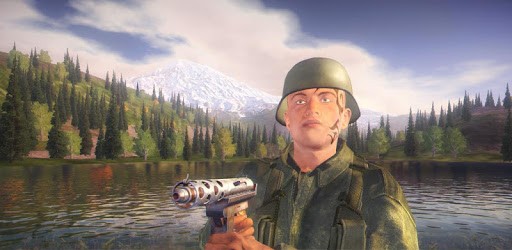
Vast Survival (Multiplayer) Open World. PC screenshot

About Vast Survival (Multiplayer) Open World. For PC

Vast Survival (Multiplayer) Open World. is an Android app developed and published by HooDoo at Google Play Store on Oct 30, 2016 for Android users. Vast Survival (Multiplayer) Open World. is so popular that it has gained 1000000 installs so far and growing.

Vast Survival (Multiplayer) Open World: A Hidden Gem in the Survival Genre

Are you a fan of survival games? If so, then you're in for a treat with Vast Survival (Multiplayer) Open World. This hidden gem is packed with excitement, adventure, and endless possibilities. Let's dive into what makes this game so special and why it deserves more recognition.

Embark on an Epic Journey

Vast Survival (Multiplayer) Open World offers a truly immersive experience, allowing you to explore a vast and detailed world. Whether you're venturing into dense forests, scaling towering mountains, or navigating treacherous caves, there's always something new to discover. The game's open-world concept gives you the freedom to go wherever you please, making each playthrough a unique and thrilling adventure.

Survive and Thrive

In this game, survival is key. You'll need to gather resources, craft tools and weapons, and build shelters to protect yourself from the dangers that lurk around every corner. From hungry bears to ruthless players, you'll constantly be on your toes, strategizing and adapting to stay alive. The adrenaline rush of outsmarting your enemies and overcoming obstacles is what makes Vast Survival (Multiplayer) Open World so addictive.

Realistic Gameplay and Stunning Graphics

One of the standout features of Vast Survival (Multiplayer) Open World is its realistic gameplay and stunning graphics. The developers have spared no expense in creating a visually stunning environment that is both immersive and awe-inspiring. The attention to detail is evident in every blade of grass, every ray of sunlight, and every sound that surrounds you. Prepare to be blown away by the sheer beauty of this game.

Community Interaction

Vast Survival (Multiplayer) Open World takes multiplayer gaming to a whole new level. With proximity voice chat, you can communicate with other players in real-time, forming alliances, planning strategies, or simply engaging in friendly banter. The sense of camaraderie and shared experiences adds an extra layer of excitement and immersion to the game.

Frequently Asked Questions

1. Is Vast Survival (Multiplayer) Open World available offline?

No, currently the game requires an internet connection to play. However, the developers are constantly working on improving the game and may consider adding an offline mode in the future.

2. Are there any plans for updates and new features?

Yes, the developers are actively working on updates and new features to enhance the gameplay experience. They are dedicated to listening to player feedback and implementing changes that will make the game even better.

3. Can I play with my friends?

Absolutely! Vast Survival (Multiplayer) Open World allows you to team up with your friends and explore the game together. Whether it's battling bears or raiding enemy camps, the multiplayer aspect adds a whole new level of excitement and cooperation.

4. Are there any known issues or glitches?

While the game is constantly being improved, there may still be some occasional glitches or issues. However, the developers are actively working on fixing these problems to ensure a smooth and enjoyable gaming experience for all players.

In conclusion, Vast Survival (Multiplayer) Open World is a hidden gem in the survival genre. With its immersive gameplay, stunning graphics, and community interaction, it offers a truly unique and thrilling experience. So, what are you waiting for? Dive into this exciting world and see for yourself why this game is a must-play for survival enthusiasts.

Can I run Vast Survival (Multiplayer) Open World. on PC?

Yes, you can run Vast Survival (Multiplayer) Open World. on PC, but first, you will need emulator software installed on your Windows or MAC, which you can download for free. In the below video, you will find Vast Survival (Multiplayer) Open World. in action. Before you install the emulator, check out the minimum and recommended system requirements to run it seamlessly. They may change depending on which version of the emulator you choose. Therefore, we recommend you download the latest version of the emulator. Below you will find three free Android emulators that we have shortlisted based on their popularity:

How to Install Vast Survival (Multiplayer) Open World. on Windows PC

BlueStacks

Minimum
  • OS: Microsoft Windows 7 and above.
  • Processor: Intel or AMD Processor.
  • RAM: Your PC must have at least 4GB of RAM. (Note that having 4GB or more disk space is not a substitute for RAM)
  • Storage: 5GB Free Disk Space.
  • You must be an Administrator on your PC.
Recommended:
  • OS: Microsoft Windows 10
  • Processor: Intel or AMD Multi-Core Processor with Single Thread benchmark score > 1000.
  • Graphics: Intel/Nvidia/ATI, Onboard or Discrete controller with benchmark score >= 750.
  • Please ensure Virtualization is enabled on your PC/Laptop.
  • RAM: 8GB or higher
  • Storage: SSD (or Fusion/Hybrid Drives)
  • Internet: Broadband connection to access games, accounts and related content.

Up to date graphics drivers from Microsoft or the chipset vendor.

  • To start with, download Bluestacks from its official website. The latest version of BluesStacks is v 5, and it is around 400 MB.
  • Once the download is done, click on the Bluestacks set up file to install it on your Windows PC. Follow the on-screen instructions and install it accordingly.
  • The next step is to launch the emulator using the desktop shortcut and sign in using your Google account.
  • Now, head over to Bluestacks home screen and click on the Google Play Store icon.
  • Hit the search bar in Google Play and search for Vast Survival (Multiplayer) Open World..
  • Install Vast Survival (Multiplayer) Open World. from the Play Store by clicking the Install option, which completes downloading of Vast Survival (Multiplayer) Open World. on PC.

NoxPlayer

Minimum
  • Operating System: Windows XP SP3, Windows Vista, Windows 7, Windows 8, Windows 10, and DirectX 9.0c
  • Processor: At least dual-core processor, both Intel, and AMD are OK
  • Video: Supports Open GL 2.0 or above
  • Memory: 1.5 GB RAM
Recommended
  • Operating System: Windows 7, Windows 8, Windows 10
  • Processor: Multiple core processors which support VT-x or AMB-V Virtualization Technology, better performance with this function enabled
  • Video: The higher performance, the better
  • Memory: 4 GB RAM

Storage: 1 GB available under installation path, 1.5GB available hard drive space

Internet: Broadband Internet connection

  • Download NoxPlayer from the official website. The latest version of NoxPlayer is v 3, and it is around 600 MB.
  • Now install the emulator using the downloaded setup file. Just go through the on-screen instructions and install NoxPlayer on your computer or laptop.
  • After the installation process, launch the Nox Android emulator and log in using your Google account when it asks you.
  • Click on the Google Play Store icon and head over to the search bar to search Vast Survival (Multiplayer) Open World.. Once found, click on the Install button to install Vast Survival (Multiplayer) Open World. for PC.
  • If you do not find Vast Survival (Multiplayer) Open World. on Google Play Store or if you want to skip logging in to Google, you can sideload APK (download the .APK file from this page and open it with NoxPlayer).
  • Launch Vast Survival (Multiplayer) Open World. from home-screen and start playing it on PC right away!

MEmu

Minimum
  • 2 cores x86/x86_64 Processor (Intel or AMD CPU)
  • WinXP SP3 / Win7 / Win8 / Win10 (Not recommended to run on Server/Enterprise)
  • Latest Windows DirectX 11 / Graphics driver with OpenGL 2.0
  • Hardware Virtualization Technology (Intel VT-x/AMD-V) shall be enabled in BIOS
  • 2GB of RAM (4GB for x64 system)
  • 5GB of hard disk free space
Recommended
  • OS: Microsoft Windows 10 with VT Enabled
  • CPU: Single Thread PassMark score > 1500 (Intel/AMD Multi-Core).
  • Graphics: Intel/Nvidia/ATI, Onboard or Discrete controller with PassMark score > 750.
  • Latest Windows DirectX 11 / Graphics driver with OpenGL 4.5 or higher
  • RAM: 8GB or higher
  • HDD: SSD, 10GB of hard disk free space
  • Internet: Broadband connection with low latency for FPS games
  • Download MEmu Play from the official website. The latest version of NoxPlayer is v 7.5.
  • When the download is completed, install the MEmu emulator on your PC. Follow the on-screen instructions and keep on clicking the Next button until the final step.
  • Now, using the desktop shortcut, look for the MEmu Play emulator and launch it. Once done, it will ask you to log in using your Google account, proceed with the same.
  • MEmu Play will ask you to log in using your Google account. When you log in, it will sync your Google account to MEmu Play. Launch the Google Play Store by clicking on the icon and search for Vast Survival (Multiplayer) Open World..
  • Click on the Install button once you find Vast Survival (Multiplayer) Open World. from the search results. You can also sideload APK (download the .APK file from this page and open it with MEmu) if you want to skip above step.
  • After the installation of Vast Survival (Multiplayer) Open World., you're all set to use the app on PC!

Regardless of which Android emulator you install, the steps to install, configure, and running the Vast Survival (Multiplayer) Open World. app on PC are the same.


Download Vast Survival (Multiplayer) Open World. For PC