Published by Photex Apps
Updated November 8, 2025
Edit your Pictures & Selfies was't so easy and creative before and editing tool
| Version | 1.0.36 |
| Size | 52.1 MB |
| What's New | Photex Post - Release Notes 🚀 What's New in This Update: ✅ Bug Fixes & Crash Resolutions: Improved stability for a smoother experience. 🤖 AI-Powered Post Content Generation: Generate post content with AI to save time and boost creativity. 🌍 Expanded Language Support: More languages added to the custom keyboard for better communication. 📝 History Feature: Easily track and access your previously created posts. Thanks for using Photex Post! Stay tuned for more updates! |
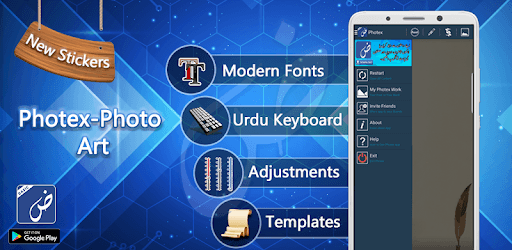
Photex Basic is an Android app developed and published by Photex Apps at Google Play Store on Aug 26, 2018 for Android users. Photex Basic is so popular that it has gained 100000 installs so far and growing.
Photex Basic is designed for those who need to create impressive visuals easily. Whether you're designing posters, creating social media posts, or just adding text to images, Photex Basic offers a simplistic yet powerful experience.
One of the key features of Photex Basic is its support for various languages, including Urdu and Arabic. This capability makes it an excellent choice for users who want to craft visuals in these languages. You can write long and detailed posts without worrying about any limitations, which adds to the versatility of this app.
Photex Basic is known for its easy-to-use interface, which allows users to navigate and create content seamlessly. Even if you're not tech-savvy, you'll find it incredibly simple to produce beautiful texts and images.
With Photex Basic, you can customize your images exactly the way you want. From fonts to sizes and colors, everything is at your fingertips. The latest updates aim to enhance user experience even further, although some have found the transition to new versions challenging. Yet, the app’s core functionalities remain robust and effective.
For those who rely on photex Basic for professional or leisurely projects, the app is a constant companion. It helps you create the content you need quickly and efficiently. Even seniors can find it easy to use, ensuring that age is no barrier to creative expression.
Photex Basic offers a reliable platform for all your visual creation needs. Whether you are making intricate designs or simple text overlays, the app generally performs consistently. However, being aware that newer updates may bring certain changes can help users adapt and continue to enjoy the app's features.
The developers of Photex Basic continuously work to improve the app, making sure it meets the needs of its users. If you encounter any issues, such as the app closing automatically, rest assured that updates and fixes are on their way to provide an even smoother experience.
Photex Basic continues to be one of the most useful applications for creating textual content on images. Whether you're a longtime user or new to the app, you’ll find that it has much to offer in terms of simplicity and power. Installing Photex Basic on your device opens up a world of creative possibilities.
Yes, you can run Photex Basic on PC, but first, you will need emulator software installed on your Windows or MAC, which you can download for free. In the below video, you will find Photex Basic in action. Before you install the emulator, check out the minimum and recommended system requirements to run it seamlessly. They may change depending on which version of the emulator you choose. Therefore, we recommend you download the latest version of the emulator. Below you will find three free Android emulators that we have shortlisted based on their popularity:
Up to date graphics drivers from Microsoft or the chipset vendor.
Storage: 1 GB available under installation path, 1.5GB available hard drive space
Internet: Broadband Internet connection
Regardless of which Android emulator you install, the steps to install, configure, and running the Photex Basic app on PC are the same.