Published by droidvision
Updated March 29, 2026
User defined Advanced IPTV solution for ANDROID
| Version | 7.4 |
| Size | 36.4 MB |
| What's New | V7.4- Fix minor bugs |
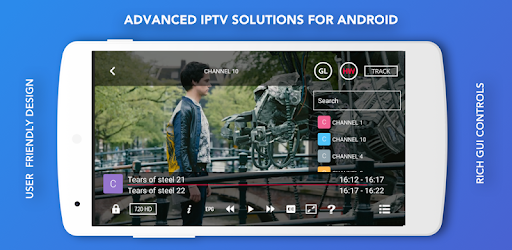
GSE SMART IPTV is an Android app developed and published by droidvision at Google Play Store on Oct 22, 2014 for Android users. GSE SMART IPTV is so popular that it has gained 1000000 installs so far and growing.
GSE SMART IPTV stands out as one of the top choices for IPTV apps available today. With its user-friendly interface and advanced features, it's designed to cater to both beginners and seasoned IPTV enthusiasts. Let's dive into what makes GSE SMART IPTV a top contender in the IPTV world.
One of the first things you'll notice about GSE SMART IPTV is its intuitive design. Finding your way around is a breeze, thanks to clear menus and an uncomplicated layout. Even if you're new to IPTV, using this app feels natural and straightforward.
GSE SMART IPTV shines when it comes to compatibility. Whether you're using an Android device or an iOS system, this app seamlessly supports both. This versatility allows you to enjoy your favorite channels and shows no matter which device you prefer.
Despite large M3U list files, GSE SMART IPTV delivers smooth and high-quality streaming. Even on slower internet connections, you won't have to deal with buffering issues. The quality remains consistent, providing a pleasant viewing experience every time.
Whether you're just starting with IPTV or are a seasoned user, GSE SMART IPTV has something for everyone. The app includes a plethora of features designed to enhance your viewing experience. Although the number of features is too vast to list, rest assured that everything you need is just a tap away.
For those looking for a personalized touch, GSE SMART IPTV offers the ability to manage your channel list effortlessly. It’s a joy to browse through your favorite channels and organize them in a way that suits you best. The app's ability to save your preferences ensures you'll always have quick access to the channels you love.
GSE SMART IPTV is perfect for sports fans. With access to a wide variety of sports channels, you can enjoy football games, tennis matches, and other sporting events. And it's not just limited to sports – news and movies are also readily available, making it a well-rounded app for all your entertainment needs.
One of the significant advantages of using GSE SMART IPTV is the ability to access multiple channels without a monthly fee. This cost-saving benefit means you get more value for what you paid, giving you a rich, diverse viewing experience at no extra cost.
The seamless performance of GSE SMART IPTV is another highlight. The app is responsive and professional, playing your list of channels without any hiccups. It provides a hassle-free experience, which is something many other IPTV apps struggle to offer.
While GSE SMART IPTV is already fantastic, a few additional features could make it even better. Highlighting the current channel being watched and integrating a channel button on the screen are some suggestions that could further enhance the user experience.
GSE SMART IPTV remains a superb choice for anyone looking to dive into IPTV. Its user-friendly design, robust features, and seamless performance set it apart from the rest. If you're searching for an IPTV app that meets all your needs, GSE SMART IPTV is definitely worth a try.
Yes, you can run GSE SMART IPTV on PC, but first, you will need emulator software installed on your Windows or MAC, which you can download for free. In the below video, you will find GSE SMART IPTV in action. Before you install the emulator, check out the minimum and recommended system requirements to run it seamlessly. They may change depending on which version of the emulator you choose. Therefore, we recommend you download the latest version of the emulator. Below you will find three free Android emulators that we have shortlisted based on their popularity:
Up to date graphics drivers from Microsoft or the chipset vendor.
Storage: 1 GB available under installation path, 1.5GB available hard drive space
Internet: Broadband Internet connection
Regardless of which Android emulator you install, the steps to install, configure, and running the GSE SMART IPTV app on PC are the same.