Published by Glu
Clear out the zombie hordes in this free-roaming, 3rd-person shooter!
| Version | 2.0.1 |
| Size | 208.4 MB |
| What's New | ➤ Bug fixes and other improvements to game performance |
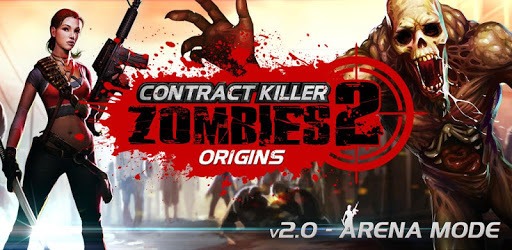
CKZ ORIGINS is an Android app developed and published by Glu at Google Play Store on Nov 30, 2012 for Android users. CKZ ORIGINS is so popular that it has gained 1000000 installs so far and growing.
CKZ Origins is a game that holds a special place in the hearts of many gamers. With its thrilling gameplay and captivating storyline, it has managed to keep players entertained for hours on end. However, as technology advances, the game has fallen behind, leaving many fans unable to enjoy it on their newer devices.
One of the main issues that players face is the compatibility problem. As technology progresses, operating systems evolve, and unfortunately, CKZ Origins has not kept up with these changes. Many players have expressed their disappointment when they discovered that the game does not work on their newer devices.
One user, who had previously enjoyed the game on their lower-end phone, expressed their frustration when they installed it on their new device, only to find that it was not compatible. They reached out to the developers, pleading for an update that would allow them to relive the excitement of CKZ Origins once again.
It's not just one user who is longing for an update. Many players have voiced their desire for the developers to breathe new life into CKZ Origins. They acknowledge the game's incredible graphics, immersive story mode, and overall enjoyable gameplay, but they can't help but wonder why the developers have not released an update for the past seven years.
The lack of updates has left players stuck on older versions of Android, unable to experience the game on the latest operating systems. While there may be other zombie games available on the Play Store, players argue that none of them can compare to the unique experience provided by CKZ Origins.
Despite the compatibility issues, there are still ways for some players to enjoy CKZ Origins. One user mentioned that they can still play the game on their Kindle Fire, which brings them a sense of relief. However, for those with newer Android devices, the frustration remains.
CKZ Origins is a game that deserves to be enjoyed by all. Its impressive 3D graphics, challenging gameplay, and engaging storyline make it a standout in the genre. However, the lack of compatibility with newer devices is holding it back from reaching its full potential.
No, unfortunately, CKZ Origins is not compatible with newer Android devices. The game has not received an update in the past seven years, leaving many players unable to play it on their newer devices.
Yes, if you own a Kindle Fire, you can still enjoy CKZ Origins. The game is compatible with this device, providing a way for some players to experience the excitement of the game.
As of now, there is no information regarding future updates for CKZ Origins. However, many players have expressed their desire for an update, hoping that the developers will listen to their pleas and bring the game up to date.
While there are many zombie games available on the Play Store, players argue that none of them can compare to the unique experience provided by CKZ Origins. The game's impressive graphics, engaging story mode, and challenging gameplay set it apart from the rest.
Overall, CKZ Origins is a game that has left a lasting impression on its players. Despite the compatibility issues, the game's captivating storyline and thrilling gameplay make it a standout in the genre. However, it is clear that an update is needed to allow all players to enjoy this classic zombie game once again.
Yes, you can run CKZ ORIGINS on PC, but first, you will need emulator software installed on your Windows or MAC, which you can download for free. In the below video, you will find CKZ ORIGINS in action. Before you install the emulator, check out the minimum and recommended system requirements to run it seamlessly. They may change depending on which version of the emulator you choose. Therefore, we recommend you download the latest version of the emulator. Below you will find three free Android emulators that we have shortlisted based on their popularity:
Up to date graphics drivers from Microsoft or the chipset vendor.
Storage: 1 GB available under installation path, 1.5GB available hard drive space
Internet: Broadband Internet connection
Regardless of which Android emulator you install, the steps to install, configure, and running the CKZ ORIGINS app on PC are the same.