Published by Noodlecake Studios Inc
Updated April 11, 2026
A local multiplayer party game. Ships can only turn right. (whaaaaa?)
| Version | 2.0.3 |
| Size | 65.2 MB |
| What's New | Minor improvements and bug fixes. |
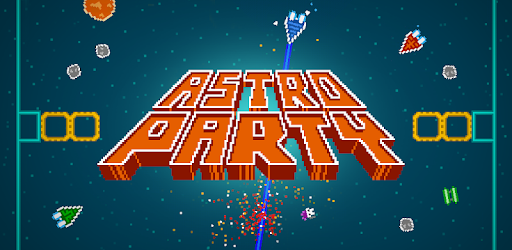
Astro Party is an Android app developed and published by Noodlecake Studios Inc at Google Play Store on Sep 16, 2015 for Android users. Astro Party is so popular that it has gained 100000 installs so far and growing.
Welcome to Astro Party, a wildly entertaining game that promises endless fun and excitement. Astro Party is a fantastic multiplayer game that allows you to compete against your friends in space-themed combat. The game's creative and simple controls, along with its pixelated graphics, make it a unique addition to any gaming library.
Astro Party embraces simplicity with its controls, yet manages to keep things fresh and engaging. The controls might take a little getting used to, but once you do, the game becomes a thrilling ride. Players can only turn right, adding a unique challenge to the gameplay that keeps everyone on their toes.
One of Astro Party's strongest features is its multiplayer mode. You can play with up to four friends, making it a perfect choice for parties or get-togethers. The game doesn’t include CPU players, so you’ll need at least one friend to enjoy the action. However, the multiplayer experience is unparalleled, making it easy to lose track of time as you battle for supremacy in space!
Astro Party also includes some delightful hidden secrets that add an extra layer of fun to the game. There are secret ships that can be unlocked by holding the add player button for a specific amount of time. Hold the button for 5 seconds to get a ship with a shark pilot, or for 10 seconds to unlock a ship piloted by soggy toast—how cool is that?
Although the game is pixelated, the graphics are incredibly charming and add to the overall appeal of Astro Party. Players have noted that the pixelation could be a bit smoother, but this minor flaw does not detract from the overall experience. The colorful and vibrant graphics keep the atmosphere lighthearted and engaging.
While Astro Party is nearly perfect, there are a few features that would make it even better. Players have expressed a desire for a single-player mode where they can play against CPU opponents. Additionally, an online multiplayer mode and different ships with unique perks would add even more depth and replayability to the game. These additions would undoubtedly elevate Astro Party to new heights.
If you're planning to play Astro Party on a tablet, you're in for a treat. The game is incredibly enjoyable on larger screens, making it even more fun to play with friends. The tablet experience enhances the overall feel of the game, bringing the galactic battles to life in a more immersive way.
The overall gameplay experience in Astro Party is phenomenal. Players love the addictiveness of the game and how it manages to keep everyone engaged for hours on end. The unique control scheme and the ability to play with friends make it a standout in the world of mobile party games. The original concept and amazing graphics are the cherry on top, making Astro Party a must-have for any gaming enthusiast.
Yes, you can run Astro Party on PC, but first, you will need emulator software installed on your Windows or MAC, which you can download for free. In the below video, you will find Astro Party in action. Before you install the emulator, check out the minimum and recommended system requirements to run it seamlessly. They may change depending on which version of the emulator you choose. Therefore, we recommend you download the latest version of the emulator. Below you will find three free Android emulators that we have shortlisted based on their popularity:
Up to date graphics drivers from Microsoft or the chipset vendor.
Storage: 1 GB available under installation path, 1.5GB available hard drive space
Internet: Broadband Internet connection
Regardless of which Android emulator you install, the steps to install, configure, and running the Astro Party app on PC are the same.