Published by Cram Fighter, Inc.
Updated July 27, 2026
A free college homework assignment tracker and digital study planner.
| Version | 2.0 |
| Size | 73.7 MB |
| What's New | It's here! Chipper 2.0 is built completely from the ground up and features improved performance and more reliable syncing between devices. In addition, we've included information about our upcoming Boosts feature, which will offer enhanced features and suggested tasks to help you accomplish your academic and career goals. Please reserve your spot for the Boosts you want to use. We have lots of new features coming, so stay tuned for regular updates. Questions? Let us know at [email protected]. |
Chipper - Free Study Planner & Homework Organizer is an Android app developed and published by Cram Fighter, Inc. at Google Play Store on Nov 15, 2018 for Android users. Chipper - Free Study Planner & Homework Organizer is so popular that it has gained 1000 installs so far and growing.
Are you a student struggling to keep track of your assignments and deadlines? Look no further than Chipper - the free study planner and homework organizer app that will revolutionize the way you manage your academic life. With its user-friendly interface and powerful features, Chipper is the ultimate tool for student organization.
One of the standout features of Chipper is its reward system. Unlike other study planner apps that simply help you keep track of your tasks, Chipper goes the extra mile by providing a sense of accomplishment and motivation. By earning rewards for completing assignments, you'll feel a sense of fulfillment and purpose, making your study sessions more meaningful and enjoyable.
But Chipper is not just about rewards. It offers a comprehensive set of tools to help you stay on task and manage your time effectively. From color coding your classes to linking with Google and utilizing study timers with built-in breaks, Chipper has everything you need to optimize your study routine.
Gone are the days of carrying around a bulky physical planner. With Chipper, you can access your study schedule anytime, anywhere. Whether you're on the go or relaxing at home, simply open the app on your phone and you'll have all your assignments, quizzes, and exams at your fingertips.
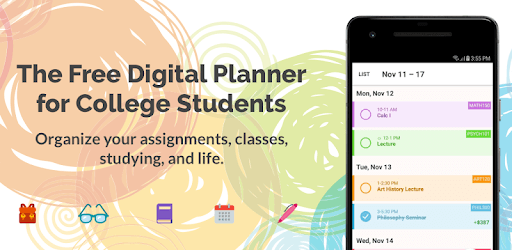
The schedule tab in Chipper offers a variety of views, including list, month, day, and overdue. This flexibility allows you to customize your schedule to fit your needs and preferences. No more flipping through pages or searching for due dates - Chipper has it all organized for you.
Chipper's intuitive interface and user-friendly design make it a breeze to create and manage tasks. Whether you're a tech-savvy student or a self-proclaimed terrible organizer, Chipper has got you covered.
One feature that sets Chipper apart is its landscape support. While many other study planner apps are limited to portrait mode, Chipper offers landscape support, providing a more immersive and enjoyable user experience. Plan your tasks and navigate the app with ease, no matter how you prefer to hold your device.
The creators of Chipper are dedicated to providing the best possible user experience. They actively listen to user feedback and continuously work on improving the app. From addressing issues with slow response times to adding new features, Chipper is constantly evolving to meet the needs of its users.
While there may be a few minor areas for improvement, such as enhanced notification options and manual task ordering, the overall functionality and convenience of Chipper make it an indispensable tool for any student.
Yes, Chipper is available for both iOS and Android devices. Simply visit the App Store or Google Play Store to download and start organizing your study life.
Currently, Chipper is only available as a mobile app. However, the creators are actively working on developing a desktop version to provide users with even more flexibility and convenience.
No, Chipper is completely ad-free. You can enjoy a seamless and uninterrupted study experience without any distractions.
While Chipper offers a study timer with customizable settings, it currently does not track the amount of time you study per class or week. However, the creators are considering adding more detailed breakdowns in the study function in future updates.
Chipper - Free Study Planner & Homework Organizer is the ultimate solution for students seeking to enhance their organization and time management skills. With its intuitive interface, powerful features, and continuous improvement, Chipper is the go-to app for students who want to stay on top of their academic game. Download Chipper today and experience the difference it can make in your student life!
Yes, you can run Chipper - Free Study Planner & Homework Organizer on PC, but first, you will need emulator software installed on your Windows or MAC, which you can download for free. In the below video, you will find Chipper - Free Study Planner & Homework Organizer in action. Before you install the emulator, check out the minimum and recommended system requirements to run it seamlessly. They may change depending on which version of the emulator you choose. Therefore, we recommend you download the latest version of the emulator. Below you will find three free Android emulators that we have shortlisted based on their popularity:
Up to date graphics drivers from Microsoft or the chipset vendor.
Storage: 1 GB available under installation path, 1.5GB available hard drive space
Internet: Broadband Internet connection
Regardless of which Android emulator you install, the steps to install, configure, and running the Chipper - Free Study Planner & Homework Organizer app on PC are the same.