Published by Gaco Games
Updated August 13, 2026
Anime Action RPG with solid combat and great story!
| Version | 6.2 |
| Size | 181.7 MB |
| What's New | Comply to new Google Play policy to support newer Android version |
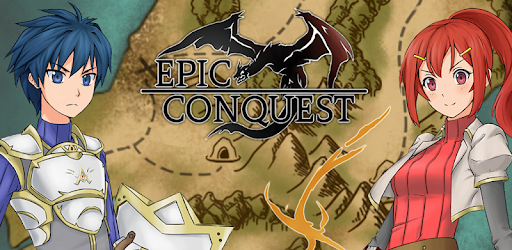
Epic Conquest is an Android app developed and published by Gaco Games at Google Play Store on Oct 5, 2017 for Android users. Epic Conquest is so popular that it has gained 9836859 installs so far and growing.
Epic Conquest is an extraordinary adventure game that provides players with an immersive and captivating experience from start to finish. Set in a fantastical realm filled with mythical creatures and epic battles, this game takes players on a thrilling journey of conquest and heroism.
One of the standout features of Epic Conquest is its stunning graphics. From the moment you start playing, you'll be mesmerized by the beautifully designed landscapes and detailed character models. The visuals truly bring the game world to life, making every moment feel like a cinematic experience.
But it's not just the graphics that make Epic Conquest impressive. The gameplay is equally engaging, offering players a wide range of character classes to choose from and customize. Whether you prefer a powerful warrior or a nimble mage, there's a character class that suits your playstyle. The controls are responsive and intuitive, allowing for smooth and enjoyable gameplay.
At the heart of Epic Conquest is a captivating storyline that will keep you hooked from beginning to end. While some may find certain elements of the story to be familiar, the character development is where the game truly shines. The relationship between the two main characters, Alaster and Edna, is beautifully portrayed, and their journey together is filled with twists and turns.
As you progress through the game, you'll uncover the secrets of the realm and face off against powerful enemies. The story is expertly woven into the gameplay, creating a seamless and immersive experience that will leave you wanting more.
In Epic Conquest, grinding is not necessary to progress, but it can be rewarding for those who want to become even more powerful. The game strikes a good balance between challenge and accessibility, allowing players to choose their level of difficulty. Whether you prefer a casual experience or a more intense challenge, Epic Conquest caters to all types of players.
Furthermore, the game offers a wide range of customization options. From equipping your character with powerful weapons and armor to unlocking new abilities and skills, there's always something to strive for. This level of customization adds depth to the gameplay and keeps you invested in your character's progression.
Yes, Epic Conquest is available for free, allowing you to embark on an epic adventure without spending a dime. However, there may be optional in-game purchases available for those who wish to enhance their gaming experience.
Absolutely! Epic Conquest offers a wide range of character classes, each with its own unique abilities and playstyle. Whether you prefer close combat or long-range attacks, there's a character class that suits your preferences.
No, grinding is not necessary to progress in Epic Conquest. The game allows you to choose your level of difficulty, so you can enjoy the game at your own pace. However, grinding can be rewarding for those who want to become even more powerful.
Yes, Epic Conquest offers a wide range of customization options. You can equip your character with powerful weapons and armor, unlock new abilities and skills, and personalize your character's appearance. This level of customization adds depth to the gameplay and allows you to create a character that reflects your playstyle.
Yes, there is a sequel to Epic Conquest called Epic Conquest 2. If you enjoyed the first game, you'll definitely want to check out the sequel, which offers even more thrilling adventures and challenges.
In conclusion, Epic Conquest is a must-play game for fans of adventure and RPG genres. With its stunning graphics, engaging gameplay, captivating storyline, and rewarding customization options, it offers an immersive experience that will keep you coming back for more. So embark on your epic conquest today and discover the fantastical realm that awaits!
Yes, you can run Epic Conquest on PC, but first, you will need emulator software installed on your Windows or MAC, which you can download for free. In the below video, you will find Epic Conquest in action. Before you install the emulator, check out the minimum and recommended system requirements to run it seamlessly. They may change depending on which version of the emulator you choose. Therefore, we recommend you download the latest version of the emulator. Below you will find three free Android emulators that we have shortlisted based on their popularity:
Up to date graphics drivers from Microsoft or the chipset vendor.
Storage: 1 GB available under installation path, 1.5GB available hard drive space
Internet: Broadband Internet connection
Regardless of which Android emulator you install, the steps to install, configure, and running the Epic Conquest app on PC are the same.