Published by Asobimo, Inc.
Updated April 23, 2026
More than 80 BILLION dress patterns! Customize your character with skills!
| Version | 4.1.16 |
| Size | 60.1 MB |
| What's New | The following improvement has been applied.・Pet model size (UI) adjustments.*For more details, please check our official website and news.Thanks for playing and good luck on your adventure! |
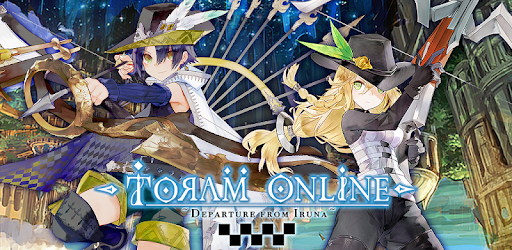
RPG Toram Online is an Android app developed and published by Asobimo, Inc. at Google Play Store on Jul 9, 2015 for Android users. RPG Toram Online is so popular that it has gained 15015141 installs so far and growing.
Are you ready to embark on an epic adventure in the world of RPG Toram Online? If you haven't tried this game yet, you're missing out on a crucial piece of your MMO life. With its captivating gameplay, stunning graphics, and immersive storyline, RPG Toram Online is the best MMORPG out there.
In RPG Toram Online, speed is the name of the game. The game is highly reliant on +attack speed (aspd) and motion speed. By increasing your motion speed, you can make your skill animations faster. Additionally, once you've reached the cap for aspd, the excess will be converted into motion speed. This unique mechanic adds a whole new level of strategy to the game, allowing you to unleash your skills with lightning-fast precision.
One of the standout features of RPG Toram Online is its improved security measures. Say goodbye to hackers and enjoy a safe and fair gaming experience. But it's not just about security – RPG Toram Online also offers a vibrant social community. Join parties and make friends who will never want to leave the game. The world of IRUNA awaits, filled with endless possibilities.
While RPG Toram Online is already an incredible game, there are always areas for improvement. Some players have suggested that the party name list should also display the level of the summoned pet, or at least allow pet owners to kick their pets even if they're not the party leader. This small change would greatly enhance the convenience and gameplay experience for pet owners.
Another suggestion involves the claw machine collab furniture. Some players have noticed that the doll always moves to the right of the claw, and the claw itself has a delayed grip. Addressing this issue would ensure a more enjoyable and fair claw machine experience for all players.
RPG Toram Online stands out from other MMORPGs with its unique player-driven economy. In this game, players are not only adventurers but also suppliers for weapons and other items. The skill tree and stat point system allow for countless combinations and builds, giving you the freedom to customize your character to suit your playstyle.
Furthermore, the captivating storyline and thrilling quests will keep you immersed in the world of RPG Toram Online. Prepare to be amazed by the depth and richness of the game's lore as you uncover its secrets and face formidable challenges.
With its continuous updates and improvements, RPG Toram Online has stood strong since its beta days. Even if you encountered any issues in the past, the game has evolved and is ready to provide you with an unforgettable gaming experience. Join the countless players who have been enjoying RPG Toram Online for years and discover why it's considered the best mobile MMO.
In conclusion, RPG Toram Online is a game that offers everything a true adventurer desires. From its captivating storyline to its challenging combat system, this game will keep you hooked for hours on end. Don't miss out on the opportunity to explore the vast open world of RPG Toram Online and create your own legendary tale.
Yes, RPG Toram Online is free to play. However, it does offer in-app purchases for additional in-game items and customization options.
Absolutely! RPG Toram Online allows you to play solo and enjoy the game at your own pace. However, joining parties and interacting with other players can enhance your gaming experience.
RPG Toram Online is compatible with most modern smartphones and tablets. However, it's always recommended to check the specific device requirements on the app store before downloading the game.
The development team behind RPG Toram Online is dedicated to providing regular updates and improvements to the game. Stay tuned for exciting new features and content!
Currently, RPG Toram Online does not offer the ability to switch servers. However, the game's popularity has led to requests for additional servers, so keep an eye out for future updates.
Yes, you can run RPG Toram Online on PC, but first, you will need emulator software installed on your Windows or MAC, which you can download for free. In the below video, you will find RPG Toram Online in action. Before you install the emulator, check out the minimum and recommended system requirements to run it seamlessly. They may change depending on which version of the emulator you choose. Therefore, we recommend you download the latest version of the emulator. Below you will find three free Android emulators that we have shortlisted based on their popularity:
Up to date graphics drivers from Microsoft or the chipset vendor.
Storage: 1 GB available under installation path, 1.5GB available hard drive space
Internet: Broadband Internet connection
Regardless of which Android emulator you install, the steps to install, configure, and running the RPG Toram Online app on PC are the same.