Published by GameDNA
Updated August 12, 2025
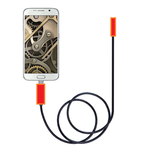
This Endoscope is a portable,handheld video endoscope system
| Version | 1.01.013 |
| Size | 9.9 MB |
| What's New | 首次上传 |
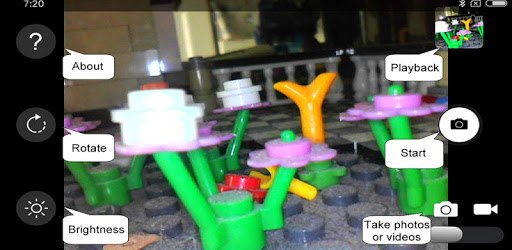
OTG Endoscope is an Android app developed and published by GameDNA at Google Play Store on May 26, 2017 for Android users. OTG Endoscope is so popular that it has gained 100000 installs so far and growing.
Have you ever needed to take a closer look into tight spaces or hard-to-reach areas? The OTG Endoscope is here to make your task much easier. It pairs perfectly with your endoscope camera, ensuring a smooth and hassle-free experience.
OTG Endoscope works like a charm with various devices, especially those running on Android. Users have reported seamless integration with several models, including the Samsung S9, Samsung Galaxy S10+, and even Google Pixel 3 XL. Whether your device is running on Android 10 or an older version, this app manages to handle it all effortlessly.
One of the standout features of OTG Endoscope is that it operates without any disruptive advertisements. Many people often find it frustrating when ads flood their screen, disrupting their activities. However, with OTG Endoscope, you can enjoy a clean user interface free from such interruptions. Additionally, it’s stable and reliable, significantly reducing the chances of crashes that users frequently experience with other similar apps.
Once you download OTG Endoscope, getting started is straightforward. There are no unnecessary permissions or complex settings to deal with. Simply plug your USB endoscope camera into your device, and start capturing images or recording videos. The app also allows you to adjust the size and lighting for optimal image quality directly within the interface.
With OTG Endoscope, you can take high-resolution images and videos with ease. Whether you are using a Teslong endoscope camera or a Shekar endoscope, the app’s compatibility and performance remain top-notch. Users have praised its ability to capture clear and detailed visuals, making it invaluable for various activities ranging from home inspections to mechanical repairs.
Furthermore, OTG Endoscope provides a straightforward way to manage your photos and videos. Captured images are automatically saved to your device's gallery, enabling easy access and sharing. The video recording feature is an added bonus, allowing you to document your inspections or findings comprehensively.
OTG Endoscope is highly versatile and can be used for numerous applications. Whether you are a DIY enthusiast, a plumber, an electrician, or just someone who needs to peek into narrow spaces occasionally, this app caters to your needs efficiently. Its plug-and-play nature means you spend less time fiddling with software and more time getting the job done.
The app boasts a user-friendly design that ensures even those not too tech-savvy can use it without issues. Navigation through the app is simple, and all essential features are easily accessible. This simplicity, combined with its robust functionality, makes OTG Endoscope a go-to tool for many.
In summary, OTG Endoscope is designed to deliver a top-tier experience for anyone needing an effective endoscope tool. Its compatibility with various devices, ad-free interface, and high-quality image capturing capabilities make it a reliable choice for professionals and hobbyists alike.
Yes, you can run OTG Endoscope on PC, but first, you will need emulator software installed on your Windows or MAC, which you can download for free. In the below video, you will find OTG Endoscope in action. Before you install the emulator, check out the minimum and recommended system requirements to run it seamlessly. They may change depending on which version of the emulator you choose. Therefore, we recommend you download the latest version of the emulator. Below you will find three free Android emulators that we have shortlisted based on their popularity:
Up to date graphics drivers from Microsoft or the chipset vendor.
Storage: 1 GB available under installation path, 1.5GB available hard drive space
Internet: Broadband Internet connection
Regardless of which Android emulator you install, the steps to install, configure, and running the OTG Endoscope app on PC are the same.