
Published by Instrument Studio
Updated August 17, 2025
3D DJ – DJ Mixer 2019 is the best virtual DJ turntables
| Version | 1.1.27 |
| Size | 30.5 MB |
| What's New | Minor bug fixes and improvements. Install or update to the newest version to check it out! |
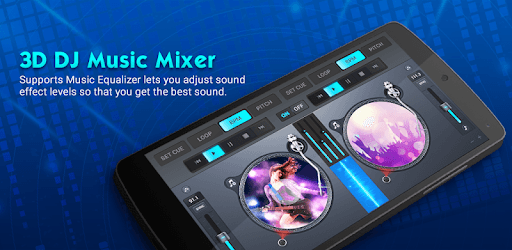
3D DJ – DJ Mixer 2019 is an Android app developed and published by Instrument Studio at Google Play Store on Nov 30, 2017 for Android users. 3D DJ – DJ Mixer 2019 is so popular that it has gained 5000000 installs so far and growing.
If you've always dreamed of being a DJ, mixing tracks, and creating your own unique sound, 3D DJ – DJ Mixer 2019 is the perfect app for you. It's designed to make DJing accessible and fun for everyone, from beginners to seasoned pros. Let's dive into what makes this DJ mixer app stand out from the crowd.
With 3D DJ – DJ Mixer 2019, you can create your own DJ songs right from your mobile device. The app provides a range of tools and features that allow you to mix and match different tracks, add effects, and tweak the sound to get just the right vibe. It’s like having a full DJ setup in the palm of your hand!
One of the coolest features of 3D DJ – DJ Mixer 2019 is the ability to share your creations. Once you've made a track you're proud of, you can easily post it on platforms like YouTube. This is a fantastic way to showcase your skills and gain some followers. If you have a YouTube channel or are thinking about starting one, this app can provide you with a unique angle to attract viewers.
Even if you have no prior experience with DJing, 3D DJ – DJ Mixer 2019 is designed to be user-friendly and intuitive. The interface is straightforward, making it easy to navigate and start mixing right away. This app ensures that everyone, regardless of their skill level, can enjoy the art of DJing.
3D DJ – DJ Mixer 2019 comes loaded with exciting features. These include a wide selection of pre-loaded tracks, loops, and sound effects. You can also customize your own playlists and save your mixes. The app's 3D interface adds a fun, dynamic element that enhances the overall user experience.
Using 3D DJ – DJ Mixer 2019 can be a great way to learn the basics of DJing. As you explore the app's features and experiment with different sounds, you'll develop a better understanding of music mixing. This can serve as a stepping stone to more advanced DJ equipment and techniques in the future.
The app is not just about creating music; it's also about connecting with others. You can join a community of like-minded individuals who share your passion for DJing. This opens up opportunities for collaboration, feedback, and inspiration from fellow music enthusiasts.
In a world where music is a universal language, 3D DJ – DJ Mixer 2019 breaks down barriers, empowering everyone to create and share their own tracks. Its user-friendly design, rich feature set, and community-building potential make it an excellent choice for aspiring DJs and music lovers alike. Dive into the world of DJing today with 3D DJ – DJ Mixer 2019 and let your creativity shine!
Yes, you can run 3D DJ – DJ Mixer 2019 on PC, but first, you will need emulator software installed on your Windows or MAC, which you can download for free. In the below video, you will find 3D DJ – DJ Mixer 2019 in action. Before you install the emulator, check out the minimum and recommended system requirements to run it seamlessly. They may change depending on which version of the emulator you choose. Therefore, we recommend you download the latest version of the emulator. Below you will find three free Android emulators that we have shortlisted based on their popularity:
Up to date graphics drivers from Microsoft or the chipset vendor.
Storage: 1 GB available under installation path, 1.5GB available hard drive space
Internet: Broadband Internet connection
Regardless of which Android emulator you install, the steps to install, configure, and running the 3D DJ – DJ Mixer 2019 app on PC are the same.








![Musicolet Music Player [Free, No ads] icon](https://cdn.desktoptwo.com/img/in.krosbits.musicolet-logo.png)