Death Invasion : Survival for PC

Death Invasion : Survival for PC

Published by JoyMeng GAME

Updated May 6, 2026

The best third-person shooting game!Just Aim, Fire, and Shoot!

What's New

Version1.2.7
Size243.8 MB
What's NewFixed some bugs

Death Invasion : Survival Screenshots

Death Invasion : Survival PC screenshot

About Death Invasion : Survival For PC

Death Invasion : Survival is an Android app developed and published by JoyMeng GAME at Google Play Store on Jul 13, 2018 for Android users. Death Invasion : Survival is so popular that it has gained 1000000 installs so far and growing.

Welcome to Death Invasion: Survival

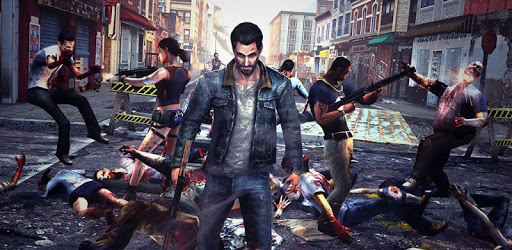
Jump into the gripping world of Death Invasion: Survival, an intense and thrilling zombie shooting game that will keep you on the edge of your seat. This game offers you the chance to fight against hordes of zombies in a post-apocalyptic environment. With excellent graphics and smooth gameplay, this survival game is a real treat for fans of the zombie genre.

Visually Stunning Graphics

One of the standout features of Death Invasion: Survival is its amazing graphics. The visuals are detailed and realistic, immersing players in a terrifyingly beautiful zombie apocalypse. The graphics not only bring the game's world to life but also contribute to the overall intensity and thrill of the experience.

Addictive Gameplay

It's not just the eye-catching graphics that make Death Invasion: Survival a hit. The gameplay is equally engaging with lots of weapons to choose from and challenging levels that become progressively more difficult. The fights are packed with excitement and keep you hooked as you strive to overcome each stage. For players who enjoy a challenge, this game is perfect as it gets tougher, making you want to play even more.

Smooth Controls

The controls are a delightfully smooth part of the gaming experience. You can move in a 360-degree angle to shoot in all directions, ensuring no zombie can sneak up on you. The automatic firing feature adds to the ease of play, allowing you to focus more on strategy and less on constant button pressing.

Weapon Variety and Upgrades

Death Invasion: Survival boasts an extensive arsenal of weapons, each with its own unique effects. This variety not only keeps the game interesting but also allows you to find and upgrade your favorite weapons to suit your playstyle. As you advance, you'll have the opportunity to encounter more powerful guns and experience each weapon's impact.

Immersive Zombie Experience

If you're a fan of zombie apocalypse scenarios, this game hits the mark. The atmosphere and gameplay make you feel like you're in a real-life zombie survival situation, reminiscent of popular shows and movies. You’ll quickly find yourself engrossed in the fight for survival, battling endless waves of undead foes.

Freedom to Explore

Another fantastic aspect of Death Invasion: Survival is the freedom it gives players. You can walk freely through the game world, exploring different areas and engaging with zombies and other threats. This sense of freedom enhances the game's immersive quality, making you feel like you’re genuinely part of this dangerous, post-apocalyptic world.

Challenges and Rewards

Each stage offers unique challenges that test your skills and strategies. As you progress, the game gets harder, but with increased difficulty comes greater rewards. Boss fights and special events present extra opportunities for valuable blueprints and items, making every victorious battle that much sweeter.

Suggestions for Improvement

While Death Invasion: Survival is already a fantastic game, adding more bosses, weapons, and elite zombies could elevate the experience even further. Introducing more blueprint drops and other elements would keep the gameplay dynamic and exciting at every turn. These enhancements could transform the game into the ultimate horror-filled adventure, keeping players engaged for even longer.

Can I run Death Invasion : Survival on PC?

Yes, you can run Death Invasion : Survival on PC, but first, you will need emulator software installed on your Windows or MAC, which you can download for free. In the below video, you will find Death Invasion : Survival in action. Before you install the emulator, check out the minimum and recommended system requirements to run it seamlessly. They may change depending on which version of the emulator you choose. Therefore, we recommend you download the latest version of the emulator. Below you will find three free Android emulators that we have shortlisted based on their popularity:

How to Install Death Invasion : Survival on Windows PC

BlueStacks

Minimum
  • OS: Microsoft Windows 7 and above.
  • Processor: Intel or AMD Processor.
  • RAM: Your PC must have at least 4GB of RAM. (Note that having 4GB or more disk space is not a substitute for RAM)
  • Storage: 5GB Free Disk Space.
  • You must be an Administrator on your PC.
Recommended:
  • OS: Microsoft Windows 10
  • Processor: Intel or AMD Multi-Core Processor with Single Thread benchmark score > 1000.
  • Graphics: Intel/Nvidia/ATI, Onboard or Discrete controller with benchmark score >= 750.
  • Please ensure Virtualization is enabled on your PC/Laptop.
  • RAM: 8GB or higher
  • Storage: SSD (or Fusion/Hybrid Drives)
  • Internet: Broadband connection to access games, accounts and related content.

Up to date graphics drivers from Microsoft or the chipset vendor.

  • To start with, download Bluestacks from its official website. The latest version of BluesStacks is v 5, and it is around 400 MB.
  • Once the download is done, click on the Bluestacks set up file to install it on your Windows PC. Follow the on-screen instructions and install it accordingly.
  • The next step is to launch the emulator using the desktop shortcut and sign in using your Google account.
  • Now, head over to Bluestacks home screen and click on the Google Play Store icon.
  • Hit the search bar in Google Play and search for Death Invasion : Survival.
  • Install Death Invasion : Survival from the Play Store by clicking the Install option, which completes downloading of Death Invasion : Survival on PC.

NoxPlayer

Minimum
  • Operating System: Windows XP SP3, Windows Vista, Windows 7, Windows 8, Windows 10, and DirectX 9.0c
  • Processor: At least dual-core processor, both Intel, and AMD are OK
  • Video: Supports Open GL 2.0 or above
  • Memory: 1.5 GB RAM
Recommended
  • Operating System: Windows 7, Windows 8, Windows 10
  • Processor: Multiple core processors which support VT-x or AMB-V Virtualization Technology, better performance with this function enabled
  • Video: The higher performance, the better
  • Memory: 4 GB RAM

Storage: 1 GB available under installation path, 1.5GB available hard drive space

Internet: Broadband Internet connection

  • Download NoxPlayer from the official website. The latest version of NoxPlayer is v 3, and it is around 600 MB.
  • Now install the emulator using the downloaded setup file. Just go through the on-screen instructions and install NoxPlayer on your computer or laptop.
  • After the installation process, launch the Nox Android emulator and log in using your Google account when it asks you.
  • Click on the Google Play Store icon and head over to the search bar to search Death Invasion : Survival. Once found, click on the Install button to install Death Invasion : Survival for PC.
  • If you do not find Death Invasion : Survival on Google Play Store or if you want to skip logging in to Google, you can sideload APK (download the .APK file from this page and open it with NoxPlayer).
  • Launch Death Invasion : Survival from home-screen and start playing it on PC right away!

MEmu

Minimum
  • 2 cores x86/x86_64 Processor (Intel or AMD CPU)
  • WinXP SP3 / Win7 / Win8 / Win10 (Not recommended to run on Server/Enterprise)
  • Latest Windows DirectX 11 / Graphics driver with OpenGL 2.0
  • Hardware Virtualization Technology (Intel VT-x/AMD-V) shall be enabled in BIOS
  • 2GB of RAM (4GB for x64 system)
  • 5GB of hard disk free space
Recommended
  • OS: Microsoft Windows 10 with VT Enabled
  • CPU: Single Thread PassMark score > 1500 (Intel/AMD Multi-Core).
  • Graphics: Intel/Nvidia/ATI, Onboard or Discrete controller with PassMark score > 750.
  • Latest Windows DirectX 11 / Graphics driver with OpenGL 4.5 or higher
  • RAM: 8GB or higher
  • HDD: SSD, 10GB of hard disk free space
  • Internet: Broadband connection with low latency for FPS games
  • Download MEmu Play from the official website. The latest version of NoxPlayer is v 7.5.
  • When the download is completed, install the MEmu emulator on your PC. Follow the on-screen instructions and keep on clicking the Next button until the final step.
  • Now, using the desktop shortcut, look for the MEmu Play emulator and launch it. Once done, it will ask you to log in using your Google account, proceed with the same.
  • MEmu Play will ask you to log in using your Google account. When you log in, it will sync your Google account to MEmu Play. Launch the Google Play Store by clicking on the icon and search for Death Invasion : Survival.
  • Click on the Install button once you find Death Invasion : Survival from the search results. You can also sideload APK (download the .APK file from this page and open it with MEmu) if you want to skip above step.
  • After the installation of Death Invasion : Survival, you're all set to use the app on PC!

Regardless of which Android emulator you install, the steps to install, configure, and running the Death Invasion : Survival app on PC are the same.

Download Death Invasion : Survival For PC