Published by Chord AI
Updated August 27, 2025
The simplest way to get the right chords of any song!
| Version | 2.7.73 |
| Size | 250.9 MB |
| What's New | Minor bug fixes and improvements. Install or update to the newest version to check it out! |
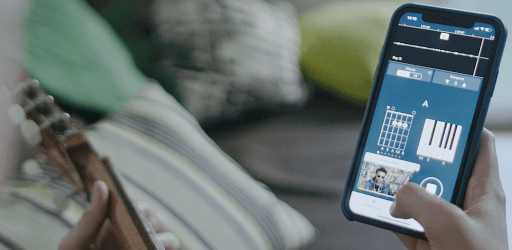
Chord AI - Real-time chord recognition is an Android app developed and published by Chord AI at Google Play Store on Apr 23, 2020 for Android users. Chord AI - Real-time chord recognition is so popular that it has gained 3124283 installs so far and growing.
Ever tried to figure out the chords of your favorite song, only to end up frustrated? Well, Chord AI – Real-time Chord Recognition might just be what you're looking for. This intelligent tool offers real-time chord recognition, turning your musical explorations into smooth sailing.
Chord AI stands out by utilizing advanced artificial intelligence to identify chords in real-time. This sets it apart from other music-related software. Whether you're dealing with simple tunes or complex polyphonic music, Chord AI rises to the challenge. It’s a genius tool, constantly amazing users with its accuracy and efficiency.
One of the key strengths of Chord AI is its user-friendly interface. The app allows you to import any mp3 file and instantly converts it into readable chords for guitar, piano, and ukulele. This makes it a versatile tool for both beginners and seasoned musicians alike. With Chord AI, learning new songs becomes a breeze!
Imagine playing along with a YouTube video and having the chords displayed in real-time. Chord AI makes this possible, significantly easing the process of learning new tracks. Whether you're playing at regular speed or slowing it down to capture every nuance, Chord AI offers a seamless experience.
Chord AI isn't just about recognizing chords; it's also a fantastic tool for ear training. By visualizing the chords and their changes in real-time, users can improve their musical ear and understanding. This makes it an invaluable companion for anyone looking to deepen their musical skills.
While no app can claim 100% accuracy, Chord AI comes impressively close. With an accuracy rate of about 90-98% in the free version, it's reliable enough for most musical needs. You can also transpose chords, making it a handy resource for transcribing and rearranging music. Its versatility extends to supporting various audio sources, including YouTube links.
Chord AI is not only a learning tool but also a support system for musicians. When online tabs fail to provide what you need, Chord AI steps in to fill the gap. It also allows for exporting chord lists, though some users have wished for even more export options. Regardless, its current features have proven to be incredibly effective.
For musicians, Chord AI quickly becomes a daily essential. It's indispensable for working out old songs, learning new ones, or simply experimenting with different voicings and chord inversions. This ongoing utility makes it one of the most treasured tools in any musician’s arsenal.
In a nutshell, Chord AI offers an unparalleled experience when it comes to real-time chord recognition. Its ease of use, high accuracy, and educational value make it a standout tool for anyone serious about music.
Yes, you can run Chord AI - Real-time chord recognition on PC, but first, you will need emulator software installed on your Windows or MAC, which you can download for free. In the below video, you will find Chord AI - Real-time chord recognition in action. Before you install the emulator, check out the minimum and recommended system requirements to run it seamlessly. They may change depending on which version of the emulator you choose. Therefore, we recommend you download the latest version of the emulator. Below you will find three free Android emulators that we have shortlisted based on their popularity:
Up to date graphics drivers from Microsoft or the chipset vendor.
Storage: 1 GB available under installation path, 1.5GB available hard drive space
Internet: Broadband Internet connection
Regardless of which Android emulator you install, the steps to install, configure, and running the Chord AI - Real-time chord recognition app on PC are the same.