Published by Contrasonic AB
Updated April 18, 2026
Chordbot - A portable backup band / songwriting tool for the mobile musician.
| Version | 3.1.11 |
| Size | 11.8 MB |
| What's New | Fix for playback problems in Android 12+ |
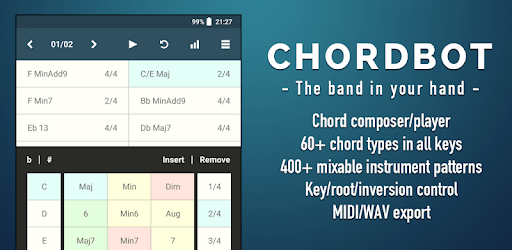
Chordbot Lite is an Android app developed and published by Contrasonic AB at Google Play Store on for Android users. Chordbot Lite is so popular that it has gained 1000000 installs so far and growing.
If you're a music enthusiast or a budding composer, you're in for a treat with Chordbot Lite. This sensational app is not only incredibly smooth but also offers a plethora of features that will take your symphonies to the next level. Whether you're on the go or sitting in your studio, Chordbot Lite is the perfect companion for creating mesmerizing music.
Chordbot Lite is designed to empower musicians of all levels. With its vast library of amazing sounds and customizable options, you have the freedom to create unique melodies and harmonies. The app allows you to control notes, chords, and modes directly, giving you full control over your compositions.
One of the standout features of Chordbot Lite is its extensive collection of patterns and styles. Whether you're into classical music or modern beats, this app has it all. And the best part? It's all written out in clean music theory, making it a joy to use for both beginners and experienced musicians.
While Chordbot Lite already offers an impressive range of instruments, some users have expressed their desire for more variety. The developers are constantly working on expanding the app's library, and we can expect to see more instruments added in the future updates. However, the current selection of instruments still provides an excellent foundation for your compositions.
One user mentioned the absence of a real piano sound, but rest assured, the developers are taking note of these requests. Chordbot Lite aims to cater to the needs of every musician, and with regular updates, we can expect to see even more exciting features in the future.
Chordbot Lite has garnered rave reviews from musicians worldwide, and it's easy to see why. The app offers a user-friendly interface, making it accessible to both seasoned composers and beginners. Its multiple instrument presets allow you to layer your chords, creating rich and immersive compositions.
With chorus and reverb settings, Chordbot Lite lets you add depth and texture to your music. The easy selection of chords and tempo makes the app a breeze to use, and the option to choose different time signatures for different chords adds a whole new level of versatility.
Chordbot Lite is not just for professional musicians. Even if you have no musical background, this app can be a valuable tool for learning scales and chord progressions. The intuitive interface allows you to quickly select your desired scale and time signature, helping you develop your musical ear.
One user, who has been producing music as a hobbyist for close to twenty years, finds Chordbot Lite to be an invaluable resource. It allows them to experiment with different instruments and playing styles, enhancing their overall music production experience.
Chordbot Lite offers exceptional features, even in its free version. With customizable options and advanced chord recognition, this app is perfect for ear training exercises and exploring more complex chord structures. However, if you want to save your creations, you'll need to upgrade to the full version.
Some users have expressed their confusion about the differences between Chordbot Lite and the full version. It's important to note that the free version is a sample of what the app has to offer. If you're looking for a more comprehensive experience, the full version is a no-brainer. It provides a wealth of additional features and functionalities that will elevate your music composition to new heights.
Unfortunately, Chordbot Lite is currently not available for Chromebook. However, the developers are aware of the demand for a Chromebook version and may consider it in the future.
Absolutely! Chordbot Lite is designed to be user-friendly and accessible to musicians of all levels. Whether you're a beginner or an experienced composer, you'll find the app intuitive and easy to use.
Yes! The developers are constantly working on expanding the app's library of instruments. While Chordbot Lite already offers a wide range of sounds, you can look forward to even more variety in future updates.
Definitely! The full version of Chordbot offers a wealth of additional features and functionalities that will take your music composition to the next level. If you're serious about music production, the upgrade is highly recommended.
In conclusion, Chordbot Lite is a game-changer for musicians and composers. Its smooth interface, extensive library of sounds, and customizable options make it a must-have app for anyone looking to create mesmerizing music. Whether you're a beginner or a seasoned professional, Chordbot Lite is the perfect tool to unlock your musical potential. Upgrade to the full version for an even more comprehensive experience. Try Chordbot Lite today and embark on a musical journey like no other!
Yes, you can run Chordbot Lite on PC, but first, you will need emulator software installed on your Windows or MAC, which you can download for free. In the below video, you will find Chordbot Lite in action. Before you install the emulator, check out the minimum and recommended system requirements to run it seamlessly. They may change depending on which version of the emulator you choose. Therefore, we recommend you download the latest version of the emulator. Below you will find three free Android emulators that we have shortlisted based on their popularity:
Up to date graphics drivers from Microsoft or the chipset vendor.
Storage: 1 GB available under installation path, 1.5GB available hard drive space
Internet: Broadband Internet connection
Regardless of which Android emulator you install, the steps to install, configure, and running the Chordbot Lite app on PC are the same.