Published by Melody Scanner UG (haftungsbeschränkt)
Updated December 6, 2025
🎶 Transcribe piano music recordings to scores and edit them online 🎶
| Version | 3.0.1 |
| Size | 25.5 MB |
| What's New | Minor stability improvements. |
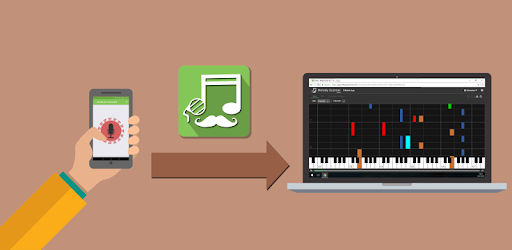
Melody Scanner - Audio to Sheet Music 🎹🎵 is an Android app developed and published by Melody Scanner UG (haftungsbeschränkt) at Google Play Store on Dec 18, 2017 for Android users. Melody Scanner - Audio to Sheet Music 🎹🎵 is so popular that it has gained 10000 installs so far and growing.
Are you a music enthusiast looking for a revolutionary app that can convert your favorite audio tracks into sheet music? Look no further! Melody Scanner - Audio to Sheet Music 🎹🎵 is here to fulfill your musical dreams. With its cutting-edge technology and user-friendly interface, this app is a game-changer in the world of music transcription.
Melody Scanner is the ultimate tool for musicians, composers, and music lovers alike. It allows you to effortlessly transform any audio track into sheet music, empowering you to play your favorite tunes on your own instrument. Whether you're a pianist, guitarist, or any other instrumentalist, this app opens up a world of possibilities.
With Melody Scanner, you no longer have to spend hours searching for sheet music that matches the exact arrangement of a song you love. Simply scan the audio you're passionate about, and watch as the app converts it into sheet music tailored to your instrument. It's like magic!
While no algorithm is perfect, Melody Scanner strives to provide accurate and reliable sheet music transcriptions. Users have reported that the app performs exceptionally well with slow-paced pieces, achieving an impressive accuracy rate of 80-90%. However, some users have noted that fast-paced compositions may result in slight inaccuracies. Nevertheless, the overall performance of the app is commendable.
It's important to note that Melody Scanner's algorithm is designed to allow for creativity and freedom in your musical expression. It's not about replicating the original audio perfectly; it's about providing a solid foundation for you to build upon and explore your own interpretations.
One of the standout features of Melody Scanner is its ability to help you learn more about music theory. By transcribing your own compositions or analyzing existing tracks, you can gain a deeper understanding of the underlying musical concepts. This app is a valuable learning tool that can take your musical journey to new heights.
Moreover, Melody Scanner offers an editing feature that allows you to make corrections and additions to the transcribed sheet music. While some users have found this feature slightly challenging to navigate, it still provides an opportunity for you to fine-tune the sheet music according to your preferences.
A: Melody Scanner strives for accuracy and has shown impressive results, especially with slower compositions. However, some minor discrepancies may occur in faster-paced pieces.
A: Yes, Melody Scanner offers an editing feature that allows you to make corrections and additions to the transcribed sheet music, giving you more control over the final result.
A: Melody Scanner supports a wide range of instruments, including piano and guitar. Whether you're a keyboardist or a guitarist, this app has got you covered.
A: Absolutely! Melody Scanner not only transcribes music but also helps you understand the theory behind the songs you write. It's a valuable tool for musicians looking to enhance their musical knowledge.
In conclusion, Melody Scanner - Audio to Sheet Music 🎹🎵 is a groundbreaking app that revolutionizes the way you interact with music. Its ability to convert audio tracks into sheet music opens up endless possibilities for musicians and music enthusiasts. While no algorithm is perfect, Melody Scanner provides a reliable and accurate transcription experience, allowing you to explore your creativity and deepen your understanding of music theory. Don't miss out on this incredible tool that will take your musical journey to new heights!
Yes, you can run Melody Scanner - Audio to Sheet Music 🎹🎵 on PC, but first, you will need emulator software installed on your Windows or MAC, which you can download for free. In the below video, you will find Melody Scanner - Audio to Sheet Music 🎹🎵 in action. Before you install the emulator, check out the minimum and recommended system requirements to run it seamlessly. They may change depending on which version of the emulator you choose. Therefore, we recommend you download the latest version of the emulator. Below you will find three free Android emulators that we have shortlisted based on their popularity:
Up to date graphics drivers from Microsoft or the chipset vendor.
Storage: 1 GB available under installation path, 1.5GB available hard drive space
Internet: Broadband Internet connection
Regardless of which Android emulator you install, the steps to install, configure, and running the Melody Scanner - Audio to Sheet Music 🎹🎵 app on PC are the same.