Call of War - WW2 Strategy Game for PC

Call of War - WW2 Strategy Game for PC

Published by Bytro Labs

Updated May 6, 2026

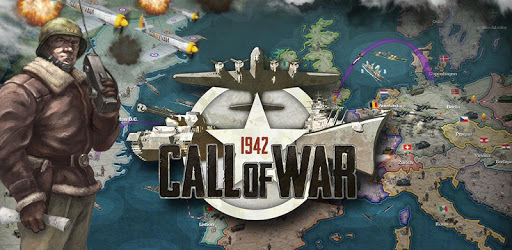
The 2nd World War: Tank clashes, Naval battles, Air combat. You rewrite history!

What's New

Version0.221
Size104.8 MB
What's NewThis week’s update enhances naval strategy with expanded vision for ships and standardized unit mobilization times. Infrastructure speed bonuses are now limited to friendly territory, providing a decisive tactical advantage to defenders. Commandos gain extra vision, and key bug fixes restore core territory defense damage bonuses and real-time display of delay orders.

Call of War - WW2 Strategy Game Screenshots

Call of War - WW2 Strategy Game PC screenshot

About Call of War - WW2 Strategy Game For PC

Call of War - WW2 Strategy Game is an Android app developed and published by Bytro Labs at Google Play Store on Mar 19, 2018 for Android users. Call of War - WW2 Strategy Game is so popular that it has gained 500000 installs so far and growing.

Call of War - WW2 Strategy Game: A Realistic and Addicting Masterpiece

Call of War - WW2 Strategy Game is a true masterpiece that brings the weapons, vehicles, and military of World War II to life. With its accurate portrayal of historical events and the slow journey of each unit, this game offers a level of realism that is truly impressive. If you're a fan of war games and crave an immersive experience, this is the game for you.

One of the standout features of Call of War is its addictive nature. Once you start playing, it's hard to put down. The excitement of planning and executing strategies, the thrill of battle, and the sense of accomplishment when you emerge victorious make this game truly captivating. It's a game that will keep you engaged for hours on end.

While Call of War offers an incredible gameplay experience, there are a few areas that could be improved. Some players have expressed frustration when, despite being on the brink of victory, they are suddenly pushed back and lose. This issue could be addressed to ensure a more balanced and satisfying gameplay experience.

Additionally, there have been requests to add Axis countries to the game, allowing players to take on the role of Germany and other nations. This would provide an even more diverse and immersive experience for players who want to explore different perspectives of World War II.

It's worth noting that Call of War does require a significant amount of storage space. While the game starts off small, it quickly expands to around 2 gigabytes. If you have a budget phone with limited storage capacity, this could be a concern. However, if you have at least 4 gigabytes of RAM, the game runs smoothly and is highly recommended.

One of the standout aspects of Call of War is its community. Unlike many other online games, Call of War has one of the least toxic fan bases. The community is supportive and welcoming, making it a great environment for players of all skill levels. Whether you're a seasoned strategist or a beginner, you'll find a community that will help you grow and improve.

Call of War goes beyond just being a game. It offers an opportunity to learn and develop skills that can be applied in various aspects of life. The strategic thinking, decision-making, and teamwork required in this game can translate into real-world success. So, if you're looking for something that can change and enhance your abilities, give Call of War a try.

FAQs

1. Can I play as different factions in Call of War?

Currently, Call of War focuses on the Allied powers. However, there have been requests to include Axis countries like Germany in future updates.

2. Does Call of War require a lot of storage space?

Yes, Call of War expands to around 2 gigabytes of storage space. If you have a budget phone with limited storage capacity, this could be a concern. It is recommended to have at least 4 gigabytes of RAM for optimal performance.

3. Is the Call of War community welcoming and supportive?

Absolutely! Call of War has one of the least toxic fan bases among online games. The community is known for being friendly and helpful, making it a great environment for players of all skill levels.

4. Can playing Call of War improve real-world skills?

Yes, Call of War offers an opportunity to develop strategic thinking, decision-making, and teamwork skills that can be applied in various aspects of life. It's a game that goes beyond entertainment and can contribute to personal growth.

Overall, Call of War - WW2 Strategy Game is a must-play for any war game enthusiast. Its realism, addictive gameplay, and supportive community make it a standout in the genre. Whether you're a history buff or simply enjoy strategic challenges, this game will provide hours of entertainment and a chance to rewrite history.

Can I run Call of War - WW2 Strategy Game on PC?

Yes, you can run Call of War - WW2 Strategy Game on PC, but first, you will need emulator software installed on your Windows or MAC, which you can download for free. In the below video, you will find Call of War - WW2 Strategy Game in action. Before you install the emulator, check out the minimum and recommended system requirements to run it seamlessly. They may change depending on which version of the emulator you choose. Therefore, we recommend you download the latest version of the emulator. Below you will find three free Android emulators that we have shortlisted based on their popularity:

How to Install Call of War - WW2 Strategy Game on Windows PC

BlueStacks

Minimum
  • OS: Microsoft Windows 7 and above.
  • Processor: Intel or AMD Processor.
  • RAM: Your PC must have at least 4GB of RAM. (Note that having 4GB or more disk space is not a substitute for RAM)
  • Storage: 5GB Free Disk Space.
  • You must be an Administrator on your PC.
Recommended:
  • OS: Microsoft Windows 10
  • Processor: Intel or AMD Multi-Core Processor with Single Thread benchmark score > 1000.
  • Graphics: Intel/Nvidia/ATI, Onboard or Discrete controller with benchmark score >= 750.
  • Please ensure Virtualization is enabled on your PC/Laptop.
  • RAM: 8GB or higher
  • Storage: SSD (or Fusion/Hybrid Drives)
  • Internet: Broadband connection to access games, accounts and related content.

Up to date graphics drivers from Microsoft or the chipset vendor.

  • To start with, download Bluestacks from its official website. The latest version of BluesStacks is v 5, and it is around 400 MB.
  • Once the download is done, click on the Bluestacks set up file to install it on your Windows PC. Follow the on-screen instructions and install it accordingly.
  • The next step is to launch the emulator using the desktop shortcut and sign in using your Google account.
  • Now, head over to Bluestacks home screen and click on the Google Play Store icon.
  • Hit the search bar in Google Play and search for Call of War - WW2 Strategy Game.
  • Install Call of War - WW2 Strategy Game from the Play Store by clicking the Install option, which completes downloading of Call of War - WW2 Strategy Game on PC.

NoxPlayer

Minimum
  • Operating System: Windows XP SP3, Windows Vista, Windows 7, Windows 8, Windows 10, and DirectX 9.0c
  • Processor: At least dual-core processor, both Intel, and AMD are OK
  • Video: Supports Open GL 2.0 or above
  • Memory: 1.5 GB RAM
Recommended
  • Operating System: Windows 7, Windows 8, Windows 10
  • Processor: Multiple core processors which support VT-x or AMB-V Virtualization Technology, better performance with this function enabled
  • Video: The higher performance, the better
  • Memory: 4 GB RAM

Storage: 1 GB available under installation path, 1.5GB available hard drive space

Internet: Broadband Internet connection

  • Download NoxPlayer from the official website. The latest version of NoxPlayer is v 3, and it is around 600 MB.
  • Now install the emulator using the downloaded setup file. Just go through the on-screen instructions and install NoxPlayer on your computer or laptop.
  • After the installation process, launch the Nox Android emulator and log in using your Google account when it asks you.
  • Click on the Google Play Store icon and head over to the search bar to search Call of War - WW2 Strategy Game. Once found, click on the Install button to install Call of War - WW2 Strategy Game for PC.
  • If you do not find Call of War - WW2 Strategy Game on Google Play Store or if you want to skip logging in to Google, you can sideload APK (download the .APK file from this page and open it with NoxPlayer).
  • Launch Call of War - WW2 Strategy Game from home-screen and start playing it on PC right away!

MEmu

Minimum
  • 2 cores x86/x86_64 Processor (Intel or AMD CPU)
  • WinXP SP3 / Win7 / Win8 / Win10 (Not recommended to run on Server/Enterprise)
  • Latest Windows DirectX 11 / Graphics driver with OpenGL 2.0
  • Hardware Virtualization Technology (Intel VT-x/AMD-V) shall be enabled in BIOS
  • 2GB of RAM (4GB for x64 system)
  • 5GB of hard disk free space
Recommended
  • OS: Microsoft Windows 10 with VT Enabled
  • CPU: Single Thread PassMark score > 1500 (Intel/AMD Multi-Core).
  • Graphics: Intel/Nvidia/ATI, Onboard or Discrete controller with PassMark score > 750.
  • Latest Windows DirectX 11 / Graphics driver with OpenGL 4.5 or higher
  • RAM: 8GB or higher
  • HDD: SSD, 10GB of hard disk free space
  • Internet: Broadband connection with low latency for FPS games
  • Download MEmu Play from the official website. The latest version of NoxPlayer is v 7.5.
  • When the download is completed, install the MEmu emulator on your PC. Follow the on-screen instructions and keep on clicking the Next button until the final step.
  • Now, using the desktop shortcut, look for the MEmu Play emulator and launch it. Once done, it will ask you to log in using your Google account, proceed with the same.
  • MEmu Play will ask you to log in using your Google account. When you log in, it will sync your Google account to MEmu Play. Launch the Google Play Store by clicking on the icon and search for Call of War - WW2 Strategy Game.
  • Click on the Install button once you find Call of War - WW2 Strategy Game from the search results. You can also sideload APK (download the .APK file from this page and open it with MEmu) if you want to skip above step.
  • After the installation of Call of War - WW2 Strategy Game, you're all set to use the app on PC!

Regardless of which Android emulator you install, the steps to install, configure, and running the Call of War - WW2 Strategy Game app on PC are the same.
Download Call of War - WW2 Strategy Game For PC