Blocky Cars - Online Shooting Game for PC

Blocky Cars - Online Shooting Game for PC

Published by Fahrenheit Lab

Updated October 1, 2025

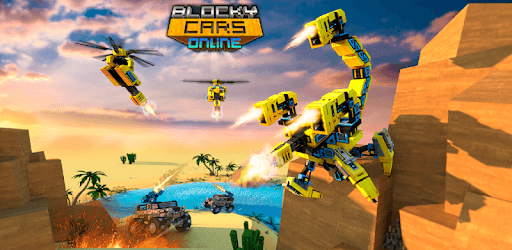
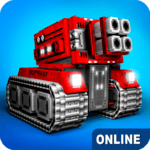
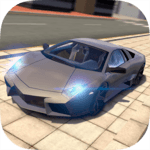
Cool car game! Online shooting, tanks and cars. Multiplayer shooter with craft!

What's New

Version8.9.5
Size241.4 MB
What's NewAdded energy gain per match. Added a new event to the game - "Energy Weekend". Now, on Saturdays and Sundays, the energy for the wheel of fortune, free energy, and energy per match will double. Some rewards in the wheel of fortune have been changed, and the chances of energy drop have been increased.Prices for New Year's hats have been changed for energyFixed a bug with new capsFixed a bug with daily tasks

Blocky Cars - Online Shooting Game Screenshots

Blocky Cars - Online Shooting Game PC screenshot

About Blocky Cars - Online Shooting Game For PC

Blocky Cars - Online Shooting Game is an Android app developed and published by Fahrenheit Lab at Google Play Store on Jul 10, 2015 for Android users. Blocky Cars - Online Shooting Game is so popular that it has gained 10000000 installs so far and growing.

Discover the Thrills of Blocky Cars - Online Shooting Game

If you love action-packed gameplay and creative vehicle customization, Blocky Cars - Online Shooting Game is the perfect match for you. This engaging game mixes the thrill of shooting and the fun of building your own vehicles, offering endless excitement and creativity for players of all ages.

Exciting Gameplay and Unique Features

Blocky Cars offers an unmatched gaming experience where you can drive and battle with custom-built vehicles. Whether you prefer cars, planes, or even boats, this game gives you the freedom to bring your wildest vehicle ideas to life. You can design and construct your own machines, each equipped with powerful weapons to help you dominate the battlefield. The combination of strategic building and intense combat makes Blocky Cars a must-play for fans of both genres.

Powerful Weapons and Customizations

One of the standout features of Blocky Cars is the array of weapons at your disposal. As you progress in the game, you will unlock an incredible variety of guns, from basic firearms to extremely powerful cannons. You can also modify and enhance your weapons to make them even more effective in battle. Imagine wielding a weapon with a damage rating of 1 million—it's possible in Blocky Cars, and it's these creative possibilities that keep the game endlessly entertaining.

A Social Gaming Experience

Blocky Cars is more than just a solo adventure; it’s also a social platform where you can interact with friends and other players from around the world. You can team up to take on tough enemies or compete against each other to see who has the best vehicles and combat skills. The multiplayer aspect of Blocky Cars adds a whole new level of engagement and fun, making it a game that you can enjoy with friends both old and new.

Challenges and Customization without Limits

One of the highlights of Blocky Cars is the sandbox mode, which allows you to let your creativity run wild without any limitations. This mode provides a space where you can build anything you want, from high-speed cars to complex flying machines, and test them out in a risk-free environment. For those who love building and experimenting, the sandbox mode is a dream come true.

Overcoming Glitches and Enhancing Gameplay

Like any complex game, Blocky Cars may occasionally have glitches. However, the developers are constantly working to improve the game and address any issues that arise. For example, if you encounter an error that prevents you from playing, a simple reinstall often resolves the problem. Despite minor technical hiccups, the overall quality and enjoyment of the game make it worth the effort to troubleshoot and continue playing.

A Favorite Among Fans

Blocky Cars has truly captured the hearts of its players, many of whom have been enjoying the game for years. The variety of vehicles, the engaging gameplay, and the ability to chat and connect with friends make it a standout choice in the realm of online shooting games. Whether you're a seasoned player or new to the game, Blocky Cars offers something for everyone, ensuring hours of endless fun and creativity.

Get ready to dive into the action-packed world of Blocky Cars - Online Shooting Game and unleash your imagination while enjoying thrilling battles and amazing vehicle creations.

Can I run Blocky Cars - Online Shooting Game on PC?

Yes, you can run Blocky Cars - Online Shooting Game on PC, but first, you will need emulator software installed on your Windows or MAC, which you can download for free. In the below video, you will find Blocky Cars - Online Shooting Game in action. Before you install the emulator, check out the minimum and recommended system requirements to run it seamlessly. They may change depending on which version of the emulator you choose. Therefore, we recommend you download the latest version of the emulator. Below you will find three free Android emulators that we have shortlisted based on their popularity:

How to Install Blocky Cars - Online Shooting Game on Windows PC

BlueStacks

Minimum
  • OS: Microsoft Windows 7 and above.
  • Processor: Intel or AMD Processor.
  • RAM: Your PC must have at least 4GB of RAM. (Note that having 4GB or more disk space is not a substitute for RAM)
  • Storage: 5GB Free Disk Space.
  • You must be an Administrator on your PC.
Recommended:
  • OS: Microsoft Windows 10
  • Processor: Intel or AMD Multi-Core Processor with Single Thread benchmark score > 1000.
  • Graphics: Intel/Nvidia/ATI, Onboard or Discrete controller with benchmark score >= 750.
  • Please ensure Virtualization is enabled on your PC/Laptop.
  • RAM: 8GB or higher
  • Storage: SSD (or Fusion/Hybrid Drives)
  • Internet: Broadband connection to access games, accounts and related content.

Up to date graphics drivers from Microsoft or the chipset vendor.

  • To start with, download Bluestacks from its official website. The latest version of BluesStacks is v 5, and it is around 400 MB.
  • Once the download is done, click on the Bluestacks set up file to install it on your Windows PC. Follow the on-screen instructions and install it accordingly.
  • The next step is to launch the emulator using the desktop shortcut and sign in using your Google account.
  • Now, head over to Bluestacks home screen and click on the Google Play Store icon.
  • Hit the search bar in Google Play and search for Blocky Cars - Online Shooting Game.
  • Install Blocky Cars - Online Shooting Game from the Play Store by clicking the Install option, which completes downloading of Blocky Cars - Online Shooting Game on PC.

NoxPlayer

Minimum
  • Operating System: Windows XP SP3, Windows Vista, Windows 7, Windows 8, Windows 10, and DirectX 9.0c
  • Processor: At least dual-core processor, both Intel, and AMD are OK
  • Video: Supports Open GL 2.0 or above
  • Memory: 1.5 GB RAM
Recommended
  • Operating System: Windows 7, Windows 8, Windows 10
  • Processor: Multiple core processors which support VT-x or AMB-V Virtualization Technology, better performance with this function enabled
  • Video: The higher performance, the better
  • Memory: 4 GB RAM

Storage: 1 GB available under installation path, 1.5GB available hard drive space

Internet: Broadband Internet connection

  • Download NoxPlayer from the official website. The latest version of NoxPlayer is v 3, and it is around 600 MB.
  • Now install the emulator using the downloaded setup file. Just go through the on-screen instructions and install NoxPlayer on your computer or laptop.
  • After the installation process, launch the Nox Android emulator and log in using your Google account when it asks you.
  • Click on the Google Play Store icon and head over to the search bar to search Blocky Cars - Online Shooting Game. Once found, click on the Install button to install Blocky Cars - Online Shooting Game for PC.
  • If you do not find Blocky Cars - Online Shooting Game on Google Play Store or if you want to skip logging in to Google, you can sideload APK (download the .APK file from this page and open it with NoxPlayer).
  • Launch Blocky Cars - Online Shooting Game from home-screen and start playing it on PC right away!

MEmu

Minimum
  • 2 cores x86/x86_64 Processor (Intel or AMD CPU)
  • WinXP SP3 / Win7 / Win8 / Win10 (Not recommended to run on Server/Enterprise)
  • Latest Windows DirectX 11 / Graphics driver with OpenGL 2.0
  • Hardware Virtualization Technology (Intel VT-x/AMD-V) shall be enabled in BIOS
  • 2GB of RAM (4GB for x64 system)
  • 5GB of hard disk free space
Recommended
  • OS: Microsoft Windows 10 with VT Enabled
  • CPU: Single Thread PassMark score > 1500 (Intel/AMD Multi-Core).
  • Graphics: Intel/Nvidia/ATI, Onboard or Discrete controller with PassMark score > 750.
  • Latest Windows DirectX 11 / Graphics driver with OpenGL 4.5 or higher
  • RAM: 8GB or higher
  • HDD: SSD, 10GB of hard disk free space
  • Internet: Broadband connection with low latency for FPS games
  • Download MEmu Play from the official website. The latest version of NoxPlayer is v 7.5.
  • When the download is completed, install the MEmu emulator on your PC. Follow the on-screen instructions and keep on clicking the Next button until the final step.
  • Now, using the desktop shortcut, look for the MEmu Play emulator and launch it. Once done, it will ask you to log in using your Google account, proceed with the same.
  • MEmu Play will ask you to log in using your Google account. When you log in, it will sync your Google account to MEmu Play. Launch the Google Play Store by clicking on the icon and search for Blocky Cars - Online Shooting Game.
  • Click on the Install button once you find Blocky Cars - Online Shooting Game from the search results. You can also sideload APK (download the .APK file from this page and open it with MEmu) if you want to skip above step.
  • After the installation of Blocky Cars - Online Shooting Game, you're all set to use the app on PC!

Regardless of which Android emulator you install, the steps to install, configure, and running the Blocky Cars - Online Shooting Game app on PC are the same.
Download Blocky Cars - Online Shooting Game For PC