Published by Bit Units Studio
Updated February 9, 2024
Turn your Android device into a WiFi universal remote for your computer.
| Version | 1.4.0 |
| Size | 4.7 MB |
| What's New | Performance improves |
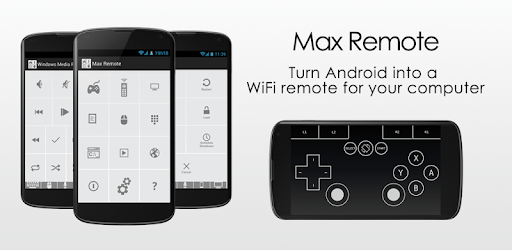
Max Remote - Computer is an Android app developed and published by Bit Units Studio at Google Play Store on Aug 23, 2013 for Android users. Max Remote - Computer is so popular that it has gained 1000000 installs so far and growing.
Are you tired of constantly having to switch between your computer and your phone while giving presentations or controlling your multimedia? Look no further than Max Remote - Computer, the ultimate app that turns your phone into a powerful remote control for your computer. With its wide range of features and user-friendly interface, Max Remote - Computer is the perfect companion for any tech-savvy individual.
Max Remote - Computer has been praised by users for its effectiveness in presentation classes. Its seamless integration with your computer allows you to control your slideshows and presentations with ease. Say goodbye to constantly looking at your phone screen to click through slides - Max Remote - Computer offers the option to use volume keys to navigate between slides, making your presentations smoother and more professional.
One of the standout features of Max Remote - Computer is its custom remote feature. Users have expressed their love for this feature, as it allows them to personalize their remote control experience. Whether you want to control game controllers, pause and play movies, or even open programs like Word and your web browser, Max Remote - Computer has got you covered.
While Max Remote - Computer boasts impressive compatibility with a wide range of devices, some users have reported compatibility issues with certain devices such as the 3DS XL. However, the developers are constantly working on improving compatibility, so stay tuned for future updates that address these concerns.
The developers behind Max Remote - Computer have received high praise for their dedication and continuous efforts to improve the app. Users have reported that each update brings new and exciting features, making the app even better than before. The positive feedback from users has prompted many to switch to the paid version, showing their support for the hardworking developers.
While Max Remote - Computer offers a wide range of features, playing games like FIFA 14 on your PC using a gamepad is not currently supported. However, the app continues to evolve, so keep an eye out for future updates that may include this feature.
Max Remote - Computer is primarily designed for controlling your computer. Connecting it to a PS3 is not supported at this time. For any further assistance, please refer to the app's official documentation or reach out to the developers directly.
Max Remote - Computer is the go-to app for anyone looking to enhance their multimedia control experience. With its impressive range of features, user-friendly interface, and dedicated developer community, it's no wonder why users are raving about this app. Download Max Remote - Computer today and take control of your computer like never before!
Yes, you can run Max Remote - Computer on PC, but first, you will need emulator software installed on your Windows or MAC, which you can download for free. In the below video, you will find Max Remote - Computer in action. Before you install the emulator, check out the minimum and recommended system requirements to run it seamlessly. They may change depending on which version of the emulator you choose. Therefore, we recommend you download the latest version of the emulator. Below you will find three free Android emulators that we have shortlisted based on their popularity:
Up to date graphics drivers from Microsoft or the chipset vendor.
Storage: 1 GB available under installation path, 1.5GB available hard drive space
Internet: Broadband Internet connection
Regardless of which Android emulator you install, the steps to install, configure, and running the Max Remote - Computer app on PC are the same.