Guitar Band Battle for PC

Guitar Band Battle for PC

Published by Zeeppo

Updated November 24, 2026

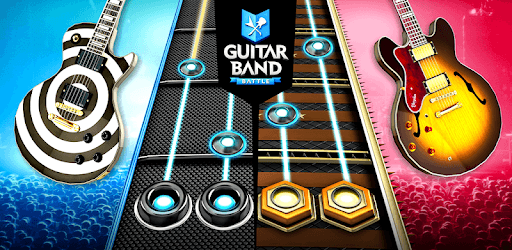
Awesome 3D guitars. Amazing guitar rhythm game!

What's New

Version4.16.1
Size180.1 MB
What's NewOur guitar rock band mobile game just got better! We've added real-world songs as made famous from bands like Kiss, Offspring, Whitesnake, Weezer, Steppenwolf, The Who, Eric Clapton, and more. Whether you're a pro or a beginner, you'll love playing along to these iconic riffs and solos. So grab your guitar and download the latest update now to start rocking out!

Guitar Band Battle Screenshots

Guitar Band Battle PC screenshot

About Guitar Band Battle For PC

Guitar Band Battle is an Android app developed and published by Zeeppo at Google Play Store on Sep 27, 2017 for Android users. Guitar Band Battle is so popular that it has gained 52997839 installs so far and growing.

Guitar Band Battle: The Ultimate Rock Experience

Are you a music enthusiast? Do you love the thrill of playing guitar and rocking out to your favorite tunes? Look no further, because Guitar Band Battle is the app for you! This game offers an incredible rock experience that will have you hooked from the very first note.

Unleash Your Inner Rockstar

Guitar Band Battle allows you to channel your inner rockstar and showcase your guitar skills. With a wide variety of songs to choose from, you'll never get bored playing the same tunes over and over again. From classic rock anthems to heavy metal hits, this app has it all.

One of the standout features of Guitar Band Battle is its vast song library. While some users have expressed their desire for additional songs like "Iron Man" by Black Sabbath and "Don't Fear the Reaper," the game already offers an impressive selection of tracks that will keep you entertained for hours on end.

Master the Art of Guitar Playing

Playing Guitar Band Battle is not just about hitting the right notes; it's about mastering the art of guitar playing. As you immerse yourself in the music, you'll notice that your fingers naturally move farther away from the keys, causing you to lose time. However, by focusing on locking your fingers into place and paying attention to where they land, you can improve your performance and achieve perfection.

Remember, in this game, four notes equal four fingers. Many players have found success by using the first two fingers of each hand, allowing them to play faster and more efficiently. However, it's crucial to watch your fingers closely to ensure accuracy and precision.

Online Battles and More

Guitar Band Battle takes the gaming experience to the next level with its exciting online battle option. Challenge other players from around the world and prove that you're the ultimate guitar hero. The graphics are stunning, and the songs, while understandable rip-offs of popular rock and metal tracks due to copyright restrictions, are truly enjoyable.

While some users have expressed their desire for more songs and higher difficulties, it's important to note that the developers are continuously working to enhance the game and provide an even more addictive and amazing experience. So keep an eye out for updates!

FAQs

1. Can I request specific songs to be added to Guitar Band Battle?

Unfortunately, the game's song selection is predetermined, and individual song requests cannot be accommodated. However, the developers are always looking to expand the library and add new tracks that will resonate with players.

2. Why am I experiencing glitches while playing the game?

Glitches can occur due to various factors, such as device compatibility or internet connectivity issues. If you encounter any glitches, we recommend ensuring that your device is up to date and that you have a stable internet connection. If the problem persists, reaching out to the game's support team can help resolve the issue.

3. How can I earn more records per song or battle to improve my rank?

Currently, the number of records you can earn per song or battle is fixed. However, the developers are constantly evaluating the game's mechanics and considering adjustments that will allow players to progress based on their skill level. Stay tuned for future updates!

So what are you waiting for? Download Guitar Band Battle now and embark on an epic rock journey that will leave you craving more. Unleash your inner rockstar, master the guitar, and show the world what you're made of. Let the music guide you, and let the battle begin!

Can I run Guitar Band Battle on PC?

Yes, you can run Guitar Band Battle on PC, but first, you will need emulator software installed on your Windows or MAC, which you can download for free. In the below video, you will find Guitar Band Battle in action. Before you install the emulator, check out the minimum and recommended system requirements to run it seamlessly. They may change depending on which version of the emulator you choose. Therefore, we recommend you download the latest version of the emulator. Below you will find three free Android emulators that we have shortlisted based on their popularity:

How to Install Guitar Band Battle on Windows PC

BlueStacks

Minimum
  • OS: Microsoft Windows 7 and above.
  • Processor: Intel or AMD Processor.
  • RAM: Your PC must have at least 4GB of RAM. (Note that having 4GB or more disk space is not a substitute for RAM)
  • Storage: 5GB Free Disk Space.
  • You must be an Administrator on your PC.
Recommended:
  • OS: Microsoft Windows 10
  • Processor: Intel or AMD Multi-Core Processor with Single Thread benchmark score > 1000.
  • Graphics: Intel/Nvidia/ATI, Onboard or Discrete controller with benchmark score >= 750.
  • Please ensure Virtualization is enabled on your PC/Laptop.
  • RAM: 8GB or higher
  • Storage: SSD (or Fusion/Hybrid Drives)
  • Internet: Broadband connection to access games, accounts and related content.

Up to date graphics drivers from Microsoft or the chipset vendor.

  • To start with, download Bluestacks from its official website. The latest version of BluesStacks is v 5, and it is around 400 MB.
  • Once the download is done, click on the Bluestacks set up file to install it on your Windows PC. Follow the on-screen instructions and install it accordingly.
  • The next step is to launch the emulator using the desktop shortcut and sign in using your Google account.
  • Now, head over to Bluestacks home screen and click on the Google Play Store icon.
  • Hit the search bar in Google Play and search for Guitar Band Battle.
  • Install Guitar Band Battle from the Play Store by clicking the Install option, which completes downloading of Guitar Band Battle on PC.

NoxPlayer

Minimum
  • Operating System: Windows XP SP3, Windows Vista, Windows 7, Windows 8, Windows 10, and DirectX 9.0c
  • Processor: At least dual-core processor, both Intel, and AMD are OK
  • Video: Supports Open GL 2.0 or above
  • Memory: 1.5 GB RAM
Recommended
  • Operating System: Windows 7, Windows 8, Windows 10
  • Processor: Multiple core processors which support VT-x or AMB-V Virtualization Technology, better performance with this function enabled
  • Video: The higher performance, the better
  • Memory: 4 GB RAM

Storage: 1 GB available under installation path, 1.5GB available hard drive space

Internet: Broadband Internet connection

  • Download NoxPlayer from the official website. The latest version of NoxPlayer is v 3, and it is around 600 MB.
  • Now install the emulator using the downloaded setup file. Just go through the on-screen instructions and install NoxPlayer on your computer or laptop.
  • After the installation process, launch the Nox Android emulator and log in using your Google account when it asks you.
  • Click on the Google Play Store icon and head over to the search bar to search Guitar Band Battle. Once found, click on the Install button to install Guitar Band Battle for PC.
  • If you do not find Guitar Band Battle on Google Play Store or if you want to skip logging in to Google, you can sideload APK (download the .APK file from this page and open it with NoxPlayer).
  • Launch Guitar Band Battle from home-screen and start playing it on PC right away!

MEmu

Minimum
  • 2 cores x86/x86_64 Processor (Intel or AMD CPU)
  • WinXP SP3 / Win7 / Win8 / Win10 (Not recommended to run on Server/Enterprise)
  • Latest Windows DirectX 11 / Graphics driver with OpenGL 2.0
  • Hardware Virtualization Technology (Intel VT-x/AMD-V) shall be enabled in BIOS
  • 2GB of RAM (4GB for x64 system)
  • 5GB of hard disk free space
Recommended
  • OS: Microsoft Windows 10 with VT Enabled
  • CPU: Single Thread PassMark score > 1500 (Intel/AMD Multi-Core).
  • Graphics: Intel/Nvidia/ATI, Onboard or Discrete controller with PassMark score > 750.
  • Latest Windows DirectX 11 / Graphics driver with OpenGL 4.5 or higher
  • RAM: 8GB or higher
  • HDD: SSD, 10GB of hard disk free space
  • Internet: Broadband connection with low latency for FPS games
  • Download MEmu Play from the official website. The latest version of NoxPlayer is v 7.5.
  • When the download is completed, install the MEmu emulator on your PC. Follow the on-screen instructions and keep on clicking the Next button until the final step.
  • Now, using the desktop shortcut, look for the MEmu Play emulator and launch it. Once done, it will ask you to log in using your Google account, proceed with the same.
  • MEmu Play will ask you to log in using your Google account. When you log in, it will sync your Google account to MEmu Play. Launch the Google Play Store by clicking on the icon and search for Guitar Band Battle.
  • Click on the Install button once you find Guitar Band Battle from the search results. You can also sideload APK (download the .APK file from this page and open it with MEmu) if you want to skip above step.
  • After the installation of Guitar Band Battle, you're all set to use the app on PC!

Regardless of which Android emulator you install, the steps to install, configure, and running the Guitar Band Battle app on PC are the same.