King of Crabs for PC

King of Crabs for PC

Published by Robot Squid

Updated October 19, 2025

Fight to become the biggest crab on the island!

What's New

Version1.21.0
Size276.4 MB
What's NewUpdate 1.21.0 v198Bug fixes and improvements

King of Crabs Screenshots

King of Crabs PC screenshot

About King of Crabs For PC

King of Crabs is an Android app developed and published by Robot Squid at Google Play Store on Mar 7, 2019 for Android users. King of Crabs is so popular that it has gained 8400810 installs so far and growing.

Immerse Yourself in the Stunning World of King of Crabs

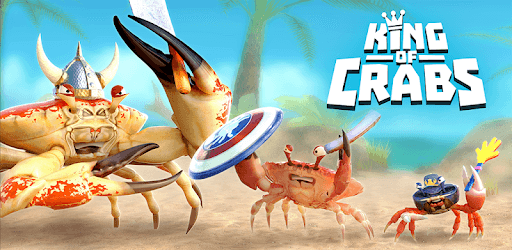
When you think of engaging games with unique visuals and innovative gameplay, King of Crabs certainly comes to mind. This game is a visual marvel, capturing the imagination with its stunning graphics. The designs are vividly detailed, perfectly blending realism with a cartoonish charm that will fascinate players of all ages. Imagine taking a trip back to your favorite summer destination; that's the kind of picturesque environment you will see within this game.

Diversified and Eye-Catching Maps

One of the standout features is the diverse and visually appealing maps. These maps are not just backdrops but are designed to pull you into an interactive world filled with various terrains and captivating scenery. You might find yourself reminiscing about a vacation from years ago, exploring crystal-clear waters and sandy beaches akin to the Maldives. That’s how beautifully designed and immersive the maps are.

Realistic and Smooth Animations

The animation in King of Crabs hits the sweet spot between being realistic and cartoonish. This unique artistic choice keeps the gameplay both immersive and entertaining. Whether it’s the way the crabs move or how they interact with the environment, everything is crafted to enhance your experience. The crabs appear so lifelike that you almost feel as if you are observing real creatures scuttle across the screen.

Satisfying Gameplay Mechanics

Gameplay is another area where King of Crabs excels. It offers a simple yet satisfying experience. Players can easily control their crabs and navigate through the expansive maps, although some improvements in mobility could make it even better. Battling against other players, collecting items, and exploring the world provide a variety of activities to keep you hooked. The immersive experience is so captivating that once you start playing, it’s hard to put the game down.

Multiplayer Interaction and Social Elements

King of Crabs isn’t just about solo adventures. The game offers robust multiplayer features, allowing you to play with friends and family. This social aspect significantly enhances the replay value, making the game not just a pastime but a shared experience. The thrill of teaming up or competing against others adds a competitive edge that keeps the gameplay exciting.

Collectible and Customizable Crabs

One highly enjoyable feature of King of Crabs is the ability to collect and unlock a variety of crabs. Each crab has its unique characteristics and designs, making the quest for the next one all the more rewarding. Players can unlock special crabs, including rare and legendary ones, which keeps the interest alive. Adding more crabs in updates, like the unique alien crab, makes the game’s ecosystem diverse and fascinating.

Special Events and Continuous Updates

King of Crabs regularly holds special events and updates to keep the gameplay fresh. Seasonal themes, like Halloween, bring new challenges and rewards, offering players something new to look forward to. The developers continuously refine and expand the game, ensuring it evolves with time and player feedback. The addition of new bosses and legendary crabs adds exciting elements that make each gaming session unique.

Technical Aspects and Recommendations

The technical execution of King of Crabs is generally smooth, with high-quality graphics and engaging animations. However, a stable WiFi connection is essential to ensure the game runs well without interruptions. Some minor issues, like occasional crashes when collecting rewards, may occur but are usually addressed promptly by the developers. These occasional hiccups don't detract from the overall enjoyment of the game.

King of Crabs offers an exceptional gaming experience with its stunning visuals, interactive maps, and engaging gameplay. Whether you’re a seasoned gamer or someone who enjoys casual play, this game invites you to dive into its captivating world and emerge as the ultimate ruler of the crabs.

Can I run King of Crabs on PC?

Yes, you can run King of Crabs on PC, but first, you will need emulator software installed on your Windows or MAC, which you can download for free. In the below video, you will find King of Crabs in action. Before you install the emulator, check out the minimum and recommended system requirements to run it seamlessly. They may change depending on which version of the emulator you choose. Therefore, we recommend you download the latest version of the emulator. Below you will find three free Android emulators that we have shortlisted based on their popularity:

How to Install King of Crabs on Windows PC

BlueStacks

Minimum
  • OS: Microsoft Windows 7 and above.
  • Processor: Intel or AMD Processor.
  • RAM: Your PC must have at least 4GB of RAM. (Note that having 4GB or more disk space is not a substitute for RAM)
  • Storage: 5GB Free Disk Space.
  • You must be an Administrator on your PC.
Recommended:
  • OS: Microsoft Windows 10
  • Processor: Intel or AMD Multi-Core Processor with Single Thread benchmark score > 1000.
  • Graphics: Intel/Nvidia/ATI, Onboard or Discrete controller with benchmark score >= 750.
  • Please ensure Virtualization is enabled on your PC/Laptop.
  • RAM: 8GB or higher
  • Storage: SSD (or Fusion/Hybrid Drives)
  • Internet: Broadband connection to access games, accounts and related content.

Up to date graphics drivers from Microsoft or the chipset vendor.

  • To start with, download Bluestacks from its official website. The latest version of BluesStacks is v 5, and it is around 400 MB.
  • Once the download is done, click on the Bluestacks set up file to install it on your Windows PC. Follow the on-screen instructions and install it accordingly.
  • The next step is to launch the emulator using the desktop shortcut and sign in using your Google account.
  • Now, head over to Bluestacks home screen and click on the Google Play Store icon.
  • Hit the search bar in Google Play and search for King of Crabs.
  • Install King of Crabs from the Play Store by clicking the Install option, which completes downloading of King of Crabs on PC.

NoxPlayer

Minimum
  • Operating System: Windows XP SP3, Windows Vista, Windows 7, Windows 8, Windows 10, and DirectX 9.0c
  • Processor: At least dual-core processor, both Intel, and AMD are OK
  • Video: Supports Open GL 2.0 or above
  • Memory: 1.5 GB RAM
Recommended
  • Operating System: Windows 7, Windows 8, Windows 10
  • Processor: Multiple core processors which support VT-x or AMB-V Virtualization Technology, better performance with this function enabled
  • Video: The higher performance, the better
  • Memory: 4 GB RAM

Storage: 1 GB available under installation path, 1.5GB available hard drive space

Internet: Broadband Internet connection

  • Download NoxPlayer from the official website. The latest version of NoxPlayer is v 3, and it is around 600 MB.
  • Now install the emulator using the downloaded setup file. Just go through the on-screen instructions and install NoxPlayer on your computer or laptop.
  • After the installation process, launch the Nox Android emulator and log in using your Google account when it asks you.
  • Click on the Google Play Store icon and head over to the search bar to search King of Crabs. Once found, click on the Install button to install King of Crabs for PC.
  • If you do not find King of Crabs on Google Play Store or if you want to skip logging in to Google, you can sideload APK (download the .APK file from this page and open it with NoxPlayer).
  • Launch King of Crabs from home-screen and start playing it on PC right away!

MEmu

Minimum
  • 2 cores x86/x86_64 Processor (Intel or AMD CPU)
  • WinXP SP3 / Win7 / Win8 / Win10 (Not recommended to run on Server/Enterprise)
  • Latest Windows DirectX 11 / Graphics driver with OpenGL 2.0
  • Hardware Virtualization Technology (Intel VT-x/AMD-V) shall be enabled in BIOS
  • 2GB of RAM (4GB for x64 system)
  • 5GB of hard disk free space
Recommended
  • OS: Microsoft Windows 10 with VT Enabled
  • CPU: Single Thread PassMark score > 1500 (Intel/AMD Multi-Core).
  • Graphics: Intel/Nvidia/ATI, Onboard or Discrete controller with PassMark score > 750.
  • Latest Windows DirectX 11 / Graphics driver with OpenGL 4.5 or higher
  • RAM: 8GB or higher
  • HDD: SSD, 10GB of hard disk free space
  • Internet: Broadband connection with low latency for FPS games
  • Download MEmu Play from the official website. The latest version of NoxPlayer is v 7.5.
  • When the download is completed, install the MEmu emulator on your PC. Follow the on-screen instructions and keep on clicking the Next button until the final step.
  • Now, using the desktop shortcut, look for the MEmu Play emulator and launch it. Once done, it will ask you to log in using your Google account, proceed with the same.
  • MEmu Play will ask you to log in using your Google account. When you log in, it will sync your Google account to MEmu Play. Launch the Google Play Store by clicking on the icon and search for King of Crabs.
  • Click on the Install button once you find King of Crabs from the search results. You can also sideload APK (download the .APK file from this page and open it with MEmu) if you want to skip above step.
  • After the installation of King of Crabs, you're all set to use the app on PC!

Regardless of which Android emulator you install, the steps to install, configure, and running the King of Crabs app on PC are the same.


Download King of Crabs For PC