MadOut2 BigCityOnline for PC

MadOut2 BigCityOnline for PC

Published by MadOut Games

Updated August 14, 2025

Number One mobile game with open world

What's New

Version18.05
Size1.4 GB
What's New☠️ TANK: a new level of chaos in single-player🧪 Consumables: health, armor, and other useful boosts🏚️ House destruction: claim the best locations by force🏎️ 1v1 races: online head-to-head duels📖 New storyline featuring new heroes of Novagrad⚙️ Weapon upgrade redesign💳 Premium bonuses🚗 Vehicle rental points in single-player mode📦 New content: 14 cars, 2 motorcycles, 1 TANK, 33 tuning parts, 4 outfits, and 17 installable items

MadOut2 BigCityOnline Screenshots

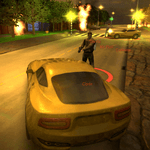
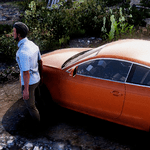
MadOut2 BigCityOnline PC screenshot

About MadOut2 BigCityOnline For PC

MadOut2 BigCityOnline is an Android app developed and published by MadOut Games at Google Play Store on May 1, 2017 for Android users. MadOut2 BigCityOnline is so popular that it has gained 1000000 installs so far and growing.

Welcome to MadOut2 BigCityOnline

MadOut2 BigCityOnline is an exciting game that offers players an open-world experience reminiscent of other notable titles. Dive into a vast map filled with adventures and opportunities to explore, drive, and engage in thrilling activities.

Features That Make MadOut2 BigCityOnline Stand Out

Vehicles Galore

One of the best things about MadOut2 BigCityOnline is the variety of cars you can drive. Whether it's sports cars like Lamborghinis or luxurious rides like Mercedes, there's something for every taste. Players often have fun driving through the city, opening car doors, and imagining new features like opening the front and back hoods or using blinkers.

Open World Adventures

The game provides many experiences, from diving into the heart of the city to exploring the countryside. Players love the freedom to roam around and discover new places. Many hope for more updates, including new maps and possibly even additional cities to explore.

Realistic Gameplay

MadOut2 BigCityOnline aims to provide a realistic gaming experience. From wanting more realistic interactions like opening gates and using showers to hoping for control over pets, players crave immersive features. Some even imagine being able to buy and build houses, ensuring every return to the game feels fresh and personal.

Comparison to GTA

Many players compare MadOut2 BigCityOnline to GTA due to its large map and realistic graphics. They appreciate the similar gameplay mechanics, such as the ability to shoot from cars and engage in various missions. With every update, fans eagerly await more features that bring their gaming experience closer to what they love in GTA.

Room for Improvement

More Transport Options

While cars are a central feature, players are keen on seeing more transportation options. Bikes, trains, and planes are at the top of the wish list. Adding these would significantly enhance the gameplay and provide more ways to explore the vast open world.

Enhanced Interaction

Players have shared that they would love to see more interactive elements. This includes everything from watching TV in-game to controlling dogs and having characters converse and react more realistically to the player's actions. Such changes would deepen the engagement and make the world feel more alive.

Improved Economy

The in-game economy is another area worth noting. Players have mentioned that certain cars need to be more accessible, ideally purchasable with in-game currency rather than premium diamonds. This adjustment could make the game more enjoyable for everyone and ensure that players feel rewarded for their efforts.

Technical Fixes

A few technical aspects need attention. For instance, there is a desire for the game to remember house purchases accurately and a call to reduce frequent ads. Addressing these issues would ensure a smoother and more enjoyable gaming experience.

Looking Forward to More Updates

The excitement around new updates is palpable. Players have many ideas and suggestions they hope will be implemented in future updates. Each addition, from new maps and vehicles to improved in-game interactions, enhances the already thrilling experience that MadOut2 BigCityOnline offers.

Dive into MadOut2 BigCityOnline and join the ever-growing community of players. With its vast world, varied vehicles, and endless possibilities, it's a game that promises hours of fun and adventure.

Can I run MadOut2 BigCityOnline on PC?

Yes, you can run MadOut2 BigCityOnline on PC, but first, you will need emulator software installed on your Windows or MAC, which you can download for free. In the below video, you will find MadOut2 BigCityOnline in action. Before you install the emulator, check out the minimum and recommended system requirements to run it seamlessly. They may change depending on which version of the emulator you choose. Therefore, we recommend you download the latest version of the emulator. Below you will find three free Android emulators that we have shortlisted based on their popularity:

How to Install MadOut2 BigCityOnline on Windows PC

BlueStacks

Minimum
  • OS: Microsoft Windows 7 and above.
  • Processor: Intel or AMD Processor.
  • RAM: Your PC must have at least 4GB of RAM. (Note that having 4GB or more disk space is not a substitute for RAM)
  • Storage: 5GB Free Disk Space.
  • You must be an Administrator on your PC.
Recommended:
  • OS: Microsoft Windows 10
  • Processor: Intel or AMD Multi-Core Processor with Single Thread benchmark score > 1000.
  • Graphics: Intel/Nvidia/ATI, Onboard or Discrete controller with benchmark score >= 750.
  • Please ensure Virtualization is enabled on your PC/Laptop.
  • RAM: 8GB or higher
  • Storage: SSD (or Fusion/Hybrid Drives)
  • Internet: Broadband connection to access games, accounts and related content.

Up to date graphics drivers from Microsoft or the chipset vendor.

  • To start with, download Bluestacks from its official website. The latest version of BluesStacks is v 5, and it is around 400 MB.
  • Once the download is done, click on the Bluestacks set up file to install it on your Windows PC. Follow the on-screen instructions and install it accordingly.
  • The next step is to launch the emulator using the desktop shortcut and sign in using your Google account.
  • Now, head over to Bluestacks home screen and click on the Google Play Store icon.
  • Hit the search bar in Google Play and search for MadOut2 BigCityOnline.
  • Install MadOut2 BigCityOnline from the Play Store by clicking the Install option, which completes downloading of MadOut2 BigCityOnline on PC.

NoxPlayer

Minimum
  • Operating System: Windows XP SP3, Windows Vista, Windows 7, Windows 8, Windows 10, and DirectX 9.0c
  • Processor: At least dual-core processor, both Intel, and AMD are OK
  • Video: Supports Open GL 2.0 or above
  • Memory: 1.5 GB RAM
Recommended
  • Operating System: Windows 7, Windows 8, Windows 10
  • Processor: Multiple core processors which support VT-x or AMB-V Virtualization Technology, better performance with this function enabled
  • Video: The higher performance, the better
  • Memory: 4 GB RAM

Storage: 1 GB available under installation path, 1.5GB available hard drive space

Internet: Broadband Internet connection

  • Download NoxPlayer from the official website. The latest version of NoxPlayer is v 3, and it is around 600 MB.
  • Now install the emulator using the downloaded setup file. Just go through the on-screen instructions and install NoxPlayer on your computer or laptop.
  • After the installation process, launch the Nox Android emulator and log in using your Google account when it asks you.
  • Click on the Google Play Store icon and head over to the search bar to search MadOut2 BigCityOnline. Once found, click on the Install button to install MadOut2 BigCityOnline for PC.
  • If you do not find MadOut2 BigCityOnline on Google Play Store or if you want to skip logging in to Google, you can sideload APK (download the .APK file from this page and open it with NoxPlayer).
  • Launch MadOut2 BigCityOnline from home-screen and start playing it on PC right away!

MEmu

Minimum
  • 2 cores x86/x86_64 Processor (Intel or AMD CPU)
  • WinXP SP3 / Win7 / Win8 / Win10 (Not recommended to run on Server/Enterprise)
  • Latest Windows DirectX 11 / Graphics driver with OpenGL 2.0
  • Hardware Virtualization Technology (Intel VT-x/AMD-V) shall be enabled in BIOS
  • 2GB of RAM (4GB for x64 system)
  • 5GB of hard disk free space
Recommended
  • OS: Microsoft Windows 10 with VT Enabled
  • CPU: Single Thread PassMark score > 1500 (Intel/AMD Multi-Core).
  • Graphics: Intel/Nvidia/ATI, Onboard or Discrete controller with PassMark score > 750.
  • Latest Windows DirectX 11 / Graphics driver with OpenGL 4.5 or higher
  • RAM: 8GB or higher
  • HDD: SSD, 10GB of hard disk free space
  • Internet: Broadband connection with low latency for FPS games
  • Download MEmu Play from the official website. The latest version of NoxPlayer is v 7.5.
  • When the download is completed, install the MEmu emulator on your PC. Follow the on-screen instructions and keep on clicking the Next button until the final step.
  • Now, using the desktop shortcut, look for the MEmu Play emulator and launch it. Once done, it will ask you to log in using your Google account, proceed with the same.
  • MEmu Play will ask you to log in using your Google account. When you log in, it will sync your Google account to MEmu Play. Launch the Google Play Store by clicking on the icon and search for MadOut2 BigCityOnline.
  • Click on the Install button once you find MadOut2 BigCityOnline from the search results. You can also sideload APK (download the .APK file from this page and open it with MEmu) if you want to skip above step.
  • After the installation of MadOut2 BigCityOnline, you're all set to use the app on PC!

Regardless of which Android emulator you install, the steps to install, configure, and running the MadOut2 BigCityOnline app on PC are the same.


Download MadOut2 BigCityOnline For PC