Dragster Mayhem - Top Fuel Sim for PC

Dragster Mayhem - Top Fuel Sim for PC

Published by Minicades Mobile

Updated November 11, 2026

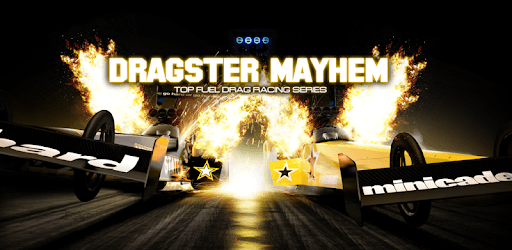
Experience the thrill of drag racing in a Top Fuel Dragster!

What's New

Version2.0.10
Size101.4 MB
What's NewWelcome back, Driver!-Easier steering-Fullscreen support-Graphics update-new burnout and engine smoke effects-Camera-shakeStay tuned for more updates!

Dragster Mayhem - Top Fuel Sim Screenshots

Dragster Mayhem - Top Fuel Sim PC screenshot

About Dragster Mayhem - Top Fuel Sim For PC

Dragster Mayhem - Top Fuel Sim is an Android app developed and published by Minicades Mobile at Google Play Store on Jan 28, 2016 for Android users. Dragster Mayhem - Top Fuel Sim is so popular that it has gained 2903570 installs so far and growing.

Dragster Mayhem - Top Fuel Sim: The Ultimate Drag Racing Game

If you're a fan of drag racing, then you absolutely have to try out Dragster Mayhem - Top Fuel Sim. This game is a must-have for all drag racing enthusiasts, offering an exhilarating and immersive experience like no other. Get ready to burn rubber, feel the adrenaline rush, and become the ultimate drag racing champion!

A Realistic and Thrilling Gameplay Experience

Dragster Mayhem - Top Fuel Sim provides a super fun and realistic gameplay experience that will keep you hooked for hours on end. The game features a wide range of high-performance cars that are sure to impress even the most die-hard drag racing fans. Whether you're into classic muscle cars or sleek modern vehicles, this game has it all.

One of the standout features of Dragster Mayhem - Top Fuel Sim is its attention to detail when it comes to the mechanics of drag racing. Burnouts, oversteer, and the importance of a perfect launch are all faithfully replicated in the game. Just like in real life, too much burnout can leave you sliding, so it's crucial to let the car drive and nudge it gently. The game truly captures the essence of drag racing and provides an authentic experience that will make you feel like you're right on the track.

An Unforgettable Multiplayer Experience

Dragster Mayhem - Top Fuel Sim takes the excitement of drag racing to a whole new level with its multiplayer mode. Unlike some other drag racing games, this one allows you to race against real players from around the world. Challenge your friends or compete against skilled opponents in intense head-to-head races. Prove your skills, dominate the leaderboard, and become the ultimate drag racing champion.

Unleash Your Inner Speed Demon

With Dragster Mayhem - Top Fuel Sim, you have the opportunity to unleash your inner speed demon and push your car to its limits. Experience the thrill of reaching mind-blowing speeds as you race towards the finish line. The game offers a wide range of customization options, allowing you to fine-tune your car to perfection and optimize its performance. Upgrade your engine, improve your grip, and leave your opponents in the dust.

FAQs

1. How much does Dragster Mayhem - Top Fuel Sim cost?

The pricing details for Dragster Mayhem - Top Fuel Sim are not explicitly mentioned. However, the game offers a free version with in-app purchases for additional features and customization options. It's important to check the app store for the most up-to-date pricing information.

2. Can I play Dragster Mayhem - Top Fuel Sim on multiple devices?

Yes, Dragster Mayhem - Top Fuel Sim is available for both Android and iOS devices. You can download and play the game on multiple devices as long as you have a compatible operating system.

3. Is Dragster Mayhem - Top Fuel Sim suitable for all ages?

Dragster Mayhem - Top Fuel Sim is a thrilling and exciting game that can be enjoyed by players of all ages. However, it's important to note that the game involves high-speed racing and may not be suitable for very young children. Parental guidance is advised.

So, what are you waiting for? Download Dragster Mayhem - Top Fuel Sim now and experience the adrenaline-pumping world of drag racing right at your fingertips. Get ready to burn rubber, leave your opponents in awe, and become the ultimate drag racing champion!

Can I run Dragster Mayhem - Top Fuel Sim on PC?

Yes, you can run Dragster Mayhem - Top Fuel Sim on PC, but first, you will need emulator software installed on your Windows or MAC, which you can download for free. In the below video, you will find Dragster Mayhem - Top Fuel Sim in action. Before you install the emulator, check out the minimum and recommended system requirements to run it seamlessly. They may change depending on which version of the emulator you choose. Therefore, we recommend you download the latest version of the emulator. Below you will find three free Android emulators that we have shortlisted based on their popularity:

How to Install Dragster Mayhem - Top Fuel Sim on Windows PC

BlueStacks

Minimum
  • OS: Microsoft Windows 7 and above.
  • Processor: Intel or AMD Processor.
  • RAM: Your PC must have at least 4GB of RAM. (Note that having 4GB or more disk space is not a substitute for RAM)
  • Storage: 5GB Free Disk Space.
  • You must be an Administrator on your PC.
Recommended:
  • OS: Microsoft Windows 10
  • Processor: Intel or AMD Multi-Core Processor with Single Thread benchmark score > 1000.
  • Graphics: Intel/Nvidia/ATI, Onboard or Discrete controller with benchmark score >= 750.
  • Please ensure Virtualization is enabled on your PC/Laptop.
  • RAM: 8GB or higher
  • Storage: SSD (or Fusion/Hybrid Drives)
  • Internet: Broadband connection to access games, accounts and related content.

Up to date graphics drivers from Microsoft or the chipset vendor.

  • To start with, download Bluestacks from its official website. The latest version of BluesStacks is v 5, and it is around 400 MB.
  • Once the download is done, click on the Bluestacks set up file to install it on your Windows PC. Follow the on-screen instructions and install it accordingly.
  • The next step is to launch the emulator using the desktop shortcut and sign in using your Google account.
  • Now, head over to Bluestacks home screen and click on the Google Play Store icon.
  • Hit the search bar in Google Play and search for Dragster Mayhem - Top Fuel Sim.
  • Install Dragster Mayhem - Top Fuel Sim from the Play Store by clicking the Install option, which completes downloading of Dragster Mayhem - Top Fuel Sim on PC.

NoxPlayer

Minimum
  • Operating System: Windows XP SP3, Windows Vista, Windows 7, Windows 8, Windows 10, and DirectX 9.0c
  • Processor: At least dual-core processor, both Intel, and AMD are OK
  • Video: Supports Open GL 2.0 or above
  • Memory: 1.5 GB RAM
Recommended
  • Operating System: Windows 7, Windows 8, Windows 10
  • Processor: Multiple core processors which support VT-x or AMB-V Virtualization Technology, better performance with this function enabled
  • Video: The higher performance, the better
  • Memory: 4 GB RAM

Storage: 1 GB available under installation path, 1.5GB available hard drive space

Internet: Broadband Internet connection

  • Download NoxPlayer from the official website. The latest version of NoxPlayer is v 3, and it is around 600 MB.
  • Now install the emulator using the downloaded setup file. Just go through the on-screen instructions and install NoxPlayer on your computer or laptop.
  • After the installation process, launch the Nox Android emulator and log in using your Google account when it asks you.
  • Click on the Google Play Store icon and head over to the search bar to search Dragster Mayhem - Top Fuel Sim. Once found, click on the Install button to install Dragster Mayhem - Top Fuel Sim for PC.
  • If you do not find Dragster Mayhem - Top Fuel Sim on Google Play Store or if you want to skip logging in to Google, you can sideload APK (download the .APK file from this page and open it with NoxPlayer).
  • Launch Dragster Mayhem - Top Fuel Sim from home-screen and start playing it on PC right away!

MEmu

Minimum
  • 2 cores x86/x86_64 Processor (Intel or AMD CPU)
  • WinXP SP3 / Win7 / Win8 / Win10 (Not recommended to run on Server/Enterprise)
  • Latest Windows DirectX 11 / Graphics driver with OpenGL 2.0
  • Hardware Virtualization Technology (Intel VT-x/AMD-V) shall be enabled in BIOS
  • 2GB of RAM (4GB for x64 system)
  • 5GB of hard disk free space
Recommended
  • OS: Microsoft Windows 10 with VT Enabled
  • CPU: Single Thread PassMark score > 1500 (Intel/AMD Multi-Core).
  • Graphics: Intel/Nvidia/ATI, Onboard or Discrete controller with PassMark score > 750.
  • Latest Windows DirectX 11 / Graphics driver with OpenGL 4.5 or higher
  • RAM: 8GB or higher
  • HDD: SSD, 10GB of hard disk free space
  • Internet: Broadband connection with low latency for FPS games
  • Download MEmu Play from the official website. The latest version of NoxPlayer is v 7.5.
  • When the download is completed, install the MEmu emulator on your PC. Follow the on-screen instructions and keep on clicking the Next button until the final step.
  • Now, using the desktop shortcut, look for the MEmu Play emulator and launch it. Once done, it will ask you to log in using your Google account, proceed with the same.
  • MEmu Play will ask you to log in using your Google account. When you log in, it will sync your Google account to MEmu Play. Launch the Google Play Store by clicking on the icon and search for Dragster Mayhem - Top Fuel Sim.
  • Click on the Install button once you find Dragster Mayhem - Top Fuel Sim from the search results. You can also sideload APK (download the .APK file from this page and open it with MEmu) if you want to skip above step.
  • After the installation of Dragster Mayhem - Top Fuel Sim, you're all set to use the app on PC!

Regardless of which Android emulator you install, the steps to install, configure, and running the Dragster Mayhem - Top Fuel Sim app on PC are the same.