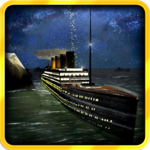
Its TITANIC for PC

Its TITANIC for PC

Published by Distinct Media

Updated November 19, 2025

Captain the Titanic, save her from huge Icebergs - or NOT!

What's New

Version1.1.4
Size46.3 MB
What's NewGuide arrows on rescue mission ICE FIELD 2 Bug Fixes and other small updates

Its TITANIC Screenshots

Its TITANIC PC screenshot

About Its TITANIC For PC

Its TITANIC is an Android app developed and published by Distinct Media at Google Play Store on Jul 13, 2017 for Android users. Its TITANIC is so popular that it has gained 1000000 installs so far and growing.

Experience the Thrills with Its TITANIC

Have you ever wanted to experience the historic voyage of the Titanic from the safety and comfort of your own home? With Its TITANIC, you can now relive the stunning moments of this grand ship's journey and its dramatic end. This game brings the Titanic's story to life, offering an engaging and educational experience for players of all ages.

Realistic Graphics and Gameplay

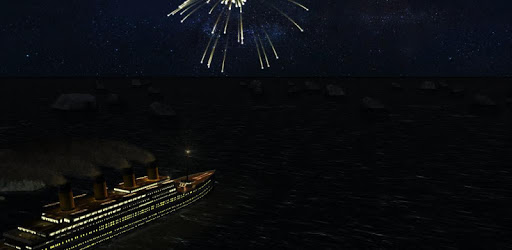
The graphics in Its TITANIC are both realistic and breathtaking. From the detailed design of the RMS Titanic to the dramatic effects when the ship hits an iceberg, every element has been carefully crafted to provide a visually immersive experience. The ship looks incredibly real, and the developers have paid close attention to the smallest details, making players feel as if they are actually onboard.

Exciting Features and Challenges

Its TITANIC isn’t just about sinking ships; it's packed with exciting features and challenges. One standout moment is when the ship breaks apart at 2:19 am, a precise recreation of the historic event. Players love the big splash that ensues when the ship splits into two, offering a thrilling spectacle that is both educational and entertaining.

A unique challenge in the game is the various stages that players must navigate. While stage 1 is easier and allows for a smooth introduction, stage 2 ramps up the difficulty, pushing players to their limits. For those who want an even more challenging experience, upgrading to options 2 or 3 within the game allows you to drive the Carpathia, adding an extra layer of excitement and difficulty.

Educational and Fun

In addition to being a fun game, Its TITANIC also provides educational value. As players navigate the ship, they learn about the historical events surrounding the Titanic's ill-fated journey. The gameplay accurately depicts the tragic crash with an iceberg, showing how passengers either perished or escaped on lifeboats. This educational aspect makes the game a valuable tool for learning about this significant historical event.

The developers have also included beautiful visual elements like fireworks and smoke stacks falling, adding to the atmospheric immersion of the game. Players can appreciate the care taken in recreating these details, which contribute to the overall enjoyment and educational value of Its TITANIC.

A Well-Loved Game

Its TITANIC has quickly become a beloved game for many. The combination of stunning graphics, realistic gameplay, and historical accuracy makes it stand out from other games. Players appreciate these elements and find themselves drawn back into the game repeatedly, enjoying the realistic sinking sequences and the chance to experience the Titanic's journey from start to finish.

With Its TITANIC, you can dive into the past and witness the grandeur and tragedy of the Titanic. Whether you are a history buff or just love exciting, well-crafted games, Its TITANIC offers an unforgettable experience that captures the imagination and heart of anyone who plays it.

Can I run Its TITANIC on PC?

Yes, you can run Its TITANIC on PC, but first, you will need emulator software installed on your Windows or MAC, which you can download for free. In the below video, you will find Its TITANIC in action. Before you install the emulator, check out the minimum and recommended system requirements to run it seamlessly. They may change depending on which version of the emulator you choose. Therefore, we recommend you download the latest version of the emulator. Below you will find three free Android emulators that we have shortlisted based on their popularity:

How to Install Its TITANIC on Windows PC

BlueStacks

Minimum
  • OS: Microsoft Windows 7 and above.
  • Processor: Intel or AMD Processor.
  • RAM: Your PC must have at least 4GB of RAM. (Note that having 4GB or more disk space is not a substitute for RAM)
  • Storage: 5GB Free Disk Space.
  • You must be an Administrator on your PC.
Recommended:
  • OS: Microsoft Windows 10
  • Processor: Intel or AMD Multi-Core Processor with Single Thread benchmark score > 1000.
  • Graphics: Intel/Nvidia/ATI, Onboard or Discrete controller with benchmark score >= 750.
  • Please ensure Virtualization is enabled on your PC/Laptop.
  • RAM: 8GB or higher
  • Storage: SSD (or Fusion/Hybrid Drives)
  • Internet: Broadband connection to access games, accounts and related content.

Up to date graphics drivers from Microsoft or the chipset vendor.

  • To start with, download Bluestacks from its official website. The latest version of BluesStacks is v 5, and it is around 400 MB.
  • Once the download is done, click on the Bluestacks set up file to install it on your Windows PC. Follow the on-screen instructions and install it accordingly.
  • The next step is to launch the emulator using the desktop shortcut and sign in using your Google account.
  • Now, head over to Bluestacks home screen and click on the Google Play Store icon.
  • Hit the search bar in Google Play and search for Its TITANIC.
  • Install Its TITANIC from the Play Store by clicking the Install option, which completes downloading of Its TITANIC on PC.

NoxPlayer

Minimum
  • Operating System: Windows XP SP3, Windows Vista, Windows 7, Windows 8, Windows 10, and DirectX 9.0c
  • Processor: At least dual-core processor, both Intel, and AMD are OK
  • Video: Supports Open GL 2.0 or above
  • Memory: 1.5 GB RAM
Recommended
  • Operating System: Windows 7, Windows 8, Windows 10
  • Processor: Multiple core processors which support VT-x or AMB-V Virtualization Technology, better performance with this function enabled
  • Video: The higher performance, the better
  • Memory: 4 GB RAM

Storage: 1 GB available under installation path, 1.5GB available hard drive space

Internet: Broadband Internet connection

  • Download NoxPlayer from the official website. The latest version of NoxPlayer is v 3, and it is around 600 MB.
  • Now install the emulator using the downloaded setup file. Just go through the on-screen instructions and install NoxPlayer on your computer or laptop.
  • After the installation process, launch the Nox Android emulator and log in using your Google account when it asks you.
  • Click on the Google Play Store icon and head over to the search bar to search Its TITANIC. Once found, click on the Install button to install Its TITANIC for PC.
  • If you do not find Its TITANIC on Google Play Store or if you want to skip logging in to Google, you can sideload APK (download the .APK file from this page and open it with NoxPlayer).
  • Launch Its TITANIC from home-screen and start playing it on PC right away!

MEmu

Minimum
  • 2 cores x86/x86_64 Processor (Intel or AMD CPU)
  • WinXP SP3 / Win7 / Win8 / Win10 (Not recommended to run on Server/Enterprise)
  • Latest Windows DirectX 11 / Graphics driver with OpenGL 2.0
  • Hardware Virtualization Technology (Intel VT-x/AMD-V) shall be enabled in BIOS
  • 2GB of RAM (4GB for x64 system)
  • 5GB of hard disk free space
Recommended
  • OS: Microsoft Windows 10 with VT Enabled
  • CPU: Single Thread PassMark score > 1500 (Intel/AMD Multi-Core).
  • Graphics: Intel/Nvidia/ATI, Onboard or Discrete controller with PassMark score > 750.
  • Latest Windows DirectX 11 / Graphics driver with OpenGL 4.5 or higher
  • RAM: 8GB or higher
  • HDD: SSD, 10GB of hard disk free space
  • Internet: Broadband connection with low latency for FPS games
  • Download MEmu Play from the official website. The latest version of NoxPlayer is v 7.5.
  • When the download is completed, install the MEmu emulator on your PC. Follow the on-screen instructions and keep on clicking the Next button until the final step.
  • Now, using the desktop shortcut, look for the MEmu Play emulator and launch it. Once done, it will ask you to log in using your Google account, proceed with the same.
  • MEmu Play will ask you to log in using your Google account. When you log in, it will sync your Google account to MEmu Play. Launch the Google Play Store by clicking on the icon and search for Its TITANIC.
  • Click on the Install button once you find Its TITANIC from the search results. You can also sideload APK (download the .APK file from this page and open it with MEmu) if you want to skip above step.
  • After the installation of Its TITANIC, you're all set to use the app on PC!

Regardless of which Android emulator you install, the steps to install, configure, and running the Its TITANIC app on PC are the same.
Download Its TITANIC For PC