Published by game-tv
Mobile esports for communities, clans & guilds. 4Mn+ game communities & counting
| Version | 3.0.0 |
| Size | 111.1 MB |
| What's New | Minor bug fixes and improvements. Install or update to the newest version to check it out! |
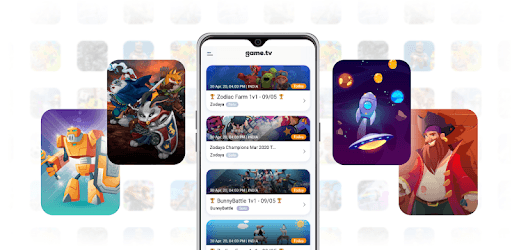
game.tv is an Android app developed and published by game-tv at Google Play Store on Aug 5, 2020 for Android users. game.tv is so popular that it has gained 2540001 installs so far and growing.
Are you an avid gamer looking to take your skills to the next level? Look no further than game.tv, the ultimate mobile esports platform. With a wide range of tournaments and a supportive community, game.tv is the go-to app for gamers of all levels. Join the excitement and start your esports journey today!
game.tv offers a user-friendly interface that makes navigating the app a breeze. Whether you're a seasoned pro or new to the world of esports, you'll find the app easy to use and engaging. With just a few taps, you can register for tournaments, connect with other players, and compete for exciting prizes.
game.tv hosts a wide variety of tournaments on a daily basis, with prize pools of up to Rs.1000. From popular games like Free Fire and BGMI to lesser-known gems, there's a tournament for every gamer. Whether you're looking to test your skills or simply have fun, game.tv has got you covered.
Joining game.tv can be a transformative experience for gamers. Many players have discovered their true potential and found a passion for esports through the app. By competing against skilled players and participating in competitive tournaments, you'll gain valuable experience and improve your gameplay. The supportive community and helpful staff in the game.tv Discord server are always there to offer guidance and assistance.
One of the biggest concerns for gamers is the legitimacy of tournaments and prize distribution. With game.tv, you can put those worries to rest. The app is known for hosting legitimate events and ensuring that winners receive their prizes. Say goodbye to fake apps and tournaments that leave you empty-handed. game.tv is committed to providing a fair and trustworthy platform for all gamers.
To join a tournament on game.tv, simply navigate to the tournament section in the app and select the tournament you're interested in. Follow the registration process and make sure to provide the necessary details. Once registered, be ready to compete and showcase your skills!
game.tv offers tournaments for a wide range of games, including popular titles like Free Fire and BGMI. You'll also find tournaments for lesser-known games, allowing you to explore new gaming experiences and showcase your skills in different genres.
game.tv ensures that prizes are distributed fairly to the winners. Once a tournament is completed, the winners will receive their prizes through the designated payment method. Rest assured that game.tv takes prize distribution seriously and strives to provide a smooth and transparent process.
game.tv offers a vibrant community of gamers who are passionate about esports. You can connect with other players through the game.tv Discord server, where you can chat, share tips, and even form teams for upcoming tournaments. It's a great way to make friends and expand your gaming network.
Yes, game.tv is available on both Android and iOS devices. Simply download the app from the respective app stores and start your esports journey today. Whether you have a smartphone or tablet, you can enjoy the thrill of competitive gaming with game.tv.
Don't miss out on the excitement and opportunities that game.tv has to offer. Join the community, compete in thrilling tournaments, and unlock your true gaming potential. Start your esports journey with game.tv today!
Yes, you can run game.tv on PC, but first, you will need emulator software installed on your Windows or MAC, which you can download for free. In the below video, you will find game.tv in action. Before you install the emulator, check out the minimum and recommended system requirements to run it seamlessly. They may change depending on which version of the emulator you choose. Therefore, we recommend you download the latest version of the emulator. Below you will find three free Android emulators that we have shortlisted based on their popularity:
Up to date graphics drivers from Microsoft or the chipset vendor.
Storage: 1 GB available under installation path, 1.5GB available hard drive space
Internet: Broadband Internet connection
Regardless of which Android emulator you install, the steps to install, configure, and running the game.tv app on PC are the same.