Published by Klaus Weidner
Updated April 25, 2026
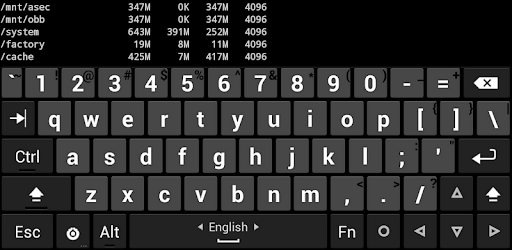
A full 5-row keyboard including arrow and Esc/Ctrl keys, intended for tablets.
| Version | v1.41.1 |
| Size | 2.6 MB |
| What's New | Try 3 for fixing popups on pre-O versions, tweak transparent and Material light themes.Fix 4 for popups on Android O MR1 (8.1). (Android P is still misbehaving.) |
Hacker's Keyboard is an Android app developed and published by Klaus Weidner at Google Play Store on May 19, 2011 for Android users. Hacker's Keyboard is so popular that it has gained 1000000 installs so far and growing.
If you're tired of struggling with small and cramped keyboards on your Android device, then look no further than Hacker's Keyboard. This incredible app brings the power and convenience of a full PC keyboard right to your fingertips. With its 5-row layout and familiar muscle memory, typing on your phone or tablet has never been easier.
One of the standout features of Hacker's Keyboard is its compatibility with newer Android versions. However, some users have reported issues with the current version not working on their devices. If you're facing the same problem, fear not! Simply head over to the app's GitHub page and download version 1.39 from 2016. This older version should solve any compatibility issues you may be experiencing.
One reviewer expressed their love for Hacker's Keyboard by stating, "Soooo good. Been using it forever." This sentiment is echoed by many long-time users who have relied on this app for years. However, some users have reported that the predictive text feature has stopped working recently, which can be a bit frustrating. But don't worry, the developers are constantly working on improving the app, so keep an eye out for updates that may address this issue.
It's worth noting that Hacker's Keyboard is designed to replicate the experience of typing on a PC keyboard, rather than a traditional phone keyboard. As one reviewer put it, "This is a keyboard PC, not a phone keyboard." So, if you're someone who prefers the feel and layout of a full-sized keyboard, this app is perfect for you.
Another reviewer praised the inclusion of cursor keys, stating, "At least, it has cursor keys, you know?" This feature is a game-changer for those who frequently edit and navigate through text on their devices. It provides a level of precision and control that is often lacking in other keyboard apps.
While Hacker's Keyboard is highly regarded by its users, there are always areas for improvement. One reviewer mentioned that the function keys could use some enhancements and suggested the inclusion of a manual to explain their functions and how to adapt them. This would be a valuable addition for users who want to make the most out of every key.
Another reviewer mentioned that the app lacks swipe-to-move-cursor-through-text functionality. While this may not be a deal-breaker, it would certainly enhance the overall user experience. However, despite these minor suggestions, the general consensus remains that Hacker's Keyboard is the best PC-like touch keyboard available.
Hacker's Keyboard offers a range of features that set it apart from other keyboard apps. One reviewer praised its DVORAK layout, stating, "Absolutely the best DVORAK keyboard layout!" This layout is highly sought after by users who prefer an alternative to the standard QWERTY layout.
Additionally, Hacker's Keyboard provides a unique Delete key option, which allows for quick and efficient text editing. This feature is particularly useful for those who frequently make corrections while typing.
While the app supports multiple languages, one reviewer expressed their desire for the inclusion of English auto-completion and spell check. They also mentioned that emojis would be a nice addition. These features would undoubtedly enhance the app's functionality and appeal to a wider user base.
Hacker's Keyboard is compatible with various Android devices, but some users have reported issues on specific versions. For example, one reviewer mentioned that they couldn't see the suggestions on Android 13, even though they were still able to select them. If you're facing similar problems, it's recommended to reach out to the app's support team for assistance in resolving the issue.
Another reviewer encountered difficulties when using the app with Telegram. They reported that the arrow keys didn't work and expressed frustration with the constant pop-up message that appears when tapping a word. They suggested that this message should only appear after a long tap to avoid interrupting the typing flow. These issues may be specific to certain configurations, but the developers are always open to feedback and suggestions for improvement.
In summary, Hacker's Keyboard is a remarkable app that brings the convenience and familiarity of a PC keyboard to your Android device. With its 5-row layout, cursor keys, and various customization options, it offers a superior typing experience for those who prefer a full-sized keyboard. While there may be minor issues and room for improvement, the overall consensus is that Hacker's Keyboard is the best choice for users seeking a PC-like touch keyboard.
Yes, Hacker's Keyboard is designed to be compatible with newer Android versions. However, if you encounter any compatibility issues, you can try downloading an older version from the app's GitHub page.
If the predictive text feature has stopped working, it's recommended to keep an eye out for updates from the app's developers. They are constantly working on improving the app and addressing any issues that may arise.
Yes, Hacker's Keyboard supports multiple languages. However, some users have expressed a desire for the inclusion of English auto-completion and spell check, as well as emojis.
If you're facing specific issues, such as the suggestions not appearing or arrow keys not working, it's best to reach out to the app's support team for assistance. They will be able to provide you with troubleshooting steps tailored to your situation.
Yes, Hacker's Keyboard works great on tablets, especially if you frequently use terminal connections to servers. It provides a much-improved typing experience compared to the original Google keyboard.
Yes, you can run Hacker's Keyboard on PC, but first, you will need emulator software installed on your Windows or MAC, which you can download for free. In the below video, you will find Hacker's Keyboard in action. Before you install the emulator, check out the minimum and recommended system requirements to run it seamlessly. They may change depending on which version of the emulator you choose. Therefore, we recommend you download the latest version of the emulator. Below you will find three free Android emulators that we have shortlisted based on their popularity:
Up to date graphics drivers from Microsoft or the chipset vendor.
Storage: 1 GB available under installation path, 1.5GB available hard drive space
Internet: Broadband Internet connection
Regardless of which Android emulator you install, the steps to install, configure, and running the Hacker's Keyboard app on PC are the same.