Retro N64 - N64 Emulator for PC

Retro N64 - N64 Emulator for PC

Published by Retro Game Emulators

Updated November 26, 2026

Retro N64 is a new N64 Emulator with many cool features and free.

What's New

Version3.0.4
Size16.2 MB
What's NewMinor bug fixes and improvements. Install or update to the newest version to check it out!

Retro N64 - N64 Emulator Screenshots

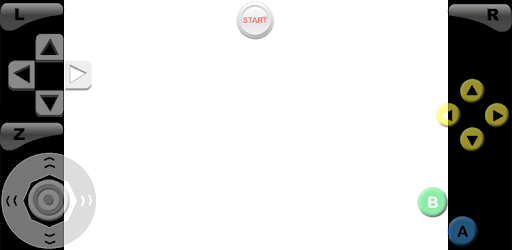
Retro N64 - N64 Emulator PC screenshot

About Retro N64 - N64 Emulator For PC

Retro N64 - N64 Emulator is an Android app developed and published by Retro Game Emulators at Google Play Store on Nov 7, 2018 for Android users. Retro N64 - N64 Emulator is so popular that it has gained 10000 installs so far and growing.

Retro N64 - N64 Emulator: The Ultimate Nostalgic Gaming Experience

Are you ready to take a trip down memory lane and relive the golden era of gaming? Look no further than Retro N64 - N64 Emulator, the perfect app for all the nostalgic gamers out there. This emulator brings back the magic of the Nintendo 64 console, allowing you to play your favorite N64 games right on your Android device. Let's dive into what makes Retro N64 the best choice for all your gaming needs.

Immersive Gameplay with Smooth Performance

One of the standout features of Retro N64 is its impressive emulation capabilities. Despite occasional stuttering for a few seconds, this emulator performs exceptionally well, ensuring a seamless gaming experience for casual players. Whether you're a die-hard fan or just curious about the games from that era, Retro N64 will not disappoint.

For the ultimate gaming experience, we highly recommend using a Bluetooth controller. This will enhance your gameplay and transport you back to the days of sitting in front of your TV, engrossed in the world of N64. With Retro N64, you can easily connect your controller and enjoy a truly immersive experience.

Easy Access to a Vast Library of Games

Thanks to Retro N64, you can now access a wide range of N64 games on your Android device. Although you'll need to obtain ROM files, the process is straightforward. Once you have the files, simply follow a few easy steps: go to your file manager, extract the files, move them to the emulator, and voila! You're ready to play.

From classics like The Legend of Zelda: Ocarina of Time to fan favorites like Paper Mario, Retro N64 has you covered. Whether you missed out on these games during their original release or simply want to relive the nostalgia, this emulator opens up a world of possibilities.

No Ads, No Errors, Just Pure Gaming Joy

One of the most frustrating aspects of using certain emulators is dealing with intrusive ads and constant errors. However, Retro N64 sets itself apart by providing a seamless gaming experience without any interruptions. Say goodbye to annoying pop-ups and hello to uninterrupted gaming sessions.

Furthermore, Retro N64 ensures a smooth and error-free performance, allowing you to focus solely on the game. No more black bars, no more choppy sound, and no more slow frame rates. This emulator is designed to deliver the best possible gaming experience, just like the original N64 console.

Frequently Asked Questions

1. Can I change the button layout in Retro N64?

Yes, you can customize the button layout in Retro N64. Simply access the settings menu within the app and navigate to the controls section. From there, you can adjust the button layout to your liking, ensuring maximum comfort and ease of use.

2. Are there any games that Retro N64 cannot play?

Retro N64 is compatible with a vast majority of N64 games. However, there may be a few exceptions. Some games, such as Shadows of the Empire, Majora's Mask, Mario Golf, and RR64, may not work on other emulators but work seamlessly on Retro N64. This emulator has been optimized to provide excellent compatibility with a wide range of games.

3. What should I do if I encounter issues while loading a game?

If you experience any difficulties loading a game, we recommend searching for a tutorial on YouTube. Many gamers have shared their experiences and troubleshooting tips, which can help you resolve any loading issues quickly. With a little guidance, you'll be back to playing your favorite games in no time.

So, what are you waiting for? Download Retro N64 - N64 Emulator now and embark on an unforgettable gaming journey. Relive the classics, immerse yourself in the nostalgia, and rediscover the joy of gaming on your Android device. Get ready to press start and let the adventure begin!

Can I run Retro N64 - N64 Emulator on PC?

Yes, you can run Retro N64 - N64 Emulator on PC, but first, you will need emulator software installed on your Windows or MAC, which you can download for free. In the below video, you will find Retro N64 - N64 Emulator in action. Before you install the emulator, check out the minimum and recommended system requirements to run it seamlessly. They may change depending on which version of the emulator you choose. Therefore, we recommend you download the latest version of the emulator. Below you will find three free Android emulators that we have shortlisted based on their popularity:

How to Install Retro N64 - N64 Emulator on Windows PC

BlueStacks

Minimum
  • OS: Microsoft Windows 7 and above.
  • Processor: Intel or AMD Processor.
  • RAM: Your PC must have at least 4GB of RAM. (Note that having 4GB or more disk space is not a substitute for RAM)
  • Storage: 5GB Free Disk Space.
  • You must be an Administrator on your PC.
Recommended:
  • OS: Microsoft Windows 10
  • Processor: Intel or AMD Multi-Core Processor with Single Thread benchmark score > 1000.
  • Graphics: Intel/Nvidia/ATI, Onboard or Discrete controller with benchmark score >= 750.
  • Please ensure Virtualization is enabled on your PC/Laptop.
  • RAM: 8GB or higher
  • Storage: SSD (or Fusion/Hybrid Drives)
  • Internet: Broadband connection to access games, accounts and related content.

Up to date graphics drivers from Microsoft or the chipset vendor.

  • To start with, download Bluestacks from its official website. The latest version of BluesStacks is v 5, and it is around 400 MB.
  • Once the download is done, click on the Bluestacks set up file to install it on your Windows PC. Follow the on-screen instructions and install it accordingly.
  • The next step is to launch the emulator using the desktop shortcut and sign in using your Google account.
  • Now, head over to Bluestacks home screen and click on the Google Play Store icon.
  • Hit the search bar in Google Play and search for Retro N64 - N64 Emulator.
  • Install Retro N64 - N64 Emulator from the Play Store by clicking the Install option, which completes downloading of Retro N64 - N64 Emulator on PC.

NoxPlayer

Minimum
  • Operating System: Windows XP SP3, Windows Vista, Windows 7, Windows 8, Windows 10, and DirectX 9.0c
  • Processor: At least dual-core processor, both Intel, and AMD are OK
  • Video: Supports Open GL 2.0 or above
  • Memory: 1.5 GB RAM
Recommended
  • Operating System: Windows 7, Windows 8, Windows 10
  • Processor: Multiple core processors which support VT-x or AMB-V Virtualization Technology, better performance with this function enabled
  • Video: The higher performance, the better
  • Memory: 4 GB RAM

Storage: 1 GB available under installation path, 1.5GB available hard drive space

Internet: Broadband Internet connection

  • Download NoxPlayer from the official website. The latest version of NoxPlayer is v 3, and it is around 600 MB.
  • Now install the emulator using the downloaded setup file. Just go through the on-screen instructions and install NoxPlayer on your computer or laptop.
  • After the installation process, launch the Nox Android emulator and log in using your Google account when it asks you.
  • Click on the Google Play Store icon and head over to the search bar to search Retro N64 - N64 Emulator. Once found, click on the Install button to install Retro N64 - N64 Emulator for PC.
  • If you do not find Retro N64 - N64 Emulator on Google Play Store or if you want to skip logging in to Google, you can sideload APK (download the .APK file from this page and open it with NoxPlayer).
  • Launch Retro N64 - N64 Emulator from home-screen and start playing it on PC right away!

MEmu

Minimum
  • 2 cores x86/x86_64 Processor (Intel or AMD CPU)
  • WinXP SP3 / Win7 / Win8 / Win10 (Not recommended to run on Server/Enterprise)
  • Latest Windows DirectX 11 / Graphics driver with OpenGL 2.0
  • Hardware Virtualization Technology (Intel VT-x/AMD-V) shall be enabled in BIOS
  • 2GB of RAM (4GB for x64 system)
  • 5GB of hard disk free space
Recommended
  • OS: Microsoft Windows 10 with VT Enabled
  • CPU: Single Thread PassMark score > 1500 (Intel/AMD Multi-Core).
  • Graphics: Intel/Nvidia/ATI, Onboard or Discrete controller with PassMark score > 750.
  • Latest Windows DirectX 11 / Graphics driver with OpenGL 4.5 or higher
  • RAM: 8GB or higher
  • HDD: SSD, 10GB of hard disk free space
  • Internet: Broadband connection with low latency for FPS games
  • Download MEmu Play from the official website. The latest version of NoxPlayer is v 7.5.
  • When the download is completed, install the MEmu emulator on your PC. Follow the on-screen instructions and keep on clicking the Next button until the final step.
  • Now, using the desktop shortcut, look for the MEmu Play emulator and launch it. Once done, it will ask you to log in using your Google account, proceed with the same.
  • MEmu Play will ask you to log in using your Google account. When you log in, it will sync your Google account to MEmu Play. Launch the Google Play Store by clicking on the icon and search for Retro N64 - N64 Emulator.
  • Click on the Install button once you find Retro N64 - N64 Emulator from the search results. You can also sideload APK (download the .APK file from this page and open it with MEmu) if you want to skip above step.
  • After the installation of Retro N64 - N64 Emulator, you're all set to use the app on PC!

Regardless of which Android emulator you install, the steps to install, configure, and running the Retro N64 - N64 Emulator app on PC are the same.