Simple Calculator for PC

Simple Calculator for PC

Published by Tecnotopia

Updated March 27, 2026

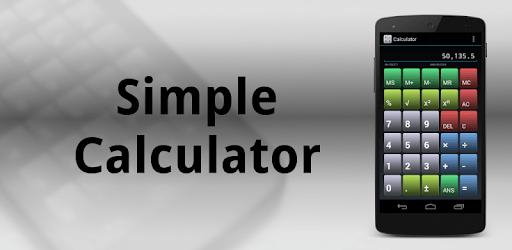
A calculator similar to handheld calculators, with memory and advanced math!

What's New

Version5.0.0-free
Size89.0 KB
What's New- New theme- Links to new Pro version with some settings

Simple Calculator Screenshots

Simple Calculator PC screenshot

About Simple Calculator For PC

Simple Calculator is an Android app developed and published by Tecnotopia at Google Play Store on Oct 15, 2011 for Android users. Simple Calculator is so popular that it has gained 500000 installs so far and growing.

Introducing Simple Calculator: The Perfect Everyday Calculator

Are you tired of using a calculator that is overly complicated or doesn't meet your daily mathematics needs? Look no further! Simple Calculator is the solution you've been searching for. With its user-friendly interface and essential features, this app is designed to make your calculations quick and hassle-free.

A Calculator That Works Just Like You Want It To

Simple Calculator is exactly what you need for your day-to-day calculations. Unlike other calculators that require you to press the equal button after every number, this app does a running total, just like your trusty old calculator. It covers all of your daily mathematics needs without overwhelming you with unnecessary scientific functions.

Whether you're a student trying to get your homework done quickly and accurately or someone who needs a reliable calculator for everyday tasks, Simple Calculator is here to help. Its solid coding ensures smooth performance, and the developer has made sure that no special permissions are required to use this app. How wonderful is that?

Features That Make Simple Calculator Stand Out

Simple Calculator not only gets the job done but also offers some handy features that enhance your user experience. One of the standout features is the ability to easily delete the wrong number with just a tap. No more starting over when you make a mistake!

Another useful feature is the memory+ function, which allows you to store numbers for future calculations. This comes in handy when you need to keep track of multiple figures or perform calculations that require the use of previous results.

And the best part? Simple Calculator is completely free and ad-free! You don't have to worry about annoying pop-ups or distractions while using this app. It's all about simplicity and efficiency.

What Users Are Saying About Simple Calculator

Simple Calculator has received rave reviews from users who have discovered its benefits. Here's what they have to say:

  • "Exactly what I was looking for, simple and a normal day to day calculator. It also added beauty to my phone."
  • "Covers ALL of my daily mathematics needs, not weirdly scientific and just an all-round fantastic application."
  • "Fits my needs exactly. Thank you."
  • "Perfect! Thanks! :-) New colors, kinda Xmasy? I'm kinda gonna keep the last update..."
  • "My most favorite, and easy to use mobile, smart phone calculator overall! Simply the best! Thank You!"

Download Simple Calculator Today

If you're tired of complicated calculators that don't meet your needs, it's time to make the switch to Simple Calculator. With its user-friendly interface, essential features, and positive user reviews, this app is a must-have for anyone who wants a reliable calculator at their fingertips.

Don't waste any more time searching for the perfect calculator. Download Simple Calculator now and experience the simplicity and efficiency it offers. Say goodbye to unnecessary complexities and hello to a calculator that truly understands your needs!

Frequently Asked Questions

1. Is Simple Calculator available for both Android and iOS devices?

Yes, Simple Calculator is available for both Android and iOS devices. You can download it from the Google Play Store or the Apple App Store.

2. Does Simple Calculator require any special permissions?

No, Simple Calculator does not require any special permissions to operate. The developer has made sure to keep the app lightweight and secure.

3. Can I use Simple Calculator to replace the calculator that came with my phone?

Absolutely! Simple Calculator is designed to be a reliable replacement for your phone's built-in calculator. Many users have already made the switch and are enjoying the simplicity and efficiency of this app.

4. Does Simple Calculator have any ads?

No, Simple Calculator is completely free and ad-free. You won't have to deal with any annoying pop-ups or distractions while using this app.

5. How do I delete a number if I make a mistake?

Deleting a number in Simple Calculator is easy. Simply tap on the delete button, and the last entered number will be removed. This feature saves you time and eliminates the need to start over when you make a mistake.

Can I run Simple Calculator on PC?

Yes, you can run Simple Calculator on PC, but first, you will need emulator software installed on your Windows or MAC, which you can download for free. In the below video, you will find Simple Calculator in action. Before you install the emulator, check out the minimum and recommended system requirements to run it seamlessly. They may change depending on which version of the emulator you choose. Therefore, we recommend you download the latest version of the emulator. Below you will find three free Android emulators that we have shortlisted based on their popularity:

How to Install Simple Calculator on Windows PC

BlueStacks

Minimum
  • OS: Microsoft Windows 7 and above.
  • Processor: Intel or AMD Processor.
  • RAM: Your PC must have at least 4GB of RAM. (Note that having 4GB or more disk space is not a substitute for RAM)
  • Storage: 5GB Free Disk Space.
  • You must be an Administrator on your PC.
Recommended:
  • OS: Microsoft Windows 10
  • Processor: Intel or AMD Multi-Core Processor with Single Thread benchmark score > 1000.
  • Graphics: Intel/Nvidia/ATI, Onboard or Discrete controller with benchmark score >= 750.
  • Please ensure Virtualization is enabled on your PC/Laptop.
  • RAM: 8GB or higher
  • Storage: SSD (or Fusion/Hybrid Drives)
  • Internet: Broadband connection to access games, accounts and related content.

Up to date graphics drivers from Microsoft or the chipset vendor.

  • To start with, download Bluestacks from its official website. The latest version of BluesStacks is v 5, and it is around 400 MB.
  • Once the download is done, click on the Bluestacks set up file to install it on your Windows PC. Follow the on-screen instructions and install it accordingly.
  • The next step is to launch the emulator using the desktop shortcut and sign in using your Google account.
  • Now, head over to Bluestacks home screen and click on the Google Play Store icon.
  • Hit the search bar in Google Play and search for Simple Calculator.
  • Install Simple Calculator from the Play Store by clicking the Install option, which completes downloading of Simple Calculator on PC.

NoxPlayer

Minimum
  • Operating System: Windows XP SP3, Windows Vista, Windows 7, Windows 8, Windows 10, and DirectX 9.0c
  • Processor: At least dual-core processor, both Intel, and AMD are OK
  • Video: Supports Open GL 2.0 or above
  • Memory: 1.5 GB RAM
Recommended
  • Operating System: Windows 7, Windows 8, Windows 10
  • Processor: Multiple core processors which support VT-x or AMB-V Virtualization Technology, better performance with this function enabled
  • Video: The higher performance, the better
  • Memory: 4 GB RAM

Storage: 1 GB available under installation path, 1.5GB available hard drive space

Internet: Broadband Internet connection

  • Download NoxPlayer from the official website. The latest version of NoxPlayer is v 3, and it is around 600 MB.
  • Now install the emulator using the downloaded setup file. Just go through the on-screen instructions and install NoxPlayer on your computer or laptop.
  • After the installation process, launch the Nox Android emulator and log in using your Google account when it asks you.
  • Click on the Google Play Store icon and head over to the search bar to search Simple Calculator. Once found, click on the Install button to install Simple Calculator for PC.
  • If you do not find Simple Calculator on Google Play Store or if you want to skip logging in to Google, you can sideload APK (download the .APK file from this page and open it with NoxPlayer).
  • Launch Simple Calculator from home-screen and start playing it on PC right away!

MEmu

Minimum
  • 2 cores x86/x86_64 Processor (Intel or AMD CPU)
  • WinXP SP3 / Win7 / Win8 / Win10 (Not recommended to run on Server/Enterprise)
  • Latest Windows DirectX 11 / Graphics driver with OpenGL 2.0
  • Hardware Virtualization Technology (Intel VT-x/AMD-V) shall be enabled in BIOS
  • 2GB of RAM (4GB for x64 system)
  • 5GB of hard disk free space
Recommended
  • OS: Microsoft Windows 10 with VT Enabled
  • CPU: Single Thread PassMark score > 1500 (Intel/AMD Multi-Core).
  • Graphics: Intel/Nvidia/ATI, Onboard or Discrete controller with PassMark score > 750.
  • Latest Windows DirectX 11 / Graphics driver with OpenGL 4.5 or higher
  • RAM: 8GB or higher
  • HDD: SSD, 10GB of hard disk free space
  • Internet: Broadband connection with low latency for FPS games
  • Download MEmu Play from the official website. The latest version of NoxPlayer is v 7.5.
  • When the download is completed, install the MEmu emulator on your PC. Follow the on-screen instructions and keep on clicking the Next button until the final step.
  • Now, using the desktop shortcut, look for the MEmu Play emulator and launch it. Once done, it will ask you to log in using your Google account, proceed with the same.
  • MEmu Play will ask you to log in using your Google account. When you log in, it will sync your Google account to MEmu Play. Launch the Google Play Store by clicking on the icon and search for Simple Calculator.
  • Click on the Install button once you find Simple Calculator from the search results. You can also sideload APK (download the .APK file from this page and open it with MEmu) if you want to skip above step.
  • After the installation of Simple Calculator, you're all set to use the app on PC!

Regardless of which Android emulator you install, the steps to install, configure, and running the Simple Calculator app on PC are the same.


Download Simple Calculator For PC