Published by Edunation
Updated April 20, 2026
The Next Generation Learning Environment for International Schools
| Version | 2.9.15 |
| Size | 56.9 MB |
| What's New | Bug fixes and stability enhancements. |
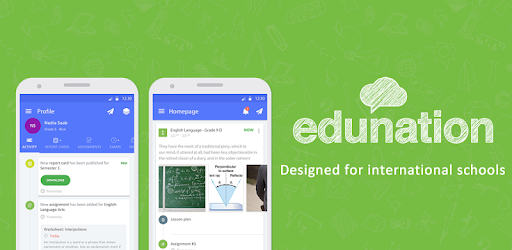
Edunation is an Android app developed and published by Edunation at Google Play Store on Nov 6, 2014 for Android users. Edunation is so popular that it has gained 10000 installs so far and growing.
Education has never been more accessible and convenient, thanks to the revolutionary app called Edunation. With its user-friendly interface and a wide range of features, this app has become a game-changer for students of all ages. Whether you're in elementary school or pursuing higher education, Edunation is here to make your learning journey smooth and enjoyable.
Edunation is not just another app; it's a comprehensive platform designed to empower students and enhance their educational experience. From managing assignments to communicating with teachers, this app has it all. Let's explore some of its key features:
Gone are the days of misplaced homework and missed deadlines. Edunation allows you to effortlessly manage your assignments, ensuring that you never miss a submission again. With a user-friendly interface, you can easily keep track of upcoming tasks, set reminders, and stay organized throughout the academic year.
Edunation recognizes the importance of effective communication between students, teachers, and parents. Through this app, you can easily connect with your teachers, ask questions, and seek guidance whenever you need it. This feature fosters a collaborative learning environment and ensures that no student is left behind.
Stay up-to-date with the latest announcements, class schedules, and important notifications through Edunation's real-time updates. Whether it's a change in the timetable or an upcoming event, you'll never miss out on any important information.
Edunation understands the significance of parental involvement in a student's academic journey. With this app, parents can easily monitor their child's progress, access report cards, and communicate with teachers. This seamless connection between home and school ensures a holistic approach to education.
A: While Edunation is a fantastic app, it may not be suitable for everyone. Its features and functionalities are primarily designed for students enrolled in schools that have adopted this platform.
A: Absolutely! Edunation provides you with the option to customize your profile. You can easily update your profile picture, add a bio, and personalize your account to reflect your unique personality.
A: The loading time of Edunation may vary depending on several factors, including the device's specifications and internet connection. However, the app developers are continuously working to optimize its performance and provide a seamless experience for all users.
A: Yes, Edunation is an excellent tool for online classes. It provides a platform for students and teachers to interact, share resources, and conduct virtual lessons. With its user-friendly interface, attending online classes becomes a breeze.
A: If you have any questions or need support regarding Edunation, you can reach out to their dedicated customer support team. They are available to assist you and ensure that your experience with the app is smooth and enjoyable.
Edunation has revolutionized the way students learn and interact with their educational institutions. With its array of features and commitment to enhancing the learning experience, this app is truly a game-changer. Download Edunation today and embark on a journey of academic excellence!
Yes, you can run Edunation on PC, but first, you will need emulator software installed on your Windows or MAC, which you can download for free. In the below video, you will find Edunation in action. Before you install the emulator, check out the minimum and recommended system requirements to run it seamlessly. They may change depending on which version of the emulator you choose. Therefore, we recommend you download the latest version of the emulator. Below you will find three free Android emulators that we have shortlisted based on their popularity:
Up to date graphics drivers from Microsoft or the chipset vendor.
Storage: 1 GB available under installation path, 1.5GB available hard drive space
Internet: Broadband Internet connection
Regardless of which Android emulator you install, the steps to install, configure, and running the Edunation app on PC are the same.