Published by Canon Inc.
Updated April 6, 2026
FREE app for PIXMA & MAXIFY by Canon Print from your smart device easily
| Version | 1.10.5 |
| Size | 65.6 MB |
| What's New | Minor bugs fixed. |
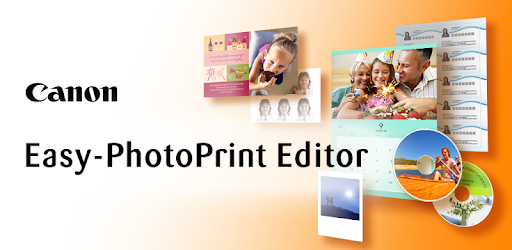
Easy-PhotoPrint Editor is an Android app developed and published by Canon Inc. at Google Play Store on Sep 2, 2018 for Android users. Easy-PhotoPrint Editor is so popular that it has gained 4462933 installs so far and growing.
Printing photos has never been easier with the innovative Easy-PhotoPrint Editor app. This powerful tool allows you to unleash your creativity and print stunning photos right from your phone. Whether you want to print passport size photos or create unique collages, this app has got you covered. Let's dive into the features that make Easy-PhotoPrint Editor the ultimate printing companion!
One of the standout features of Easy-PhotoPrint Editor is its ability to print multiple photos on a single sheet of photo paper. This means you can maximize your prints and save money by fitting more photos on a 4x6 inch sheet. Whether you need passport size photos or any other custom size, this app makes it possible with just a few taps. Say goodbye to wasting paper and hello to efficient printing!
Easy-PhotoPrint Editor takes printing to a whole new level by allowing you to choose the rear tray to print from. This feature is a game-changer for those who prefer specific trays for different types of paper. With this app, you have full control over your printing preferences, ensuring that every print comes out just the way you want it.
When it comes to customization, Easy-PhotoPrint Editor has you covered. From simple collages to different sizes of photos, this app offers a wide range of options to suit your creative needs. You can easily create personalized projects for both adults and kids, making it a versatile tool for all your printing endeavors. The possibilities are truly endless!
If you've been struggling with the basic Canon app and encountering error codes when printing on photo paper, Easy-PhotoPrint Editor is here to save the day. This app provides a seamless printing experience, allowing you to produce full-color, glossy photos of any size. Don't give up on your printing dreams – install this app and unlock a world of possibilities!
Easy-PhotoPrint Editor is designed to make printing from your mobile phone a breeze. With its user-friendly interface and fast processing, you can quickly print your favorite photos wherever you are. Plus, the app supports background printing, allowing you to prepare more photos while your printer works its magic. It's the perfect companion for those who value efficiency and convenience.
Getting started with Easy-PhotoPrint Editor is a simple process. First, make sure you have the app installed on your phone. You can easily find it on the app store for your device. Once installed, register your printer and customize the paper size and type to match your preferences. Don't be discouraged by the preset options – this app offers endless customization possibilities!
Easy-PhotoPrint Editor is the ultimate printing app that brings your photos to life. With its intuitive interface, seamless integration with your printer, and a plethora of customization options, this app is a must-have for anyone who loves printing photos. Say goodbye to complicated processes and hello to a world of creativity at your fingertips. Try Easy-PhotoPrint Editor today and experience the joy of hassle-free printing!
Yes, Easy-PhotoPrint Editor allows you to print passport size photos and customize the size to your liking.
Absolutely! Easy-PhotoPrint Editor gives you the freedom to select the rear tray for printing, ensuring optimal results.
Yes, Easy-PhotoPrint Editor supports background printing, allowing you to prepare more photos while your printer works its magic.
To get started, simply install the app on your phone, register your printer, and customize the paper size and type according to your preferences.
Yes, Easy-PhotoPrint Editor is specifically designed for Canon printer users, providing a seamless printing experience.
Yes, you can run Easy-PhotoPrint Editor on PC, but first, you will need emulator software installed on your Windows or MAC, which you can download for free. In the below video, you will find Easy-PhotoPrint Editor in action. Before you install the emulator, check out the minimum and recommended system requirements to run it seamlessly. They may change depending on which version of the emulator you choose. Therefore, we recommend you download the latest version of the emulator. Below you will find three free Android emulators that we have shortlisted based on their popularity:
Up to date graphics drivers from Microsoft or the chipset vendor.
Storage: 1 GB available under installation path, 1.5GB available hard drive space
Internet: Broadband Internet connection
Regardless of which Android emulator you install, the steps to install, configure, and running the Easy-PhotoPrint Editor app on PC are the same.