phyphox for PC

phyphox for PC

Published by RWTH Aachen University

Updated April 13, 2026

Perform physics experiments with your phone. (by the RWTH Aachen University)

What's New

Version1.2.0
Size20.6 MB
What's NewNew camera-based sensors to measure luma, luminance, hue, saturation and valueNew camera-related experiments: Brightness stopwatch, color stopwatch, brightness spectrumNew UI elements: Slider, Dropdown and ToggleRedesign of export/save dialogs to offer an additional download to filesystem buttonThe deprecated Apache-based webserver has been replaced with jlhttp (big thanks to Amicha R.)Full list of changes at https://phyphox.org/wiki/index.php/Version_history#1.2.0

phyphox Screenshots

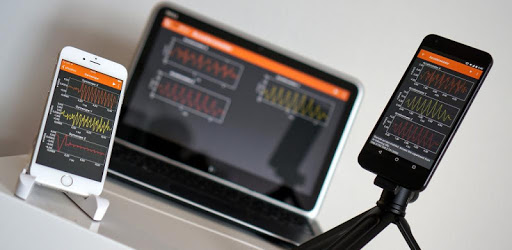
phyphox PC screenshot

About phyphox For PC

phyphox is an Android app developed and published by RWTH Aachen University at Google Play Store on Sep 9, 2016 for Android users. phyphox is so popular that it has gained 100000 installs so far and growing.

Unlock the Potential of Your Phone's Sensors with Phyphox

Looking for a way to make the most out of the sensors on your smartphone? Look no further than Phyphox, the app that allows you to explore endless possibilities in the world of physics. Whether you're a science enthusiast, a teacher looking for innovative classroom experiments, or simply curious about the capabilities of your mobile device, Phyphox has got you covered.

Unleash Your Curiosity

One of the standout features of Phyphox is its ability to tap into the various sensors on your phone. From measuring acceleration during takeoff to recording AC frequency without the need for a multimeter, this app opens up a whole new world of experimentation. Say goodbye to the limitations of traditional lab equipment and say hello to the power of your smartphone.

But it doesn't stop there. Phyphox goes beyond raw sensor readings by offering advanced algorithmic processing. This means that even the most advanced users will find the functionality they desire for their projects. Whether you're a beginner or an expert, Phyphox has something to offer.

A Science Playground for All Ages

Phyphox is not just for the seasoned scientist. It's a playground for all ages. Give your nephews a chance to explore the wonders of science and watch as they become engrossed in the experiments. Who knew that science could be so addictive?

And for those science addicts out there, Phyphox is a must-have. With its export capability, you can easily share your results and findings with others. Whether you're conducting simple experiments or delving into more complex concepts, Phyphox has the tools you need to make your experiments a success.

Continuous Improvement

Phyphox is constantly evolving to meet the needs of its users. The developers are responsive and dedicated to improving the app based on user feedback. While there may be occasional hiccups, such as inconsistent results from the magnetometer, the developer's commitment to addressing these issues shines through.

And if you're worried about language barriers, fear not. The developers have made efforts to respond to reviews, even if the translations may not always be perfect. They are actively working to ensure that all users can fully enjoy the app.

Frequently Asked Questions

1. Can Phyphox measure particle vibration instead of acceleration?

Yes, Phyphox has the capability to measure particle vibration. Simply follow the instructions and use the app's features to guide you through the process.

2. Is there a way to increase the magnetic field or power of the sensor?

Currently, Phyphox does not have a feature to increase the magnetic field or power of the sensor. However, the developers are constantly working on improving the app and adding new features, so it's worth keeping an eye out for future updates.

3. How can I utilize all the features of Phyphox?

Phyphox offers a wide range of features and experiments. To make the most out of the app, we recommend checking out their YouTube videos, where you can find inspiration and ideas for utilizing all the capabilities of Phyphox.

4. Can I use Phyphox for educational purposes?

Absolutely! Phyphox is a fantastic tool for educators. Whether you're teaching physics in a classroom or conducting experiments remotely, Phyphox can enhance the learning experience and make physics come alive for your students.

5. Is Phyphox compatible with all smartphones?

Phyphox is compatible with most smartphones that have sensors. However, it's always a good idea to check the app's compatibility with your specific device before downloading.

So why wait? Unlock the potential of your phone's sensors and dive into the world of physics with Phyphox. Download the app today and start exploring!

Can I run phyphox on PC?

Yes, you can run phyphox on PC, but first, you will need emulator software installed on your Windows or MAC, which you can download for free. In the below video, you will find phyphox in action. Before you install the emulator, check out the minimum and recommended system requirements to run it seamlessly. They may change depending on which version of the emulator you choose. Therefore, we recommend you download the latest version of the emulator. Below you will find three free Android emulators that we have shortlisted based on their popularity:

How to Install phyphox on Windows PC

BlueStacks

Minimum
  • OS: Microsoft Windows 7 and above.
  • Processor: Intel or AMD Processor.
  • RAM: Your PC must have at least 4GB of RAM. (Note that having 4GB or more disk space is not a substitute for RAM)
  • Storage: 5GB Free Disk Space.
  • You must be an Administrator on your PC.
Recommended:
  • OS: Microsoft Windows 10
  • Processor: Intel or AMD Multi-Core Processor with Single Thread benchmark score > 1000.
  • Graphics: Intel/Nvidia/ATI, Onboard or Discrete controller with benchmark score >= 750.
  • Please ensure Virtualization is enabled on your PC/Laptop.
  • RAM: 8GB or higher
  • Storage: SSD (or Fusion/Hybrid Drives)
  • Internet: Broadband connection to access games, accounts and related content.

Up to date graphics drivers from Microsoft or the chipset vendor.

  • To start with, download Bluestacks from its official website. The latest version of BluesStacks is v 5, and it is around 400 MB.
  • Once the download is done, click on the Bluestacks set up file to install it on your Windows PC. Follow the on-screen instructions and install it accordingly.
  • The next step is to launch the emulator using the desktop shortcut and sign in using your Google account.
  • Now, head over to Bluestacks home screen and click on the Google Play Store icon.
  • Hit the search bar in Google Play and search for phyphox.
  • Install phyphox from the Play Store by clicking the Install option, which completes downloading of phyphox on PC.

NoxPlayer

Minimum
  • Operating System: Windows XP SP3, Windows Vista, Windows 7, Windows 8, Windows 10, and DirectX 9.0c
  • Processor: At least dual-core processor, both Intel, and AMD are OK
  • Video: Supports Open GL 2.0 or above
  • Memory: 1.5 GB RAM
Recommended
  • Operating System: Windows 7, Windows 8, Windows 10
  • Processor: Multiple core processors which support VT-x or AMB-V Virtualization Technology, better performance with this function enabled
  • Video: The higher performance, the better
  • Memory: 4 GB RAM

Storage: 1 GB available under installation path, 1.5GB available hard drive space

Internet: Broadband Internet connection

  • Download NoxPlayer from the official website. The latest version of NoxPlayer is v 3, and it is around 600 MB.
  • Now install the emulator using the downloaded setup file. Just go through the on-screen instructions and install NoxPlayer on your computer or laptop.
  • After the installation process, launch the Nox Android emulator and log in using your Google account when it asks you.
  • Click on the Google Play Store icon and head over to the search bar to search phyphox. Once found, click on the Install button to install phyphox for PC.
  • If you do not find phyphox on Google Play Store or if you want to skip logging in to Google, you can sideload APK (download the .APK file from this page and open it with NoxPlayer).
  • Launch phyphox from home-screen and start playing it on PC right away!

MEmu

Minimum
  • 2 cores x86/x86_64 Processor (Intel or AMD CPU)
  • WinXP SP3 / Win7 / Win8 / Win10 (Not recommended to run on Server/Enterprise)
  • Latest Windows DirectX 11 / Graphics driver with OpenGL 2.0
  • Hardware Virtualization Technology (Intel VT-x/AMD-V) shall be enabled in BIOS
  • 2GB of RAM (4GB for x64 system)
  • 5GB of hard disk free space
Recommended
  • OS: Microsoft Windows 10 with VT Enabled
  • CPU: Single Thread PassMark score > 1500 (Intel/AMD Multi-Core).
  • Graphics: Intel/Nvidia/ATI, Onboard or Discrete controller with PassMark score > 750.
  • Latest Windows DirectX 11 / Graphics driver with OpenGL 4.5 or higher
  • RAM: 8GB or higher
  • HDD: SSD, 10GB of hard disk free space
  • Internet: Broadband connection with low latency for FPS games
  • Download MEmu Play from the official website. The latest version of NoxPlayer is v 7.5.
  • When the download is completed, install the MEmu emulator on your PC. Follow the on-screen instructions and keep on clicking the Next button until the final step.
  • Now, using the desktop shortcut, look for the MEmu Play emulator and launch it. Once done, it will ask you to log in using your Google account, proceed with the same.
  • MEmu Play will ask you to log in using your Google account. When you log in, it will sync your Google account to MEmu Play. Launch the Google Play Store by clicking on the icon and search for phyphox.
  • Click on the Install button once you find phyphox from the search results. You can also sideload APK (download the .APK file from this page and open it with MEmu) if you want to skip above step.
  • After the installation of phyphox, you're all set to use the app on PC!

Regardless of which Android emulator you install, the steps to install, configure, and running the phyphox app on PC are the same.

Download phyphox For PC