
Published by Webkey Team
Updated June 16, 2026
You can control your phone from any browser: type, click, GPS, screenshot, etc.
| Version | 3.16.27-01c4e84a-ui |
| Size | 18.9 MB |
| What's New | Fix file browser |
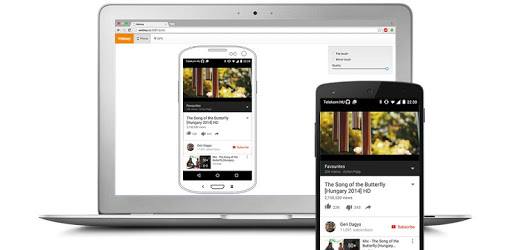
Webkey (ROOT REQUIRED) is an Android app developed and published by Webkey Team at Google Play Store on Jun 26, 2010 for Android users. Webkey (ROOT REQUIRED) is so popular that it has gained 100000 installs so far and growing.
Have you ever wished for a way to control your Android device remotely? Look no further than Webkey, the app that allows you to take full control of your device from anywhere in the world. Whether you're looking to access your phone's camera, control your music collection, or even shut down your device, Webkey has got you covered.
Webkey is back and better than ever, now compatible with the latest Android version, Lollipop. While some web functions may have become paid features, the app still offers a wide range of functionalities that will revolutionize the way you interact with your device. Say goodbye to the limitations of traditional remote control apps and say hello to Webkey.
One of the standout features of Webkey is its ability to turn your Android device into a CC camera. With just two phones, you can create a powerful surveillance system and have endless fun exploring its capabilities. The developer deserves a big thanks for creating such an awesome app that brings joy and excitement to its users.
But Webkey is not just about fun and games. It is also a practical tool that can be a lifesaver in certain situations. Imagine having your phone lost or stolen, but with Webkey installed, you can still have control over it remotely. It's the first app you should install on a fresh OS, providing you with peace of mind and a sense of security.
Webkey offers a plethora of features and ways to access your Android device. Unlike other apps, it doesn't limit you when it comes to controlling apps like Kodi using a mouse. It truly is a versatile app that caters to all your needs, making it a must-have for any Android user.
Webkey has garnered rave reviews from its users, with many expressing their love for the app. One user even mentioned attaching speakers to an old phone and using Webkey to control the Google Play Music app remotely. This allowed them to access their entire music collection without the need to physically interact with the phone. It's a game-changer for those who want convenience and accessibility at their fingertips.
However, some users have encountered minor issues, such as a black screen when opening the camera or difficulties in finding the port number for port forwarding. These concerns, while valid, do not overshadow the overall positive experience that Webkey provides.
Webkey has the potential to become a paid app, given its exceptional features and functionality. Many users have expressed their willingness to pay for such a brilliant app, highlighting its value and importance in the Android ecosystem. It's a testament to the impact Webkey has had on its users.
As with any app, there is always room for improvement. Some users have requested additional features, such as an "app-switcher" button for easy app closure and a "mini" mode for the browser window. These suggestions show the dedication and enthusiasm of the Webkey community, always striving for a better user experience.
Unfortunately, Webkey does not have a built-in feature to restart or shut down your Android device. However, you can achieve this by using the power button on your device.
Webkey aims to provide a seamless experience when viewing your phone screen remotely. While some lag may occur depending on your network connection, the app strives to minimize any disruptions and provide a smooth viewing experience.
Yes, one of the advantages of Webkey is its compatibility with older phones. Unlike other apps, Webkey works seamlessly on a wide range of devices, ensuring that no user is left behind.
If you wish to support the development of Webkey, you can donate to show your appreciation for the app. Your contribution will help ensure that Webkey continues to thrive and provide its users with exceptional remote control capabilities.
In conclusion, Webkey is a game-changing app that allows you to take full control of your Android device remotely. With its wide range of features and functionalities, it has become a favorite among Android users. While some minor issues exist, the overall positive experience and potential for future improvements make Webkey a must-have app for anyone seeking convenience and accessibility.
Yes, you can run Webkey (ROOT REQUIRED) on PC, but first, you will need emulator software installed on your Windows or MAC, which you can download for free. In the below video, you will find Webkey (ROOT REQUIRED) in action. Before you install the emulator, check out the minimum and recommended system requirements to run it seamlessly. They may change depending on which version of the emulator you choose. Therefore, we recommend you download the latest version of the emulator. Below you will find three free Android emulators that we have shortlisted based on their popularity:
Up to date graphics drivers from Microsoft or the chipset vendor.
Storage: 1 GB available under installation path, 1.5GB available hard drive space
Internet: Broadband Internet connection
Regardless of which Android emulator you install, the steps to install, configure, and running the Webkey (ROOT REQUIRED) app on PC are the same.