Published by Screenovate Technologies LTD.
Updated August 14, 2025
Complete wireless integration between your smartphone and Dell PC
| Version | 3.3.9803 |
| Size | 20.3 MB |
| What's New | Bug Fixes |
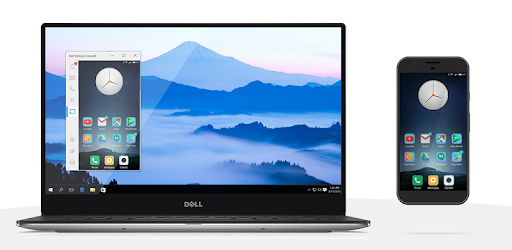
Dell Mobile Connect is an Android app developed and published by Screenovate Technologies LTD. at Google Play Store on Dec 21, 2017 for Android users. Dell Mobile Connect is so popular that it has gained 100000 installs so far and growing.
Imagine a world where your smartphone and your laptop or desktop harmoniously work together with minimal effort. Enter Dell Mobile Connect. This app bridges the gap between your mobile device and your computer, providing convenience and streamlining tasks.
One of the standout features of Dell Mobile Connect is its ability to transfer files with ease. Gone are the days of emailing yourself photos, documents, or other files. With just a click, you can transfer files between your phone and your computer efficiently. This feature is incredibly user-friendly and saves a substantial amount of time.
Dell Mobile Connect shines when it comes to communication. The app allows users to receive and manage text messages, calls, and notifications directly on their computer. This level of integration makes it so you don’t have to constantly switch between devices to stay connected. Whether you're receiving an important text or answering a call, you can handle it all from your computer.
Screen mirroring is another powerful feature offered by Dell Mobile Connect. This function enables users to project their phone screen onto their computer. It’s particularly useful for presentations, browsing content on a larger screen, or simply navigating your phone using the computer’s keyboard and mouse.
The app leverages Bluetooth to establish a connection between your phone and computer. This makes the setup process straightforward, allowing seamless integration without the need for an internet connection. Just make sure both devices have Bluetooth enabled, and you're good to go.
Dell Mobile Connect goes beyond basic features, offering remote management of your phone when connected to a Wi-Fi network. This means you can control your phone, manage files, and even answer calls while it's charging in another room. The convenience of this feature can’t be overstated for professionals and everyday users alike.
For those who frequently use their phone and computer simultaneously, Dell Mobile Connect proves to be an indispensable tool. It is not just about transferring files or answering calls—it’s about creating a unified workspace. Your phone and computer can now interact seamlessly, making multitasking more efficient than ever before.
Despite its advanced features, Dell Mobile Connect is easy to install and use. Most users find the setup process straightforward, although it can be slightly tricky due to Bluetooth pairing. However, once set up, the app provides a smooth and intuitive user experience. You don't need to be tech-savvy to enjoy the benefits it offers.
This app fundamentally changes the way you interact with your devices. By consolidating your workflows, Dell Mobile Connect helps boost productivity. Whether you’re working on important documents or staying in touch with loved ones, this app ensures you do so efficiently and without hassle.
In summary, Dell Mobile Connect unlocks the potential for seamless integration between your smartphone and computer, proving to be a valuable tool for anyone looking to enhance their device interactions. It simplifies file transfers, improves communication, and offers robust functionalities like screen mirroring and remote management—all through an easy-to-use interface.
Yes, you can run Dell Mobile Connect on PC, but first, you will need emulator software installed on your Windows or MAC, which you can download for free. In the below video, you will find Dell Mobile Connect in action. Before you install the emulator, check out the minimum and recommended system requirements to run it seamlessly. They may change depending on which version of the emulator you choose. Therefore, we recommend you download the latest version of the emulator. Below you will find three free Android emulators that we have shortlisted based on their popularity:
Up to date graphics drivers from Microsoft or the chipset vendor.
Storage: 1 GB available under installation path, 1.5GB available hard drive space
Internet: Broadband Internet connection
Regardless of which Android emulator you install, the steps to install, configure, and running the Dell Mobile Connect app on PC are the same.