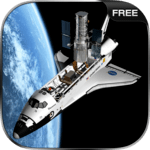
Space Shuttle Simulator Free for PC

Space Shuttle Simulator Free for PC

Published by Thetis Games and Flight Simulators

Updated October 1, 2026

Cosmos Space Simulator is the best space simulator already created for Android!

What's New

Version2025.11.18
Size205.3 MB
What's NewMinor bug fixes and improvements. Install or update to the newest version to check it out!

Space Shuttle Simulator Free Screenshots

Space Shuttle Simulator Free PC screenshot

About Space Shuttle Simulator Free For PC

Space Shuttle Simulator Free is an Android app developed and published by Thetis Games and Flight Simulators at Google Play Store on May 30, 2014 for Android users. Space Shuttle Simulator Free is so popular that it has gained 7048878 installs so far and growing.

Discover the Wonders of Space Travel with Space Shuttle Simulator Free

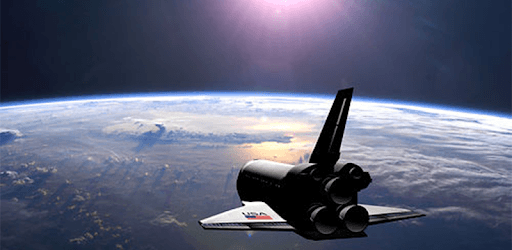
Space Shuttle Simulator Free offers an exciting adventure through the cosmos. This engaging game lets you experience the life of a space pilot, navigating your spacecraft through the vastness of space, embarking on thrilling missions, and encountering various challenges along the way.

Thrilling Space Missions

Space Shuttle Simulator Free brings you a variety of missions that will test your space navigation skills. You start as a rookie pilot and gradually progress through tougher expeditions. From dodging alien lasers to using asteroids as cover, every mission is designed to keep you on the edge of your seat. As you advance, you face the Quorks, an alien race threatening human existence. The game provides a deep sense of urgency and adventure, pushing you to become a space hero.

Expansive Cosmic Exploration

One of the most captivating features of Space Shuttle Simulator Free is the opportunity to explore the galaxy. You get to fly a spacecraft and set out on a journey through space. While exploring, you'll view stunning celestial bodies and the serene beauty of Earth from space. Although the current version may limit the number of different planets you can visit, the experience of space travel is still mesmerizing.

Realistic Spacecraft Control

The game gives you a realistic experience of controlling a spacecraft. You can manage fuel levels, navigate through space using warp drives, and handle various mechanical aspects of the ship. The simulator adds layers of realism that make you feel like a real astronaut. Adding features like a spaceman inside the craft and a detailed space station would further enhance this immersive experience.

Captivating Storyline

The backdrop of Space Shuttle Simulator Free is set in the year 3208, where humans are fighting for survival against the alien Quorks. This storyline immerses players into a gripping space saga, enabling them to contribute to the resistance squad's efforts. The vivid narrative drives you to complete the space expeditions and save humanity, making the game much more than just a flight simulator.

Fun and Educational

Space Shuttle Simulator Free is not only entertaining but also educational. It helps spark interest in space travel and astronomy, making it an excellent choice for young players. The game can keep even the most active minds engaged, offering a fantastic blend of learning and fun.

Areas for Improvement

While the game provides an incredible space experience, it has room for enhancements. Adding more planets to visit, integrating missions, and introducing various animations inside the spacecraft could elevate the gameplay. Features like vapour baths, dinner packs, and machine controllers inside the ship would add a layer of depth and realism, making the space simulation even more enthralling.

User-Friendly Interface

The interface of Space Shuttle Simulator Free is straightforward, making it accessible to players of all ages. Even if you're just starting, you'll find it easy to navigate through the game and understand the controls. The game's design ensures that every feature is just a few clicks away, providing a seamless gaming experience.

Final Thoughts

Space Shuttle Simulator Free offers a compelling and educational journey through space. With its thrilling missions, realistic spacecraft controls, and captivating storyline, it's bound to captivate anyone with a fascination for space. As more features are added, it has the potential to become even more engaging and enjoyable.

Can I run Space Shuttle Simulator Free on PC?

Yes, you can run Space Shuttle Simulator Free on PC, but first, you will need emulator software installed on your Windows or MAC, which you can download for free. In the below video, you will find Space Shuttle Simulator Free in action. Before you install the emulator, check out the minimum and recommended system requirements to run it seamlessly. They may change depending on which version of the emulator you choose. Therefore, we recommend you download the latest version of the emulator. Below you will find three free Android emulators that we have shortlisted based on their popularity:

How to Install Space Shuttle Simulator Free on Windows PC

BlueStacks

Minimum
  • OS: Microsoft Windows 7 and above.
  • Processor: Intel or AMD Processor.
  • RAM: Your PC must have at least 4GB of RAM. (Note that having 4GB or more disk space is not a substitute for RAM)
  • Storage: 5GB Free Disk Space.
  • You must be an Administrator on your PC.
Recommended:
  • OS: Microsoft Windows 10
  • Processor: Intel or AMD Multi-Core Processor with Single Thread benchmark score > 1000.
  • Graphics: Intel/Nvidia/ATI, Onboard or Discrete controller with benchmark score >= 750.
  • Please ensure Virtualization is enabled on your PC/Laptop.
  • RAM: 8GB or higher
  • Storage: SSD (or Fusion/Hybrid Drives)
  • Internet: Broadband connection to access games, accounts and related content.

Up to date graphics drivers from Microsoft or the chipset vendor.

  • To start with, download Bluestacks from its official website. The latest version of BluesStacks is v 5, and it is around 400 MB.
  • Once the download is done, click on the Bluestacks set up file to install it on your Windows PC. Follow the on-screen instructions and install it accordingly.
  • The next step is to launch the emulator using the desktop shortcut and sign in using your Google account.
  • Now, head over to Bluestacks home screen and click on the Google Play Store icon.
  • Hit the search bar in Google Play and search for Space Shuttle Simulator Free.
  • Install Space Shuttle Simulator Free from the Play Store by clicking the Install option, which completes downloading of Space Shuttle Simulator Free on PC.

NoxPlayer

Minimum
  • Operating System: Windows XP SP3, Windows Vista, Windows 7, Windows 8, Windows 10, and DirectX 9.0c
  • Processor: At least dual-core processor, both Intel, and AMD are OK
  • Video: Supports Open GL 2.0 or above
  • Memory: 1.5 GB RAM
Recommended
  • Operating System: Windows 7, Windows 8, Windows 10
  • Processor: Multiple core processors which support VT-x or AMB-V Virtualization Technology, better performance with this function enabled
  • Video: The higher performance, the better
  • Memory: 4 GB RAM

Storage: 1 GB available under installation path, 1.5GB available hard drive space

Internet: Broadband Internet connection

  • Download NoxPlayer from the official website. The latest version of NoxPlayer is v 3, and it is around 600 MB.
  • Now install the emulator using the downloaded setup file. Just go through the on-screen instructions and install NoxPlayer on your computer or laptop.
  • After the installation process, launch the Nox Android emulator and log in using your Google account when it asks you.
  • Click on the Google Play Store icon and head over to the search bar to search Space Shuttle Simulator Free. Once found, click on the Install button to install Space Shuttle Simulator Free for PC.
  • If you do not find Space Shuttle Simulator Free on Google Play Store or if you want to skip logging in to Google, you can sideload APK (download the .APK file from this page and open it with NoxPlayer).
  • Launch Space Shuttle Simulator Free from home-screen and start playing it on PC right away!

MEmu

Minimum
  • 2 cores x86/x86_64 Processor (Intel or AMD CPU)
  • WinXP SP3 / Win7 / Win8 / Win10 (Not recommended to run on Server/Enterprise)
  • Latest Windows DirectX 11 / Graphics driver with OpenGL 2.0
  • Hardware Virtualization Technology (Intel VT-x/AMD-V) shall be enabled in BIOS
  • 2GB of RAM (4GB for x64 system)
  • 5GB of hard disk free space
Recommended
  • OS: Microsoft Windows 10 with VT Enabled
  • CPU: Single Thread PassMark score > 1500 (Intel/AMD Multi-Core).
  • Graphics: Intel/Nvidia/ATI, Onboard or Discrete controller with PassMark score > 750.
  • Latest Windows DirectX 11 / Graphics driver with OpenGL 4.5 or higher
  • RAM: 8GB or higher
  • HDD: SSD, 10GB of hard disk free space
  • Internet: Broadband connection with low latency for FPS games
  • Download MEmu Play from the official website. The latest version of NoxPlayer is v 7.5.
  • When the download is completed, install the MEmu emulator on your PC. Follow the on-screen instructions and keep on clicking the Next button until the final step.
  • Now, using the desktop shortcut, look for the MEmu Play emulator and launch it. Once done, it will ask you to log in using your Google account, proceed with the same.
  • MEmu Play will ask you to log in using your Google account. When you log in, it will sync your Google account to MEmu Play. Launch the Google Play Store by clicking on the icon and search for Space Shuttle Simulator Free.
  • Click on the Install button once you find Space Shuttle Simulator Free from the search results. You can also sideload APK (download the .APK file from this page and open it with MEmu) if you want to skip above step.
  • After the installation of Space Shuttle Simulator Free, you're all set to use the app on PC!

Regardless of which Android emulator you install, the steps to install, configure, and running the Space Shuttle Simulator Free app on PC are the same.
Download Space Shuttle Simulator Free For PC