Published by Sphero Inc.
Updated October 21, 2026
Meet BB-8™ - your very own app-enabled Astromech Droid.
| Version | 1.3.2 |
| Size | 245.5 MB |
| What's New | Various bug fixes |
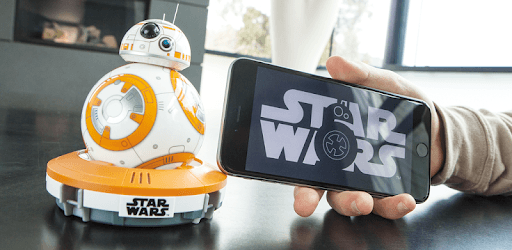
BB-8™ Droid App by Sphero is an Android app developed and published by Sphero Inc. at Google Play Store on Sep 2, 2015 for Android users. BB-8™ Droid App by Sphero is so popular that it has gained 1000000 installs so far and growing.
The BB-8™ Droid App by Sphero brings the beloved Star Wars character to life in your home. This app works seamlessly with the BB-8 droid, making it a joy to maneuver and interact with the charming little robot.
The BB-8™ Droid App by Sphero is simple to use. You can control your droid effortlessly, thanks to the intuitive and responsive movement controls. Whether you are a long-time Star Wars fan or just looking for an entertaining gadget, this app offers enjoyable experiences for everyone. It’s especially great for kids and adults alike, ensuring hours of fun playtime.
BB-8’s iconic sounds are recreated perfectly through the app. Turn the volume up on your smartphone for a more immersive experience. The adorable chirps and beeps are sure to bring smiles and laughter. This engaging feature makes interacting with the droid even more delightful, adding a touch of whimsy to each session.
The BB-8™ Droid App by Sphero includes advanced features such as voice recognition. Although the voice commands can be a bit unpredictable at times, they significantly enhance the interactive experience. This hands-free control method makes it feel like BB-8 is responding to your every word, which is both futuristic and exciting.
Sphero constantly updates the app, adding new modes and features. Recent updates have included special modes for popular Star Wars movies like Rogue One, providing fresh content and extending the fun. Though some users might face occasional update issues, the overall experience is consistently improved through these updates.
If you want to elevate your experience, pair the app with the Force Band accessory. This combination transforms your playtime, giving you the feeling of using the Force! The Force Band allows you to control BB-8 with simple hand gestures, providing a unique and immersive way to interact with your droid.
One of the most exciting features is the “Watch With Me” mode. This allows you and your BB-8 to watch Star Wars movies together. The droid reacts to key moments, adding an interactive dimension to your viewing experience. New updates have included Rogue One, and fans are eagerly hoping for compatibility with more episodes and spin-offs in the future.
While the BB-8™ Droid App by Sphero is fantastic, there are a few areas for potential improvement. The hologram feature can sometimes be a bit laggy, and voice recognition may not always function perfectly. However, these minor critiques do not overshadow the overall enjoyment and ease of use.
All in all, the BB-8™ Droid App by Sphero shines as a remarkable tech toy. Its smooth controls, fun interactions, and continuous updates keep it fresh and engaging. This droid is sure to become a hit in any household, capturing the hearts of Star Wars fans and tech enthusiasts alike.
Yes, you can run BB-8™ Droid App by Sphero on PC, but first, you will need emulator software installed on your Windows or MAC, which you can download for free. In the below video, you will find BB-8™ Droid App by Sphero in action. Before you install the emulator, check out the minimum and recommended system requirements to run it seamlessly. They may change depending on which version of the emulator you choose. Therefore, we recommend you download the latest version of the emulator. Below you will find three free Android emulators that we have shortlisted based on their popularity:
Up to date graphics drivers from Microsoft or the chipset vendor.
Storage: 1 GB available under installation path, 1.5GB available hard drive space
Internet: Broadband Internet connection
Regardless of which Android emulator you install, the steps to install, configure, and running the BB-8™ Droid App by Sphero app on PC are the same.