Weapon stripping for PC

Weapon stripping for PC

Published by Sega SVD

Updated March 18, 2026

Guns field strip simulator, firing, training, studying, gun sim

What's New

Version157.618
Size521.4 MB
What's New+ audio bugfix
+ AS Val added into AR category

Weapon stripping Screenshots

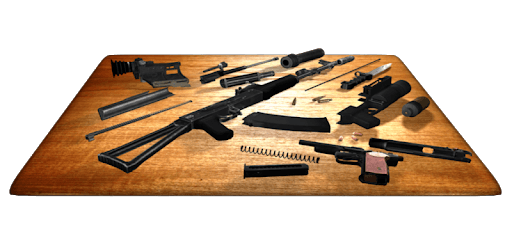
Weapon stripping PC screenshot

About Weapon stripping For PC

Weapon stripping is an Android app developed and published by Sega SVD at Google Play Store on Feb 21, 2015 for Android users. Weapon stripping is so popular that it has gained 7891911 installs so far and growing.

Experience Realistic Gun Simulations with Weapon Stripping

Are you a gun enthusiast looking for a realistic and educational gaming experience? Look no further than Weapon Stripping, a simulation game that offers an immersive and interactive gun stripping experience. In this article, we will explore the features and highlights of this game, as well as address some common user suggestions and inquiries.

Immersive Gameplay and Regular Updates

Weapon Stripping stands out from other games in its genre due to its highly interactive and reactive gun mechanics. The guns in this game feel more realistic and engaging, providing an unparalleled experience for gun enthusiasts. With regular updates, the game keeps adding new guns, ensuring that players always have something new to explore and enjoy.

Expanding Gun Collection

One of the most common requests from players is the addition of specific guns to the game. While we cannot directly address individual requests, we strive to provide a diverse and expanding collection of firearms. From full auto pistols to machine pistols, Weapon Stripping offers a wide range of guns for players to explore and learn about.

Country Restrictions and Future Updates

Some players have expressed concerns about restricted access to certain content in their countries. While we understand the frustration, these restrictions are beyond our control. We recommend reaching out to your local app store or service provider for more information on potential workarounds or future changes.

Enhancements and New Features

Weapon Stripping is constantly evolving, and we appreciate the valuable feedback from our players. Suggestions such as modifying weapons and an arena to test them out have been noted, and we will continue to explore ways to enhance the gameplay experience. Stay tuned for future updates!

Attention to Detail and Realism

One of the standout features of Weapon Stripping is its excellent graphics and highly detailed gun models. The game strives to provide a realistic representation of firearms, allowing players to appreciate the intricate design and mechanics of each weapon. While some regions may have limitations on accessing modern weapon models, the historical weapons remain available for exploration.

Frequently Asked Questions

1. Can I suggest specific guns to be added to the game?

While we cannot guarantee the inclusion of specific guns, we appreciate player suggestions and strive to provide a diverse gun collection that caters to various interests.

2. Will the restricted content be accessible in the future?

We recommend reaching out to your local app store or service provider for more information on potential workarounds or future changes regarding restricted content.

3. Are there plans to add new features and enhancements?

Yes, we are constantly working on improving the game and adding new features based on player feedback. Stay tuned for future updates!

4. Can I contact the developer to purchase Weapon Stripping 2 with a gift card?

Unfortunately, we do not have a separate contact method for purchasing the sequel. Please keep an eye out for any announcements or updates regarding the release of Weapon Stripping 2.

5. Are there plans to introduce customization options for the weapons?

We appreciate the suggestion and will take it into consideration for future updates. We are always looking for ways to enhance the gameplay experience and provide more customization options for our players.

Overall, Weapon Stripping offers an immersive and educational gaming experience for gun enthusiasts. With its realistic gun simulations and regular updates, the game continues to evolve and provide new content for players to enjoy. Download Weapon Stripping today and embark on a journey through the intricate world of firearms!

Can I run Weapon stripping on PC?

Yes, you can run Weapon stripping on PC, but first, you will need emulator software installed on your Windows or MAC, which you can download for free. In the below video, you will find Weapon stripping in action. Before you install the emulator, check out the minimum and recommended system requirements to run it seamlessly. They may change depending on which version of the emulator you choose. Therefore, we recommend you download the latest version of the emulator. Below you will find three free Android emulators that we have shortlisted based on their popularity:

How to Install Weapon stripping on Windows PC

BlueStacks

Minimum
  • OS: Microsoft Windows 7 and above.
  • Processor: Intel or AMD Processor.
  • RAM: Your PC must have at least 4GB of RAM. (Note that having 4GB or more disk space is not a substitute for RAM)
  • Storage: 5GB Free Disk Space.
  • You must be an Administrator on your PC.
Recommended:
  • OS: Microsoft Windows 10
  • Processor: Intel or AMD Multi-Core Processor with Single Thread benchmark score > 1000.
  • Graphics: Intel/Nvidia/ATI, Onboard or Discrete controller with benchmark score >= 750.
  • Please ensure Virtualization is enabled on your PC/Laptop.
  • RAM: 8GB or higher
  • Storage: SSD (or Fusion/Hybrid Drives)
  • Internet: Broadband connection to access games, accounts and related content.

Up to date graphics drivers from Microsoft or the chipset vendor.

  • To start with, download Bluestacks from its official website. The latest version of BluesStacks is v 5, and it is around 400 MB.
  • Once the download is done, click on the Bluestacks set up file to install it on your Windows PC. Follow the on-screen instructions and install it accordingly.
  • The next step is to launch the emulator using the desktop shortcut and sign in using your Google account.
  • Now, head over to Bluestacks home screen and click on the Google Play Store icon.
  • Hit the search bar in Google Play and search for Weapon stripping.
  • Install Weapon stripping from the Play Store by clicking the Install option, which completes downloading of Weapon stripping on PC.

NoxPlayer

Minimum
  • Operating System: Windows XP SP3, Windows Vista, Windows 7, Windows 8, Windows 10, and DirectX 9.0c
  • Processor: At least dual-core processor, both Intel, and AMD are OK
  • Video: Supports Open GL 2.0 or above
  • Memory: 1.5 GB RAM
Recommended
  • Operating System: Windows 7, Windows 8, Windows 10
  • Processor: Multiple core processors which support VT-x or AMB-V Virtualization Technology, better performance with this function enabled
  • Video: The higher performance, the better
  • Memory: 4 GB RAM

Storage: 1 GB available under installation path, 1.5GB available hard drive space

Internet: Broadband Internet connection

  • Download NoxPlayer from the official website. The latest version of NoxPlayer is v 3, and it is around 600 MB.
  • Now install the emulator using the downloaded setup file. Just go through the on-screen instructions and install NoxPlayer on your computer or laptop.
  • After the installation process, launch the Nox Android emulator and log in using your Google account when it asks you.
  • Click on the Google Play Store icon and head over to the search bar to search Weapon stripping. Once found, click on the Install button to install Weapon stripping for PC.
  • If you do not find Weapon stripping on Google Play Store or if you want to skip logging in to Google, you can sideload APK (download the .APK file from this page and open it with NoxPlayer).
  • Launch Weapon stripping from home-screen and start playing it on PC right away!

MEmu

Minimum
  • 2 cores x86/x86_64 Processor (Intel or AMD CPU)
  • WinXP SP3 / Win7 / Win8 / Win10 (Not recommended to run on Server/Enterprise)
  • Latest Windows DirectX 11 / Graphics driver with OpenGL 2.0
  • Hardware Virtualization Technology (Intel VT-x/AMD-V) shall be enabled in BIOS
  • 2GB of RAM (4GB for x64 system)
  • 5GB of hard disk free space
Recommended
  • OS: Microsoft Windows 10 with VT Enabled
  • CPU: Single Thread PassMark score > 1500 (Intel/AMD Multi-Core).
  • Graphics: Intel/Nvidia/ATI, Onboard or Discrete controller with PassMark score > 750.
  • Latest Windows DirectX 11 / Graphics driver with OpenGL 4.5 or higher
  • RAM: 8GB or higher
  • HDD: SSD, 10GB of hard disk free space
  • Internet: Broadband connection with low latency for FPS games
  • Download MEmu Play from the official website. The latest version of NoxPlayer is v 7.5.
  • When the download is completed, install the MEmu emulator on your PC. Follow the on-screen instructions and keep on clicking the Next button until the final step.
  • Now, using the desktop shortcut, look for the MEmu Play emulator and launch it. Once done, it will ask you to log in using your Google account, proceed with the same.
  • MEmu Play will ask you to log in using your Google account. When you log in, it will sync your Google account to MEmu Play. Launch the Google Play Store by clicking on the icon and search for Weapon stripping.
  • Click on the Install button once you find Weapon stripping from the search results. You can also sideload APK (download the .APK file from this page and open it with MEmu) if you want to skip above step.
  • After the installation of Weapon stripping, you're all set to use the app on PC!

Regardless of which Android emulator you install, the steps to install, configure, and running the Weapon stripping app on PC are the same.