Published by Polycompsol
Updated August 16, 2025
Ammunition Reloading Calculator and Reloading Data Viewer and Tracker
| Version | 3.03.21 |
| Size | 55.1 MB |
| What's New | Framework related update/patches. |
Reloading Assistant is an Android app developed and published by Polycompsol at Google Play Store on Aug 8, 2014 for Android users. Reloading Assistant is so popular that it has gained 162012 installs so far and growing.
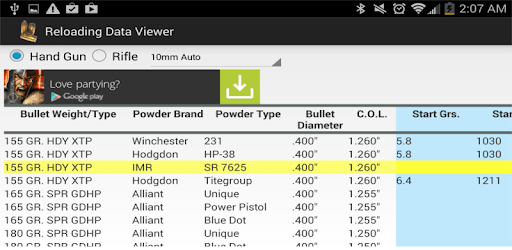
Reloading ammunition can be a complex and time-consuming process, but with the right tools, it becomes a breeze. That's where the Reloading Assistant app comes in. This free app combines all publicly posted load data into one convenient place, making it easier than ever to find the information you need. Whether you're a seasoned reloader or just starting out, this app is a must-have for anyone looking to optimize their reloading process.
One of the standout features of Reloading Assistant is its user-friendly interface. The app is designed to be easy to navigate, ensuring that you can quickly find the load data you're looking for. With just a few taps, you'll have access to a wealth of information on popular calibers and powders.
But what sets this app apart from others is the ability to add your own loads. This customization feature allows you to tailor the app to your specific needs. Whether you're experimenting with different powders or developing your own rounds, Reloading Assistant has you covered.
While the app offers a calculator for load development, some users find it less relevant if they already know the bullet and powder they want to use. However, the calculator can still be a useful tool for those who are new to reloading or looking for additional guidance.
Reloading Assistant is a game-changer when it comes to saving time. Instead of flipping through multiple manuals or searching online for load data, you can simply refer to this app on the go. It's a valuable resource for reloaders who need quick access to information while at the range or in the store.
Many users have praised the app for its accuracy and comprehensive data. With information from major suppliers, you can trust that the load data provided is reliable and up-to-date. It's like having a collection of reloading manuals right at your fingertips.
The positive feedback from users speaks volumes about the quality of Reloading Assistant. One user even went as far as to say, "This is the best free reloading app." Others have expressed their gratitude for the time-saving capabilities of the app, stating that it has become their go-to resource for load data.
While the app is highly regarded, some users have suggested a few improvements. They would like to see updates that include new calibers, as well as the addition of case manufacturer, primer type and brand, and a short comment field. These updates would further enhance the app's functionality and make it even more useful for reloaders.
Yes, Reloading Assistant is available for both Android and iOS devices. You can download it from the Google Play Store or the Apple App Store.
Yes, there is an option to remove ads in Reloading Assistant. For a small fee, you can enjoy an ad-free experience while using the app.
Currently, Reloading Assistant does not have a log book feature. However, users have expressed their desire for this functionality, and it may be considered in future updates.
Absolutely! The load data in Reloading Assistant is sourced from major suppliers and is known for its accuracy. You can trust the information provided to help you make informed decisions during the reloading process.
While Reloading Assistant is a valuable resource, it is always recommended to cross-check load data with other reliable sources, such as reloading manuals. This ensures the utmost safety and accuracy in your reloading endeavors.
In conclusion, Reloading Assistant is a game-changing app for reloaders of all levels. With its comprehensive load data, user-friendly interface, and customization options, it's no wonder why users are raving about it. Download the app today and experience the convenience and efficiency it brings to your reloading process!
Yes, you can run Reloading Assistant on PC, but first, you will need emulator software installed on your Windows or MAC, which you can download for free. In the below video, you will find Reloading Assistant in action. Before you install the emulator, check out the minimum and recommended system requirements to run it seamlessly. They may change depending on which version of the emulator you choose. Therefore, we recommend you download the latest version of the emulator. Below you will find three free Android emulators that we have shortlisted based on their popularity:
Up to date graphics drivers from Microsoft or the chipset vendor.
Storage: 1 GB available under installation path, 1.5GB available hard drive space
Internet: Broadband Internet connection
Regardless of which Android emulator you install, the steps to install, configure, and running the Reloading Assistant app on PC are the same.