Ultimate Coaster for PC

Ultimate Coaster for PC

Published by Phony Studios

Updated April 1, 2026

Build and ride the roller coaster of your dreams!

What's New

Version1.4
Size26.4 MB
What's NewUpdate sdk versionsAdded auto-building Vertical Loops

Ultimate Coaster Screenshots

Ultimate Coaster PC screenshot

About Ultimate Coaster For PC

Ultimate Coaster is an Android app developed and published by Phony Studios at Google Play Store on Feb 7, 2017 for Android users. Ultimate Coaster is so popular that it has gained 1436432 installs so far and growing.

Experience the Thrill with Ultimate Coaster

A True Rollercoaster Enthusiast's Dream

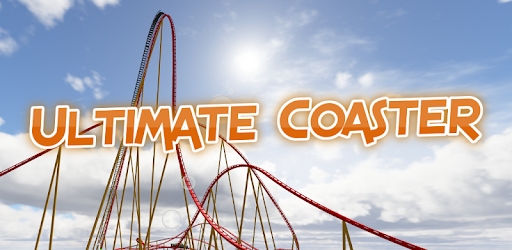
Ultimate Coaster stands out as a top-notch rollercoaster simulation game that thrills players with its realistic physics and engaging gameplay. Whether you are an experienced coaster enthusiast or someone just stepping into the world of coaster building, this game offers an enriching experience.

Truly Realistic Coaster Physics

One of the defining aspects of Ultimate Coaster is its focus on realism. The game requires strategic thinking, particularly in terms of speed and track design. If your coaster lacks momentum, it may start to roll back, prompting you to rethink your layout. This adds a layer of strategy that keeps the game exciting.

Easy to Pick Up, Hard to Put Down

Ultimate Coaster is designed to be user-friendly. You can dive right in and start creating your dream coasters. And even if it’s your first time playing, the interface is intuitive, ensuring that you can build complicated coasters without feeling overwhelmed.

Endless Creativity

The game's main draw is the freedom it gives you to design unique rollercoasters. There are no preset themes or requirements, allowing you to bring your wildest coaster dreams to life. Many players have already recreated famous rollercoasters, adding their own unique twists.

Room for Improvement

While the game excels in many areas, there are a few aspects that could be enhanced. For instance, adding wooden coasters or more inversion elements would expand the variety and deepen the gameplay. Some additional track types, especially those not locked behind paywalls, would also make for a richer experience.

Embrace the Minimalistic Design

The simplicity of Ultimate Coaster has its own charm. The lack of trees, buildings, or other decorations makes the game run smoothly, even on less powerful devices. This focus allows players to concentrate solely on coaster design and performance, which is the core of the game.

Future Potential

The game shows great promise for future updates. Adding more coaster elements, different track types, and additional scenery could elevate it even further. Fans are eager to see what the developers will introduce next, hoping for features like single rail wooden coasters or the ability to create dueling coasters with two stations.

Great Graphics and VR Mode

The graphics in Ultimate Coaster are commendable, providing a visually appealing experience. For those who want an even more immersive experience, the VR mode adds an extra layer of excitement, allowing you to ride your creations in virtual reality.

Save Your Progress

One essential tip is to always save your work before exiting. Not saving can result in lost progress, which could be frustrating. Thankfully, the save button is straightforward to use, ensuring that your creations are safe and sound for future tweaking.

Final Thoughts

Ultimate Coaster is a compelling option for rollercoaster fans. Its realistic physics, minimalistic design, and potential for future updates make it a standout in the world of coaster simulation games. Whether you're a serious coaster architect or just looking to kill some time creatively, Ultimate Coaster delivers endless fun and satisfaction.

Can I run Ultimate Coaster on PC?

Yes, you can run Ultimate Coaster on PC, but first, you will need emulator software installed on your Windows or MAC, which you can download for free. In the below video, you will find Ultimate Coaster in action. Before you install the emulator, check out the minimum and recommended system requirements to run it seamlessly. They may change depending on which version of the emulator you choose. Therefore, we recommend you download the latest version of the emulator. Below you will find three free Android emulators that we have shortlisted based on their popularity:

How to Install Ultimate Coaster on Windows PC

BlueStacks

Minimum
  • OS: Microsoft Windows 7 and above.
  • Processor: Intel or AMD Processor.
  • RAM: Your PC must have at least 4GB of RAM. (Note that having 4GB or more disk space is not a substitute for RAM)
  • Storage: 5GB Free Disk Space.
  • You must be an Administrator on your PC.
Recommended:
  • OS: Microsoft Windows 10
  • Processor: Intel or AMD Multi-Core Processor with Single Thread benchmark score > 1000.
  • Graphics: Intel/Nvidia/ATI, Onboard or Discrete controller with benchmark score >= 750.
  • Please ensure Virtualization is enabled on your PC/Laptop.
  • RAM: 8GB or higher
  • Storage: SSD (or Fusion/Hybrid Drives)
  • Internet: Broadband connection to access games, accounts and related content.

Up to date graphics drivers from Microsoft or the chipset vendor.

  • To start with, download Bluestacks from its official website. The latest version of BluesStacks is v 5, and it is around 400 MB.
  • Once the download is done, click on the Bluestacks set up file to install it on your Windows PC. Follow the on-screen instructions and install it accordingly.
  • The next step is to launch the emulator using the desktop shortcut and sign in using your Google account.
  • Now, head over to Bluestacks home screen and click on the Google Play Store icon.
  • Hit the search bar in Google Play and search for Ultimate Coaster.
  • Install Ultimate Coaster from the Play Store by clicking the Install option, which completes downloading of Ultimate Coaster on PC.

NoxPlayer

Minimum
  • Operating System: Windows XP SP3, Windows Vista, Windows 7, Windows 8, Windows 10, and DirectX 9.0c
  • Processor: At least dual-core processor, both Intel, and AMD are OK
  • Video: Supports Open GL 2.0 or above
  • Memory: 1.5 GB RAM
Recommended
  • Operating System: Windows 7, Windows 8, Windows 10
  • Processor: Multiple core processors which support VT-x or AMB-V Virtualization Technology, better performance with this function enabled
  • Video: The higher performance, the better
  • Memory: 4 GB RAM

Storage: 1 GB available under installation path, 1.5GB available hard drive space

Internet: Broadband Internet connection

  • Download NoxPlayer from the official website. The latest version of NoxPlayer is v 3, and it is around 600 MB.
  • Now install the emulator using the downloaded setup file. Just go through the on-screen instructions and install NoxPlayer on your computer or laptop.
  • After the installation process, launch the Nox Android emulator and log in using your Google account when it asks you.
  • Click on the Google Play Store icon and head over to the search bar to search Ultimate Coaster. Once found, click on the Install button to install Ultimate Coaster for PC.
  • If you do not find Ultimate Coaster on Google Play Store or if you want to skip logging in to Google, you can sideload APK (download the .APK file from this page and open it with NoxPlayer).
  • Launch Ultimate Coaster from home-screen and start playing it on PC right away!

MEmu

Minimum
  • 2 cores x86/x86_64 Processor (Intel or AMD CPU)
  • WinXP SP3 / Win7 / Win8 / Win10 (Not recommended to run on Server/Enterprise)
  • Latest Windows DirectX 11 / Graphics driver with OpenGL 2.0
  • Hardware Virtualization Technology (Intel VT-x/AMD-V) shall be enabled in BIOS
  • 2GB of RAM (4GB for x64 system)
  • 5GB of hard disk free space
Recommended
  • OS: Microsoft Windows 10 with VT Enabled
  • CPU: Single Thread PassMark score > 1500 (Intel/AMD Multi-Core).
  • Graphics: Intel/Nvidia/ATI, Onboard or Discrete controller with PassMark score > 750.
  • Latest Windows DirectX 11 / Graphics driver with OpenGL 4.5 or higher
  • RAM: 8GB or higher
  • HDD: SSD, 10GB of hard disk free space
  • Internet: Broadband connection with low latency for FPS games
  • Download MEmu Play from the official website. The latest version of NoxPlayer is v 7.5.
  • When the download is completed, install the MEmu emulator on your PC. Follow the on-screen instructions and keep on clicking the Next button until the final step.
  • Now, using the desktop shortcut, look for the MEmu Play emulator and launch it. Once done, it will ask you to log in using your Google account, proceed with the same.
  • MEmu Play will ask you to log in using your Google account. When you log in, it will sync your Google account to MEmu Play. Launch the Google Play Store by clicking on the icon and search for Ultimate Coaster.
  • Click on the Install button once you find Ultimate Coaster from the search results. You can also sideload APK (download the .APK file from this page and open it with MEmu) if you want to skip above step.
  • After the installation of Ultimate Coaster, you're all set to use the app on PC!

Regardless of which Android emulator you install, the steps to install, configure, and running the Ultimate Coaster app on PC are the same.