Published by g(x) labs
Updated February 9, 2024
Create .nomedia in a easy way! Smart media scanner, File manager.
| Version | 4.6.4 |
| Size | 8.0 MB |
| What's New | 1) Fix bugs 2) Compatible with Android 17 |
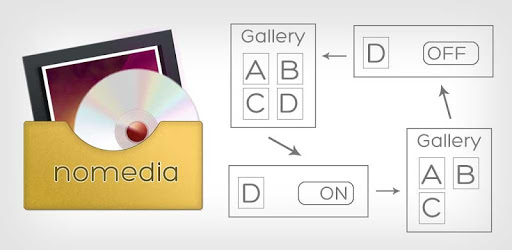
Nomedia is an Android app developed and published by g(x) labs at Google Play Store on Sep 14, 2013 for Android users. Nomedia is so popular that it has gained 5719347 installs so far and growing.
Are you tired of your gallery app being cluttered with unwanted photos and videos? Do you wish there was a simple solution to hide certain files from prying eyes? Look no further than Nomedia, the app that will save your sanity and keep your gallery organized.
With the rise of social media and messaging apps, it's become increasingly common for our devices to be flooded with media files. After reinstalling WhatsApp and restoring media, one user found themselves with a whopping 20,000 photos and videos in their gallery, creating a chaotic mess. But thanks to Nomedia, they were able to regain control.
Some users may misunderstand the purpose of this app, but let us clarify - Nomedia creates a ".nomedia" file in the media folder(s) of your choice. This simple file serves the purpose of hiding the specified media from your gallery app. It's a small feature, but without Nomedia, creating a ".nomedia" file can be a real hassle.
Before you jump to conclusions and leave a bad review, it's important to understand the true purpose of nomedia files. They are not meant for viewing files, although you can do so with this app. The main objective is to keep certain files hidden on your device, such as private videos or personal photos. Imagine you're showing some innocent photos to a friend, and suddenly a private video pops up in the slideshow. Nomedia prevents those awkward moments from happening.
One user expressed their appreciation for Nomedia, stating that it saved them hours of frustration. After updating their firmware, cached images started flooding their gallery, and they spent a total of 4 hours researching for a solution. Thanks to Nomedia, their problem was solved in no time.
If you're tired of random photos and logos cluttering your gallery, Nomedia is the perfect solution. This app allows you to easily locate and hide media files that you don't want appearing in your gallery. It's a simple process of checking each unknown media folder and hiding it with just a few taps.
What sets Nomedia apart from simply pasting a ".nomedia" file is its effectiveness. Users have reported that this app works better than other methods they've tried. So if you're looking for a reliable way to keep certain folders hidden in your gallery, Nomedia is the way to go.
Another user discovered that Nomedia was the only app that actually delivered on its promise. They had been struggling for days to move their apps and files to their SD card, and Nomedia was the only solution that worked. If you're facing a similar issue, don't hesitate to give this app a try.
Eliminating unwanted photos from your gallery has never been easier. Nomedia helps you get rid of those pesky cached photos, random file apps, and even Facebook ads that somehow find their way into your gallery. Say goodbye to the clutter and enjoy a clean and organized gallery.
OnePlus 6T owners, rejoice! If you're tired of dealing with excessive cached photos from various apps, Nomedia is here to save the day. Download this app and regain control over your gallery. You won't be disappointed.
Need to open a file, regardless of its size? Nomedia has got you covered. No matter how big or small the file is, this app will open it effortlessly. Say goodbye to the frustration of not being able to access certain files and let Nomedia handle it for you.
Simple and Excellent
Forget about spending days trying to solve issues with images not showing up on gallery apps. Nomedia simplifies the process with just one touch. It's the perfect solution for those who want a quick and efficient way to solve their gallery woes.
With Nomedia, you can trust that your files will remain hidden and your gallery will stay organized. Don't let unwanted photos and videos clutter your device any longer. Take control with Nomedia and enjoy a stress-free gallery experience.
Nomedia is designed to create a ".nomedia" file in the media folder(s) you specify, hiding the specified media from your gallery app.
While the main purpose of Nomedia is not for viewing files, you can still do so with this app.
Nomedia eliminates the need to manually create a ".nomedia" file, saving you time and effort.
Yes, Nomedia is compatible with all Android devices.
Yes, Nomedia is available for free on the Google Play Store.
Yes, you can run Nomedia on PC, but first, you will need emulator software installed on your Windows or MAC, which you can download for free. In the below video, you will find Nomedia in action. Before you install the emulator, check out the minimum and recommended system requirements to run it seamlessly. They may change depending on which version of the emulator you choose. Therefore, we recommend you download the latest version of the emulator. Below you will find three free Android emulators that we have shortlisted based on their popularity:
Up to date graphics drivers from Microsoft or the chipset vendor.
Storage: 1 GB available under installation path, 1.5GB available hard drive space
Internet: Broadband Internet connection
Regardless of which Android emulator you install, the steps to install, configure, and running the Nomedia app on PC are the same.