
Published by Modicare
Updated August 10, 2025
Samir Modi's Vision: Modicare App - A virtual office at ease for consultant.
| Version | 5.0.1 |
| Size | 23.0 MB |
| What's New | We've squashed some bugs! This update fixes various issues to make your app experience smoother and more reliable. |
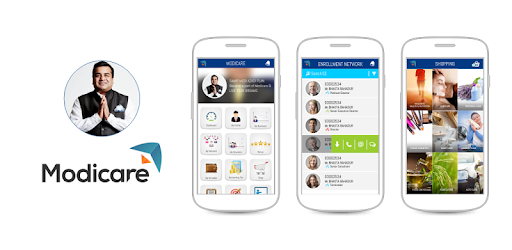
Modicare is an Android app developed and published by Modicare at Google Play Store on Dec 3, 2015 for Android users. Modicare is so popular that it has gained 7186830 installs so far and growing.
Welcome to the world of Modicare, an all-encompassing platform designed to streamline your business needs and provide ample support for all related activities. It’s much more than just a useful tool—it’s a gateway to managing and growing your Modicare business with ease.
One of the standout features of Modicare is its user-friendly interface. The app is designed to be intuitive and easy to navigate. You’ll quickly find everything you need, right at your fingertips. The straightforward design ensures that even those new to the platform can get started right away without any hassle.
Modicare offers a complete view of your team structure and helps you oversee your downline business efficiently. This feature is particularly beneficial for keen business management as it provides clarity and helps set a path for success. By tracking your team's progress, you can tailor strategies to boost their performance and earn rewards based on their efforts.
For consultants, Modicare is an invaluable resource. It serves as a comprehensive repository of information related to Modicare, making it easier to stay updated and informed. By utilizing this app, consultants can access everything they need to guide their teams and drive their business forward.
Modicare is not just about business; it’s also about improving your life and the lives of your loved ones. The app provides a foundation for offering good education to your children by creating successful business opportunities. The success you achieve here can translate into a better, more secure future for your family.
The app makes it simple to place online orders and manage your Modicare ID. You can also monitor your orders and ensure everything is on track. This seamless process ensures that you remain focused on your business without any unnecessary interruptions.
Although the app is designed for current business consultants, expanding its accessibility to teenagers aged 16 and above could provide new opportunities. By using a family member's account for practice, younger users can gain insights and be prepared to manage their accounts in the future, accumulating profits in their own account eventually.
While Modicare is a fantastic app, it’s important to address certain issues that may arise. Logging errors and app unavailability can hinder business activities. Regular updates and prompt bug fixes are crucial for maintaining a smooth operation. The developers of Modicare should ensure constant improvements to offer a seamless user experience.
Issues such as calendar appointments not being fixed at the desired times should be looked into for an enhanced experience. Suggestions for a more user-friendly approach indicate the need for continuous development and attention to user feedback.
Moreover, minor glitches like the back button resetting the item list should be addressed to eliminate user frustration. The developers’ responsiveness to these issues will greatly enhance overall satisfaction with the app.
Modicare is a well-rounded, effective platform designed to support and grow your business. Its ease of use, comprehensive management tools, and vast information repository make it an indispensable resource for consultants. By addressing user feedback and performing regular updates, the app will continue to improve and provide exceptional value to its users.
Yes, you can run Modicare on PC, but first, you will need emulator software installed on your Windows or MAC, which you can download for free. In the below video, you will find Modicare in action. Before you install the emulator, check out the minimum and recommended system requirements to run it seamlessly. They may change depending on which version of the emulator you choose. Therefore, we recommend you download the latest version of the emulator. Below you will find three free Android emulators that we have shortlisted based on their popularity:
Up to date graphics drivers from Microsoft or the chipset vendor.
Storage: 1 GB available under installation path, 1.5GB available hard drive space
Internet: Broadband Internet connection
Regardless of which Android emulator you install, the steps to install, configure, and running the Modicare app on PC are the same.