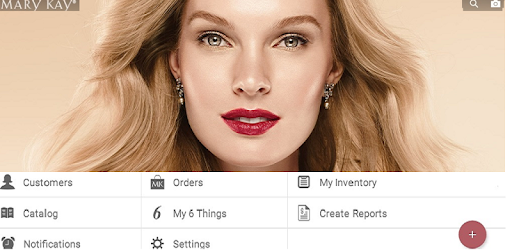
Mary Kay myCustomers+ for PC

Mary Kay myCustomers+ for PC

Published by Mary Kay, Inc.

Updated September 13, 2025

Mary Kay customers, sales tickets, product information, inventory, and more.

What's New

Version6.0.4 (6004000)
Size60.5 MB
What's NewThank you for using the myCustomers+SM App! Improved app experience and addressed issues where some users experienced.This release includes: * Removal of the inventory feature. * Various performance enhancements

Mary Kay myCustomers+ Screenshots

Mary Kay myCustomers+ PC screenshot

About Mary Kay myCustomers+ For PC

Mary Kay myCustomers+ is an Android app developed and published by Mary Kay, Inc. at Google Play Store on Jul 12, 2016 for Android users. Mary Kay myCustomers+ is so popular that it has gained 50000 installs so far and growing.

Mary Kay myCustomers+: Optimize Your Business on the Go

Mary Kay myCustomers+ is designed to be a powerful tool for Mary Kay consultants, offering immense convenience right at your fingertips 24/7. Embrace cutting-edge technology to stay ahead in managing your business efficiently. Whether you're updating customer details, adding inventory, or simply trying to keep everything in one place, Mary Kay myCustomers+ has you covered.

Empower Your Business Mobility

This app empowers you by making your Mary Kay business completely mobile. If you're always on the move, Mary Kay myCustomers+ provides the flexibility to manage your business without being tied to a desktop. Updating customer records and managing your product inventory has never been easier. This makes it an invaluable resource for consultants looking to streamline their operations.

Easy-to-Use Interface

Simplicity meets functionality with Mary Kay myCustomers+. The app's user-friendly interface makes it easy for anyone to navigate, regardless of their tech-savviness. The intuitive design ensures you can quickly access all the features you need, making your daily tasks smoother and more efficient.

Inventory Management and More

One of the standout features of Mary Kay myCustomers+ is its robust inventory management capabilities. You can keep track of your product inventory with ease, ensuring you know exactly what's in stock. The inventory scanner feature is particularly noteworthy, simplifying the process of updating your stock levels.

Comprehensive Business Tool

Mary Kay myCustomers+ isn't just about inventory. The app also offers powerful tools to help you manage orders, customer information, and even schedule follow-up appointments. While some advanced features for tracking follow-ups may still be in development, the app already provides a comprehensive suite of tools to elevate your business operations.

Connect and Grow

Mary Kay myCustomers+ also facilitates better communication within your team. It offers a feature that allows you to send your WAS (Weekly Accomplishment Sheet) to your director, ensuring everyone is on the same page and can contribute to your business growth effectively.

Cost-Effective Business Solution

Investing in Mary Kay myCustomers+ is worth every penny. While there might be a minimal monthly cost, the convenience and efficiency it brings to your business can more than make up for it. The app helps you keep everything organized and accessible, leaving you with more time to focus on growing your business and providing excellent customer service. Many consultants find the cost worthwhile, especially given the comprehensive features it offers.

What's New and Next

Excitement is building around the potential future updates to Mary Kay myCustomers+. The app is constantly evolving, with feedback options available directly within the app to suggest improvements. As it grows, so will its capabilities, promising even more tools to help you succeed in your Mary Kay business. Early adopters have found it already transformative, even in its initial release stages.

Training and Support

Mary Kay provides training to help you get the most out of this app. Whether you're a new consultant or a seasoned veteran, taking advantage of available training sessions can significantly enhance your efficiency and understanding of the app's full potential. Make sure to close out past orders and take time to set up the app properly for smooth operations.

Mary Kay myCustomers+ is an essential tool for anyone serious about taking their Mary Kay business to the next level. With its powerful features, ease of use, and ongoing improvements, it's set to become a staple for consultants everywhere.

Can I run Mary Kay myCustomers+ on PC?

Yes, you can run Mary Kay myCustomers+ on PC, but first, you will need emulator software installed on your Windows or MAC, which you can download for free. In the below video, you will find Mary Kay myCustomers+ in action. Before you install the emulator, check out the minimum and recommended system requirements to run it seamlessly. They may change depending on which version of the emulator you choose. Therefore, we recommend you download the latest version of the emulator. Below you will find three free Android emulators that we have shortlisted based on their popularity:

How to Install Mary Kay myCustomers+ on Windows PC

BlueStacks

Minimum
  • OS: Microsoft Windows 7 and above.
  • Processor: Intel or AMD Processor.
  • RAM: Your PC must have at least 4GB of RAM. (Note that having 4GB or more disk space is not a substitute for RAM)
  • Storage: 5GB Free Disk Space.
  • You must be an Administrator on your PC.
Recommended:
  • OS: Microsoft Windows 10
  • Processor: Intel or AMD Multi-Core Processor with Single Thread benchmark score > 1000.
  • Graphics: Intel/Nvidia/ATI, Onboard or Discrete controller with benchmark score >= 750.
  • Please ensure Virtualization is enabled on your PC/Laptop.
  • RAM: 8GB or higher
  • Storage: SSD (or Fusion/Hybrid Drives)
  • Internet: Broadband connection to access games, accounts and related content.

Up to date graphics drivers from Microsoft or the chipset vendor.

  • To start with, download Bluestacks from its official website. The latest version of BluesStacks is v 5, and it is around 400 MB.
  • Once the download is done, click on the Bluestacks set up file to install it on your Windows PC. Follow the on-screen instructions and install it accordingly.
  • The next step is to launch the emulator using the desktop shortcut and sign in using your Google account.
  • Now, head over to Bluestacks home screen and click on the Google Play Store icon.
  • Hit the search bar in Google Play and search for Mary Kay myCustomers+.
  • Install Mary Kay myCustomers+ from the Play Store by clicking the Install option, which completes downloading of Mary Kay myCustomers+ on PC.

NoxPlayer

Minimum
  • Operating System: Windows XP SP3, Windows Vista, Windows 7, Windows 8, Windows 10, and DirectX 9.0c
  • Processor: At least dual-core processor, both Intel, and AMD are OK
  • Video: Supports Open GL 2.0 or above
  • Memory: 1.5 GB RAM
Recommended
  • Operating System: Windows 7, Windows 8, Windows 10
  • Processor: Multiple core processors which support VT-x or AMB-V Virtualization Technology, better performance with this function enabled
  • Video: The higher performance, the better
  • Memory: 4 GB RAM

Storage: 1 GB available under installation path, 1.5GB available hard drive space

Internet: Broadband Internet connection

  • Download NoxPlayer from the official website. The latest version of NoxPlayer is v 3, and it is around 600 MB.
  • Now install the emulator using the downloaded setup file. Just go through the on-screen instructions and install NoxPlayer on your computer or laptop.
  • After the installation process, launch the Nox Android emulator and log in using your Google account when it asks you.
  • Click on the Google Play Store icon and head over to the search bar to search Mary Kay myCustomers+. Once found, click on the Install button to install Mary Kay myCustomers+ for PC.
  • If you do not find Mary Kay myCustomers+ on Google Play Store or if you want to skip logging in to Google, you can sideload APK (download the .APK file from this page and open it with NoxPlayer).
  • Launch Mary Kay myCustomers+ from home-screen and start playing it on PC right away!

MEmu

Minimum
  • 2 cores x86/x86_64 Processor (Intel or AMD CPU)
  • WinXP SP3 / Win7 / Win8 / Win10 (Not recommended to run on Server/Enterprise)
  • Latest Windows DirectX 11 / Graphics driver with OpenGL 2.0
  • Hardware Virtualization Technology (Intel VT-x/AMD-V) shall be enabled in BIOS
  • 2GB of RAM (4GB for x64 system)
  • 5GB of hard disk free space
Recommended
  • OS: Microsoft Windows 10 with VT Enabled
  • CPU: Single Thread PassMark score > 1500 (Intel/AMD Multi-Core).
  • Graphics: Intel/Nvidia/ATI, Onboard or Discrete controller with PassMark score > 750.
  • Latest Windows DirectX 11 / Graphics driver with OpenGL 4.5 or higher
  • RAM: 8GB or higher
  • HDD: SSD, 10GB of hard disk free space
  • Internet: Broadband connection with low latency for FPS games
  • Download MEmu Play from the official website. The latest version of NoxPlayer is v 7.5.
  • When the download is completed, install the MEmu emulator on your PC. Follow the on-screen instructions and keep on clicking the Next button until the final step.
  • Now, using the desktop shortcut, look for the MEmu Play emulator and launch it. Once done, it will ask you to log in using your Google account, proceed with the same.
  • MEmu Play will ask you to log in using your Google account. When you log in, it will sync your Google account to MEmu Play. Launch the Google Play Store by clicking on the icon and search for Mary Kay myCustomers+.
  • Click on the Install button once you find Mary Kay myCustomers+ from the search results. You can also sideload APK (download the .APK file from this page and open it with MEmu) if you want to skip above step.
  • After the installation of Mary Kay myCustomers+, you're all set to use the app on PC!

Regardless of which Android emulator you install, the steps to install, configure, and running the Mary Kay myCustomers+ app on PC are the same.


Download Mary Kay myCustomers+ For PC