Published by Koober
Updated October 27, 2026
READ BEST-SELLER BOOKS UP TO 9X FASTER. 1 BOOK. 1 DAY. 20 MINUTES.
| Version | 7.0.14 |
| Size | 108.8 MB |
| What's New | In this new version, our developers have fixed some bugs and carefully refined the application, to offer you an app that is even more pleasant to use. |
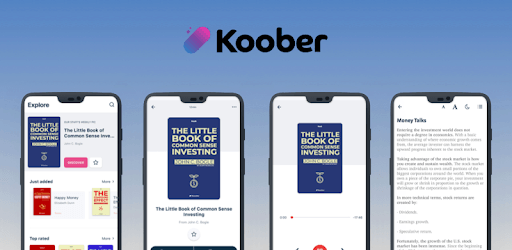
Koober is an Android app developed and published by Koober at Google Play Store on Mar 1, 2018 for Android users. Koober is so popular that it has gained 1568057 installs so far and growing.
Are you tired of spending hours reading lengthy books, only to find that they could have been summarized in just a few pages? Look no further than Koober - the app that revolutionizes the way we consume knowledge. With Koober, you can now resume two books of over 200 pages each within a maximum of 45 minutes. Let's dive into what makes this app so fantastic and how it can help you improve your life.
One of the standout features of Koober is its ability to provide comprehensive summaries of various subjects. Whether you're interested in self-help, personal growth, or expanding your general knowledge, this app has got you covered. The audio option is particularly helpful, allowing you to listen to the summaries on the go. With Koober, learning becomes convenient and accessible, fitting seamlessly into your busy schedule.
With Koober, you can unlock a world of learning and gain insights from a vast library of books. The app offers a wide range of topics, ensuring there's something for everyone. From personal development to cultural enrichment, Koober allows you to explore different subjects and expand your horizons. The best part? You can choose to read more from the original text or move on to the next subject, tailoring your learning experience to suit your interests.
While Koober offers an excellent user experience, some users have reported difficulties accessing the app's contents despite being paid members. If you're facing a similar issue, don't worry - help is just a click away. Reach out to Koober's dedicated customer support, and they will assist you in accessing the contents promptly. Your learning journey should be smooth and hassle-free, and Koober is committed to ensuring just that.
Yes, Koober allows you to download the summaries and listen to them offline, making it convenient for those times when you're on the go or have limited internet access.
Yes, Koober offers a 7-day free trial for you to experience the app and all its features before committing to a subscription. It's a great way to see if Koober is the right fit for you.
Koober is constantly expanding its library to provide users with a diverse range of books and subjects. While the app strives to keep the library updated regularly, it's always a good idea to check for new additions.
Absolutely! If a summary leaves you wanting more, Koober gives you the option to purchase the full book. This way, you can delve deeper into the subject and explore it at your own pace.
No need to worry. Koober's customer support is there to assist you. Simply reach out to them, and they will promptly resolve any accidental purchases or subscription issues.
Start your journey of learning and personal growth with Koober today. Join the countless individuals who have already experienced the app's amazing features and transformed their lives. With Koober, knowledge is at your fingertips.
Yes, you can run Koober on PC, but first, you will need emulator software installed on your Windows or MAC, which you can download for free. In the below video, you will find Koober in action. Before you install the emulator, check out the minimum and recommended system requirements to run it seamlessly. They may change depending on which version of the emulator you choose. Therefore, we recommend you download the latest version of the emulator. Below you will find three free Android emulators that we have shortlisted based on their popularity:
Up to date graphics drivers from Microsoft or the chipset vendor.
Storage: 1 GB available under installation path, 1.5GB available hard drive space
Internet: Broadband Internet connection
Regardless of which Android emulator you install, the steps to install, configure, and running the Koober app on PC are the same.