Published by keuwlsoft
Updated August 4, 2026
Audio Frequency Counter
| Version | 1.19 |
| Size | 6.4 MB |
| What's New | v1.19 Updated to use newer code methods to better target and run reliably on newer devices. |
Audio Frequency Counter is an Android app developed and published by keuwlsoft at Google Play Store on Dec 13, 2014 for Android users. Audio Frequency Counter is so popular that it has gained 500000 installs so far and growing.
Are you someone who relies on frequencies for meditation and healing? Do you often find yourself in need of a reliable app to test false frequencies? Look no further than Audio Frequency Counter! This app has been designed to meet all your frequency testing needs, providing accurate results and a user-friendly experience.
One of the standout features of Audio Frequency Counter is its accuracy. Users have praised this app for its ability to report pure tones with precision. Whether you're testing a gadget or simply exploring different frequencies, this app will detect the frequency immediately, giving you the confidence that you're getting accurate results.
Many users have also compared the readings from Audio Frequency Counter with other measuring devices, such as oscilloscopes, and have found the frequency difference to be minimal. This level of accuracy is crucial, especially when it comes to identifying issues with plugins or testing specific gadgets.
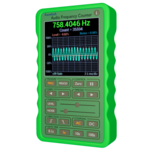
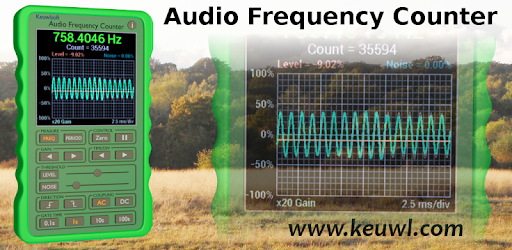
Audio Frequency Counter boasts a simple and easy-to-understand interface. The screen is designed to be visually appealing, displaying the Hz number and a graph for those who prefer a visual representation. However, if you're only interested in the Hz number, you can easily focus on that without any distractions.
While some users have mentioned that it takes a few button presses to fully grasp the app's functionality, they have also appreciated the range of features it offers. And the best part? It's completely free! You can enjoy all the benefits of Audio Frequency Counter without spending a dime.
While Audio Frequency Counter has received high praise from users, there are a few suggestions for improvement. Some users have expressed a desire for additional information, such as average readings, and the option to download recorded results. These additions would enhance the app's functionality and make it even more valuable for users.
Furthermore, there have been requests for the ability to choose a specific sound pitch or tone for counting. This customization option would cater to individual preferences and expand the app's versatility.
Yes, Audio Frequency Counter has been praised by users for its accuracy in reporting pure tones and detecting frequencies with precision.
Absolutely! Many users have compared the app's readings with other measuring devices, such as oscilloscopes, and have found the frequency difference to be minimal.
Yes, Audio Frequency Counter features a user-friendly interface that is easy to navigate. While it may take a few button presses to fully understand the app's functionality, users have found it intuitive and straightforward.
Currently, Audio Frequency Counter does not offer the option to choose a specific sound pitch or tone. However, this feature has been suggested by users and may be considered for future updates.
Yes, Audio Frequency Counter is completely free to download and use, making it accessible to all users.
Overall, Audio Frequency Counter is a reliable and accurate app for frequency testing. Its user-friendly interface and precise results make it a valuable tool for anyone in need of frequency detection. Download Audio Frequency Counter today and experience its benefits firsthand!
Yes, you can run Audio Frequency Counter on PC, but first, you will need emulator software installed on your Windows or MAC, which you can download for free. In the below video, you will find Audio Frequency Counter in action. Before you install the emulator, check out the minimum and recommended system requirements to run it seamlessly. They may change depending on which version of the emulator you choose. Therefore, we recommend you download the latest version of the emulator. Below you will find three free Android emulators that we have shortlisted based on their popularity:
Up to date graphics drivers from Microsoft or the chipset vendor.
Storage: 1 GB available under installation path, 1.5GB available hard drive space
Internet: Broadband Internet connection
Regardless of which Android emulator you install, the steps to install, configure, and running the Audio Frequency Counter app on PC are the same.