Published by Happy Little Apps
Updated August 13, 2025
Play lush pads under your mix, in any key, forever.
| Version | 3.2.0 |
| Size | 12.4 MB |
| What's New | - Target newer Android version- No more pumpkin :(- Update copyright string |
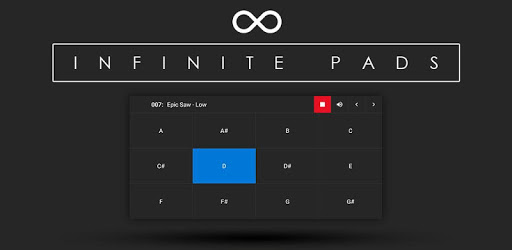
Infinite Pads is an Android app developed and published by Happy Little Apps at Google Play Store on Oct 15, 2018 for Android users. Infinite Pads is so popular that it has gained 50000 installs so far and growing.
Infinite Pads stands out as a top choice for anyone looking to add smooth ambient pads to their music. With a user-friendly interface and high-quality sound design, this app is perfect for both amateurs and professionals looking to enhance their music.
One of the most endearing features of Infinite Pads is its ease of use. Whether it's your first time using a pad app or you’re a seasoned musician, you’ll find navigating through the app straightforward. The interface is clean and simple, making it easy for anyone to get started quickly.
The sound designs in Infinite Pads are second to none. From strings to atmospheric sounds, there is a wide variety of pads that offer rich, high-quality sound. These pads are perfect for creating ambient backgrounds and smooth transitions, especially useful in live music settings and church bands.
Infinite Pads excels at providing smooth transitions. The fade-ins and outs, along with the cross-fades, work seamlessly to ensure your music flows without interruption. This feature is especially valuable for those who need consistent and clean transitions between different pads.
While many free apps bombard users with ads, Infinite Pads offers a refreshing experience with no ads in the free version. This allows you to focus solely on creating your music without any distractions. It's perfect for uninterrupted practice sessions and live performances.
Infinite Pads offers several customization options to tailor the sound to your needs. Users have expressed a desire for features like fade-in/out adjustments and EQ settings, and these could provide even more control over the sound. Additionally, the ability to view all sounds in a single list might make the app even more user-friendly.
While the free version of Infinite Pads is packed with features, upgrading to the paid version unlocks even more potential. For a small fee, users can gain access to additional pads and customization options, making it a worthwhile investment for anyone serious about their music.
Infinite Pads runs smoothly on a range of devices, from basic smartphones to tablets. This flexibility allows you to turn almost any device into a portable synthesizer, making it convenient for on-the-go music making. The app’s performance is solid across different platforms, ensuring you get the same quality experience whether you’re using a Samsung tablet or a basic Nokia smartphone.
Whether you’re looking to enhance a small church band, add depth to solo performances, or need a reliable app for recordings, Infinite Pads has you covered. The app’s versatile nature makes it suitable for a variety of musical settings. It's an excellent companion for worship musicians looking to add an extra layer of sound to their performances.
While Infinite Pads already offers a lot, there are suggestions for further improvements that could make the app even better. For instance, keeping sounds playing even when switching to another app or ensuring pads continue without having the screen on could enhance its usability. Despite these areas for improvement, Infinite Pads remains a remarkable tool for any musician.
Overall, Infinite Pads is a gem for anyone needing smooth, ambient pads. Its intuitive interface, high-quality sounds, and smooth transitions make it a top choice. Combined with its ad-free experience and flexibility across devices, it’s no wonder that many would highly recommend it for both practice and live performances.
Yes, you can run Infinite Pads on PC, but first, you will need emulator software installed on your Windows or MAC, which you can download for free. In the below video, you will find Infinite Pads in action. Before you install the emulator, check out the minimum and recommended system requirements to run it seamlessly. They may change depending on which version of the emulator you choose. Therefore, we recommend you download the latest version of the emulator. Below you will find three free Android emulators that we have shortlisted based on their popularity:
Up to date graphics drivers from Microsoft or the chipset vendor.
Storage: 1 GB available under installation path, 1.5GB available hard drive space
Internet: Broadband Internet connection
Regardless of which Android emulator you install, the steps to install, configure, and running the Infinite Pads app on PC are the same.