Ham Test Prep (New) for PC

Ham Test Prep (New) for PC

Published by iversoft.com

Updated April 11, 2026

US Amateur Radio Exam preparation app.

What's New

Version1.4.12
Size888.1 KB
What's NewFixed General Class Question pool

Ham Test Prep (New) Screenshots

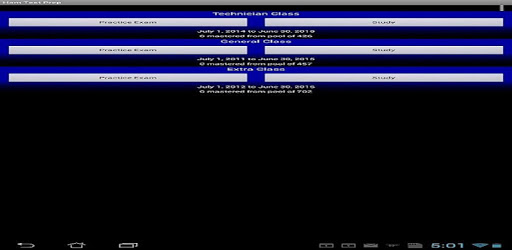
Ham Test Prep (New) PC screenshot

About Ham Test Prep (New) For PC

Ham Test Prep (New) is an Android app developed and published by iversoft.com at Google Play Store on Jun 24, 2018 for Android users. Ham Test Prep (New) is so popular that it has gained 5000 installs so far and growing.

Prepare for Your Ham Exam with Ham Test Prep (New)

Are you looking to obtain your Ham radio license? Look no further than Ham Test Prep (New), the ultimate app for studying and acing your Ham exams. With its user-friendly interface and comprehensive question pool, this app is a must-have for anyone preparing for the Ham Technician, General, or Extra exams.

Study Smarter, Not Harder

Ham Test Prep (New) is designed to help you identify areas where you need to focus your studies. Many users have found this app to be incredibly helpful in pinpointing their weak spots and improving their overall knowledge. Whether you're studying for the Tech or General exam, this app will guide you towards success.

One user shared, "Great for seeing what you need to study more. I used it to study for Tech and General, and aced both. Then again I sat Extra since I'd paid my $15 and was there anyway. Missed passing by 3 questions, but since I hadn't even looked at the questions....."

Stay Up-to-Date

While Ham Test Prep (New) has received rave reviews for its effectiveness, some users have pointed out that two out of three question pools are now outdated. We understand the importance of staying current, and we are committed to providing regular updates to ensure that all question pools are up-to-date.

One user expressed their desire for an upgrade, stating, "Would like to get the extra class test prep upgraded to the current question pool thank you."

A Comprehensive Test Prep Solution

Ham Test Prep (New) is widely regarded as the best online application for Ham test prep. It offers a Q&A review format, along with customizable settings for practice tests and correct answer-only reviews. With this app, you can simulate real exam conditions and gain the confidence you need to pass with flying colors.

Another satisfied user shared, "This app is a Q and multi A review w/ settings for practice test and correct answer only review as well."

A Few Hiccups

While Ham Test Prep (New) has received overwhelmingly positive feedback, a few users have encountered minor issues. One user reported a bug that causes the app to crash when attempting to solve certain problems beyond a specific point. However, they still praised the program, stating, "The program is great for study. The only issue is that there seems to be a bug with trying to do any problem past G0B11. It crashes. Still a great program."

Continual Improvement

We value user feedback and are constantly working to enhance the app's functionality. We appreciate your patience as we strive to address any reported issues and provide the best user experience possible.

Join the Ham Test Prep (New) Community

Ham Test Prep (New) has garnered a loyal following of Ham radio enthusiasts who have successfully obtained their licenses with the help of this app. Join our community and embark on your journey towards becoming a licensed Ham radio operator.

FAQs

1. Is Ham Test Prep (New) free?

Yes, Ham Test Prep (New) is completely free to download and use. We believe that access to quality test preparation should be available to everyone.

2. Are there any ads in the app?

No, we understand that ads can be distracting and disruptive to the learning process. That's why we have made Ham Test Prep (New) completely ad-free.

3. How often are the question pools updated?

We strive to update the question pools regularly to ensure that they are current and aligned with the latest exam requirements. We appreciate your patience as we work to provide the most up-to-date content.

4. Can I customize my practice tests?

Absolutely! Ham Test Prep (New) allows you to customize your practice tests according to your preferences. You can choose to review correct answers only or simulate a full-length exam.

5. Is technical support available?

Yes, if you encounter any technical issues or have any questions, our support team is here to assist you. Simply reach out to us through the app, and we'll be happy to help.

Prepare for your Ham exam with confidence using Ham Test Prep (New). Download the app today and unlock your potential as a licensed Ham radio operator!

Can I run Ham Test Prep (New) on PC?

Yes, you can run Ham Test Prep (New) on PC, but first, you will need emulator software installed on your Windows or MAC, which you can download for free. In the below video, you will find Ham Test Prep (New) in action. Before you install the emulator, check out the minimum and recommended system requirements to run it seamlessly. They may change depending on which version of the emulator you choose. Therefore, we recommend you download the latest version of the emulator. Below you will find three free Android emulators that we have shortlisted based on their popularity:

How to Install Ham Test Prep (New) on Windows PC

BlueStacks

Minimum
  • OS: Microsoft Windows 7 and above.
  • Processor: Intel or AMD Processor.
  • RAM: Your PC must have at least 4GB of RAM. (Note that having 4GB or more disk space is not a substitute for RAM)
  • Storage: 5GB Free Disk Space.
  • You must be an Administrator on your PC.
Recommended:
  • OS: Microsoft Windows 10
  • Processor: Intel or AMD Multi-Core Processor with Single Thread benchmark score > 1000.
  • Graphics: Intel/Nvidia/ATI, Onboard or Discrete controller with benchmark score >= 750.
  • Please ensure Virtualization is enabled on your PC/Laptop.
  • RAM: 8GB or higher
  • Storage: SSD (or Fusion/Hybrid Drives)
  • Internet: Broadband connection to access games, accounts and related content.

Up to date graphics drivers from Microsoft or the chipset vendor.

  • To start with, download Bluestacks from its official website. The latest version of BluesStacks is v 5, and it is around 400 MB.
  • Once the download is done, click on the Bluestacks set up file to install it on your Windows PC. Follow the on-screen instructions and install it accordingly.
  • The next step is to launch the emulator using the desktop shortcut and sign in using your Google account.
  • Now, head over to Bluestacks home screen and click on the Google Play Store icon.
  • Hit the search bar in Google Play and search for Ham Test Prep (New).
  • Install Ham Test Prep (New) from the Play Store by clicking the Install option, which completes downloading of Ham Test Prep (New) on PC.

NoxPlayer

Minimum
  • Operating System: Windows XP SP3, Windows Vista, Windows 7, Windows 8, Windows 10, and DirectX 9.0c
  • Processor: At least dual-core processor, both Intel, and AMD are OK
  • Video: Supports Open GL 2.0 or above
  • Memory: 1.5 GB RAM
Recommended
  • Operating System: Windows 7, Windows 8, Windows 10
  • Processor: Multiple core processors which support VT-x or AMB-V Virtualization Technology, better performance with this function enabled
  • Video: The higher performance, the better
  • Memory: 4 GB RAM

Storage: 1 GB available under installation path, 1.5GB available hard drive space

Internet: Broadband Internet connection

  • Download NoxPlayer from the official website. The latest version of NoxPlayer is v 3, and it is around 600 MB.
  • Now install the emulator using the downloaded setup file. Just go through the on-screen instructions and install NoxPlayer on your computer or laptop.
  • After the installation process, launch the Nox Android emulator and log in using your Google account when it asks you.
  • Click on the Google Play Store icon and head over to the search bar to search Ham Test Prep (New). Once found, click on the Install button to install Ham Test Prep (New) for PC.
  • If you do not find Ham Test Prep (New) on Google Play Store or if you want to skip logging in to Google, you can sideload APK (download the .APK file from this page and open it with NoxPlayer).
  • Launch Ham Test Prep (New) from home-screen and start playing it on PC right away!

MEmu

Minimum
  • 2 cores x86/x86_64 Processor (Intel or AMD CPU)
  • WinXP SP3 / Win7 / Win8 / Win10 (Not recommended to run on Server/Enterprise)
  • Latest Windows DirectX 11 / Graphics driver with OpenGL 2.0
  • Hardware Virtualization Technology (Intel VT-x/AMD-V) shall be enabled in BIOS
  • 2GB of RAM (4GB for x64 system)
  • 5GB of hard disk free space
Recommended
  • OS: Microsoft Windows 10 with VT Enabled
  • CPU: Single Thread PassMark score > 1500 (Intel/AMD Multi-Core).
  • Graphics: Intel/Nvidia/ATI, Onboard or Discrete controller with PassMark score > 750.
  • Latest Windows DirectX 11 / Graphics driver with OpenGL 4.5 or higher
  • RAM: 8GB or higher
  • HDD: SSD, 10GB of hard disk free space
  • Internet: Broadband connection with low latency for FPS games
  • Download MEmu Play from the official website. The latest version of NoxPlayer is v 7.5.
  • When the download is completed, install the MEmu emulator on your PC. Follow the on-screen instructions and keep on clicking the Next button until the final step.
  • Now, using the desktop shortcut, look for the MEmu Play emulator and launch it. Once done, it will ask you to log in using your Google account, proceed with the same.
  • MEmu Play will ask you to log in using your Google account. When you log in, it will sync your Google account to MEmu Play. Launch the Google Play Store by clicking on the icon and search for Ham Test Prep (New).
  • Click on the Install button once you find Ham Test Prep (New) from the search results. You can also sideload APK (download the .APK file from this page and open it with MEmu) if you want to skip above step.
  • After the installation of Ham Test Prep (New), you're all set to use the app on PC!

Regardless of which Android emulator you install, the steps to install, configure, and running the Ham Test Prep (New) app on PC are the same.

Download Ham Test Prep (New) For PC