Published by QualifyGate
Updated April 27, 2026
Now do your GATE Preparation with Gate Virtual Calculator [OFFLINE].
| Version | 29 |
| Size | 15.0 MB |
| What's New | Updated DA syllabus |
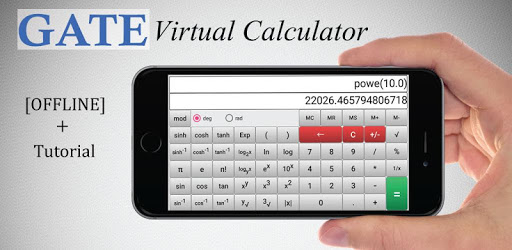
Gate Virtual Calculator is an Android app developed and published by QualifyGate at Google Play Store on Jan 3, 2016 for Android users. Gate Virtual Calculator is so popular that it has gained 990291 installs so far and growing.
Are you preparing for the GATE examination and looking for a reliable virtual calculator? Look no further! Gate Virtual Calculator is the ultimate app that provides everything you need to ace your exam. From a smooth user experience to comprehensive study materials, this app has it all.
One of the standout features of Gate Virtual Calculator is its seamless user experience. Unlike other apps, it doesn't bombard you with annoying ads or unnecessary steps. With just a single click, you are taken directly to the calculator. No crashes or faults will interrupt your study sessions.
The app is designed to be user-friendly, allowing you to navigate effortlessly through its various features. Whether you are a beginner or an experienced user, you'll find it easy to operate and make the most of its functionalities.
Gate Virtual Calculator goes beyond being a simple calculator. It offers a wide range of resources that are essential for GATE exam preparation. The app provides access to the syllabus, old papers with answer keys, and even job notifications related to GATE. It's a one-stop solution for all your exam needs.
Additionally, Gate Virtual Calculator offers a unique feature that allows you to use it as a floating window on your screen. This means you can multitask while watching lectures or using other apps without having to switch back and forth. It's like having a floating messenger on your screen, ensuring convenience and efficiency.
The developers of Gate Virtual Calculator are committed to providing the best possible experience for users. They regularly update the app to add new features and address any issues. In fact, the latest version of the app has received rave reviews for its cool design and well-organized information.
One user even mentioned that the app helped them practice calculations faster, improving their overall speed. Another user appreciated the inclusion of previous year question papers and useful links, making it a valuable resource for exam preparation.
Yes, the app provides the syllabus for GATE 2021, ensuring you have the most up-to-date information for your exam preparation.
The developers are constantly working to improve the app's compatibility. If you experience any issues, make sure you have the latest version installed and reach out to the support team for assistance.
Yes, Gate Virtual Calculator can be used offline, allowing you to study and practice even without an internet connection.
The developers are always looking for ways to enhance the app. They have taken note of user suggestions, and the addition of a stopwatch feature is one of the updates planned for the near future.
In conclusion, Gate Virtual Calculator is the ultimate app for GATE exam preparation. With its smooth user experience, comprehensive study materials, and regular updates, it is a must-have tool for all serious aspirants. Download the app today and take your exam preparation to the next level!
Yes, you can run Gate Virtual Calculator on PC, but first, you will need emulator software installed on your Windows or MAC, which you can download for free. In the below video, you will find Gate Virtual Calculator in action. Before you install the emulator, check out the minimum and recommended system requirements to run it seamlessly. They may change depending on which version of the emulator you choose. Therefore, we recommend you download the latest version of the emulator. Below you will find three free Android emulators that we have shortlisted based on their popularity:
Up to date graphics drivers from Microsoft or the chipset vendor.
Storage: 1 GB available under installation path, 1.5GB available hard drive space
Internet: Broadband Internet connection
Regardless of which Android emulator you install, the steps to install, configure, and running the Gate Virtual Calculator app on PC are the same.