Published by Betacom (UK) S.A.
Updated March 20, 2026
Defeat the chickens' latest evil plan to save the day (quite literally)!
| Version | 1.30ggl |
| Size | 28.3 MB |
| What's New | Requires at least Android 5.0+.Compatible with Android 10.Uses new Google Play Billing Library for purchases.Crashes on certain Android devices fixed.Ad banner is now displayed over a solid dark blue background.Fixed rare cases of automatic refunds. |
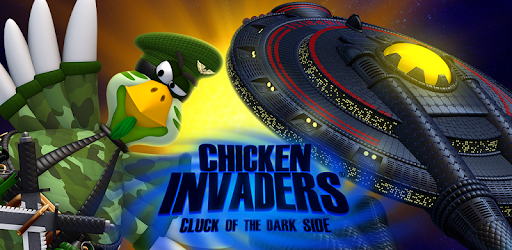
Chicken Invaders 5 is an Android app developed and published by Betacom (UK) S.A. at Google Play Store on Dec 9, 2014 for Android users. Chicken Invaders 5 is so popular that it has gained 1000000 installs so far and growing.
Chicken Invaders 5 is a beloved game that has captured the hearts of players of all ages. From its nostalgic appeal to its addictive gameplay, this game has been a favorite since its release. Whether you played it on your computer or are now enjoying it on your mobile device, Chicken Invaders 5 is sure to provide hours of entertainment.
For those who have been playing Chicken Invaders since childhood, this game holds a special place in their hearts. It brings back memories of simpler times, when gaming was all about having fun. The excitement of battling against waves of mischievous chickens and saving the world from their clutches is truly unmatched.
With its availability on mobile devices, Chicken Invaders 5 allows you to relive those nostalgic moments anytime, anywhere. Whether you're on a long commute or simply want to take a trip down memory lane, this game is the perfect companion.
One question that often arises among fans is whether Chicken Invaders 5 has a multiplayer mode for mobile phones. While the game doesn't currently offer a multiplayer feature, it doesn't take away from the enjoyment it provides. The single-player mode is still incredibly engaging and offers a challenging experience that will keep you hooked.
With its fast-paced gameplay and various difficulty levels, Chicken Invaders 5 ensures that each playthrough is unique and exciting. So gather your friends and challenge each other to beat high scores or simply enjoy the game individually, either way, you're in for a thrilling adventure.
One aspect that sets Chicken Invaders 5 apart is its captivating music. The game's soundtrack perfectly complements the gameplay, immersing you in the world of chicken invasions. From catchy tunes to intense beats, the music enhances the overall experience and keeps you engaged throughout.
Additionally, Chicken Invaders 5 offers a seamless transition from PC to mobile devices. Players who have been enjoying the early access of Chicken Invaders 6 on their PCs can now experience the same level of excitement on their mobiles. The game's developers have ensured that the mobile version lives up to the expectations of its loyal fanbase.
While Chicken Invaders 5 is an incredible game, there are a few minor drawbacks that some players have noticed. Some find the henterprise boss too easy to defeat, craving a more challenging encounter. However, this doesn't diminish the overall enjoyment of the game, as the rest of the levels and bosses provide plenty of excitement.
Another concern raised by players is the occasional laggy controls on mobile phones. While this can be frustrating, it doesn't take away from the addictive gameplay and the joy of saving the world from the chicken menace.
Currently, Chicken Invaders 5 does not offer a multiplayer mode for mobile phones. However, the single-player mode provides an engaging and challenging experience.
Chicken Invaders 5 is available for PC, allowing you to enjoy the game on a larger screen and with enhanced controls.
Yes, Chicken Invaders 5 is available for download on various platforms, including mobile app stores and PC gaming platforms.
Chicken Invaders 5 may contain ads, but you can enjoy the game without making any in-app purchases. However, if you wish to support the developers and remove ads, you may have the option to do so.
Overall, Chicken Invaders 5 is a classic game that continues to captivate players with its addictive gameplay, nostalgic charm, and immersive music. Whether you're a long-time fan or new to the series, this game is sure to provide endless hours of fun and excitement. So, grab your mobile device or fire up your PC and get ready to save the world from the clutches of the mischievous chickens!
Yes, you can run Chicken Invaders 5 on PC, but first, you will need emulator software installed on your Windows or MAC, which you can download for free. In the below video, you will find Chicken Invaders 5 in action. Before you install the emulator, check out the minimum and recommended system requirements to run it seamlessly. They may change depending on which version of the emulator you choose. Therefore, we recommend you download the latest version of the emulator. Below you will find three free Android emulators that we have shortlisted based on their popularity:
Up to date graphics drivers from Microsoft or the chipset vendor.
Storage: 1 GB available under installation path, 1.5GB available hard drive space
Internet: Broadband Internet connection
Regardless of which Android emulator you install, the steps to install, configure, and running the Chicken Invaders 5 app on PC are the same.