AmpliTube UA for PC

AmpliTube UA for PC

Published by IK Multimedia US, LLC

Updated October 6, 2025

Your guitar tone on your Android phone

What's New

Version1.0.11
Size32.8 MB
What's New- General reliability improvements

AmpliTube UA Screenshots

AmpliTube UA PC screenshot

About AmpliTube UA For PC

AmpliTube UA is an Android app developed and published by IK Multimedia US, LLC at Google Play Store on Apr 15, 2015 for Android users. AmpliTube UA is so popular that it has gained 500000 installs so far and growing.

Discover The Versatility of AmpliTube UA for Guitar Enthusiasts

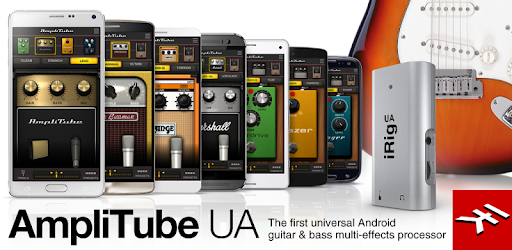
AmpliTube UA offers an exceptional experience for guitar lovers wanting to transform their Android device into a powerful amp modeler. This app stands out by letting you play your guitar while enjoying incredibly low latency, making it a practical choice for musicians on the go.

Enjoy Stunning Sound Quality on Your Android Device

If you've dreamed of playing your favorite amp models without carrying heavy equipment, AmpliTube UA makes it a reality. Users rave about the high-quality sounds they get on devices like the Galaxy S4 and Tab S 8.4 tablet. This app allows your device to deliver professional-grade tones that can satisfy even the pickiest of musicians.

Expand Your Sonic Possibilities

AmpliTube UA is not just a basic guitar amp modeler. After trying the basic rig, many find themselves purchasing additional effects and amps. These extra features expand the range of tones and sounds you can achieve, taking your music to the next level. Whether it's the Soldano amp or other virtual instruments, the app offers a myriad of possibilities for creative expression.

Seamless Integration and User-Friendly Interface

One of the best aspects of AmpliTube UA is its user-friendly interface. While virtual knobs might take some getting used to, the overall experience is smooth and enjoyable. Once set up, the app runs seamlessly in the background, allowing you to use other apps like YouTube for backing tracks. This integration makes it easy to practice or perform without interruptions.

Convenient for Musicians on the Go

For those who travel frequently, AmpliTube UA is a lifesaver. It eliminates the need to pack a lot of gear, allowing you to play in hotel rooms or on the road with minimum fuss. Simply plug your guitar into the iRig UA interface, and you’re good to go.

Perfect for Live Performances

AmpliTube UA isn't just for practice. Users praise the app's capabilities in live performance settings. The accurate tuner, customizable presets, and zero-lag features make it a reliable choice for gigs. Output to headphones is loud and clear, ensuring you hear every note precisely.

Compatibility and Future Features

The excitement around AmpliTube UA extends to its future potential. While current users appreciate the existing features, many look forward to new updates and added functionalities. The app is a USB device, sparking curiosity about whether it can be used with PCs or integrated with other interfaces.

Simplifying Your Setup

If you're tired of dealing with multiple pedals and amps, AmpliTube UA offers a streamlined solution. By using this app with the iRig interface, you can connect directly through a direct box to your sound system. This simplified setup is a game-changer for musicians who value efficiency without sacrificing sound quality.

In conclusion, AmpliTube UA is a fantastic tool for any guitar player looking to explore new sonic horizons, whether at home, on the road, or on stage. Its ease of use, rich features, and top-notch sound quality make it an invaluable addition to any musician's toolkit.

Can I run AmpliTube UA on PC?

Yes, you can run AmpliTube UA on PC, but first, you will need emulator software installed on your Windows or MAC, which you can download for free. In the below video, you will find AmpliTube UA in action. Before you install the emulator, check out the minimum and recommended system requirements to run it seamlessly. They may change depending on which version of the emulator you choose. Therefore, we recommend you download the latest version of the emulator. Below you will find three free Android emulators that we have shortlisted based on their popularity:

How to Install AmpliTube UA on Windows PC

BlueStacks

Minimum
  • OS: Microsoft Windows 7 and above.
  • Processor: Intel or AMD Processor.
  • RAM: Your PC must have at least 4GB of RAM. (Note that having 4GB or more disk space is not a substitute for RAM)
  • Storage: 5GB Free Disk Space.
  • You must be an Administrator on your PC.
Recommended:
  • OS: Microsoft Windows 10
  • Processor: Intel or AMD Multi-Core Processor with Single Thread benchmark score > 1000.
  • Graphics: Intel/Nvidia/ATI, Onboard or Discrete controller with benchmark score >= 750.
  • Please ensure Virtualization is enabled on your PC/Laptop.
  • RAM: 8GB or higher
  • Storage: SSD (or Fusion/Hybrid Drives)
  • Internet: Broadband connection to access games, accounts and related content.

Up to date graphics drivers from Microsoft or the chipset vendor.

  • To start with, download Bluestacks from its official website. The latest version of BluesStacks is v 5, and it is around 400 MB.
  • Once the download is done, click on the Bluestacks set up file to install it on your Windows PC. Follow the on-screen instructions and install it accordingly.
  • The next step is to launch the emulator using the desktop shortcut and sign in using your Google account.
  • Now, head over to Bluestacks home screen and click on the Google Play Store icon.
  • Hit the search bar in Google Play and search for AmpliTube UA.
  • Install AmpliTube UA from the Play Store by clicking the Install option, which completes downloading of AmpliTube UA on PC.

NoxPlayer

Minimum
  • Operating System: Windows XP SP3, Windows Vista, Windows 7, Windows 8, Windows 10, and DirectX 9.0c
  • Processor: At least dual-core processor, both Intel, and AMD are OK
  • Video: Supports Open GL 2.0 or above
  • Memory: 1.5 GB RAM
Recommended
  • Operating System: Windows 7, Windows 8, Windows 10
  • Processor: Multiple core processors which support VT-x or AMB-V Virtualization Technology, better performance with this function enabled
  • Video: The higher performance, the better
  • Memory: 4 GB RAM

Storage: 1 GB available under installation path, 1.5GB available hard drive space

Internet: Broadband Internet connection

  • Download NoxPlayer from the official website. The latest version of NoxPlayer is v 3, and it is around 600 MB.
  • Now install the emulator using the downloaded setup file. Just go through the on-screen instructions and install NoxPlayer on your computer or laptop.
  • After the installation process, launch the Nox Android emulator and log in using your Google account when it asks you.
  • Click on the Google Play Store icon and head over to the search bar to search AmpliTube UA. Once found, click on the Install button to install AmpliTube UA for PC.
  • If you do not find AmpliTube UA on Google Play Store or if you want to skip logging in to Google, you can sideload APK (download the .APK file from this page and open it with NoxPlayer).
  • Launch AmpliTube UA from home-screen and start playing it on PC right away!

MEmu

Minimum
  • 2 cores x86/x86_64 Processor (Intel or AMD CPU)
  • WinXP SP3 / Win7 / Win8 / Win10 (Not recommended to run on Server/Enterprise)
  • Latest Windows DirectX 11 / Graphics driver with OpenGL 2.0
  • Hardware Virtualization Technology (Intel VT-x/AMD-V) shall be enabled in BIOS
  • 2GB of RAM (4GB for x64 system)
  • 5GB of hard disk free space
Recommended
  • OS: Microsoft Windows 10 with VT Enabled
  • CPU: Single Thread PassMark score > 1500 (Intel/AMD Multi-Core).
  • Graphics: Intel/Nvidia/ATI, Onboard or Discrete controller with PassMark score > 750.
  • Latest Windows DirectX 11 / Graphics driver with OpenGL 4.5 or higher
  • RAM: 8GB or higher
  • HDD: SSD, 10GB of hard disk free space
  • Internet: Broadband connection with low latency for FPS games
  • Download MEmu Play from the official website. The latest version of NoxPlayer is v 7.5.
  • When the download is completed, install the MEmu emulator on your PC. Follow the on-screen instructions and keep on clicking the Next button until the final step.
  • Now, using the desktop shortcut, look for the MEmu Play emulator and launch it. Once done, it will ask you to log in using your Google account, proceed with the same.
  • MEmu Play will ask you to log in using your Google account. When you log in, it will sync your Google account to MEmu Play. Launch the Google Play Store by clicking on the icon and search for AmpliTube UA.
  • Click on the Install button once you find AmpliTube UA from the search results. You can also sideload APK (download the .APK file from this page and open it with MEmu) if you want to skip above step.
  • After the installation of AmpliTube UA, you're all set to use the app on PC!

Regardless of which Android emulator you install, the steps to install, configure, and running the AmpliTube UA app on PC are the same.


Download AmpliTube UA For PC