Street Chaser for PC

Street Chaser for PC

Published by iGold Technologies

Updated August 23, 2025

RUN, CHASE and CATCH!

What's New

Version6.4.0
Size146.4 MB
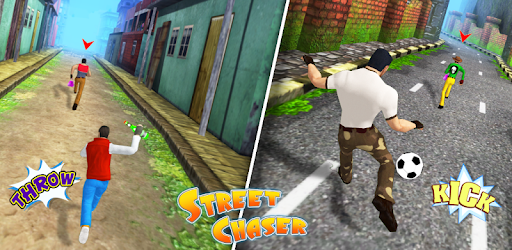
What's New• Interesting bonus games to earn free coins after every five missions.• New and improved obstacle patterns and robber behaviour.• Enhanced climate effects like rain, wind and sunset added.• Avoid hitting the new game characters while they cross your path.• Swipe and throw bottles on target to earn those coins.• Swipe and kick balls on target bins to earn coin rewards.• Daily free bonus game turns added for reward games.• Several bug fixes and improvements are done.

Street Chaser Screenshots

Street Chaser PC screenshot

About Street Chaser For PC

Street Chaser is an Android app developed and published by iGold Technologies at Google Play Store on Oct 10, 2017 for Android users. Street Chaser is so popular that it has gained 10000000 installs so far and growing.

Exciting Adventure with Street Chaser

Street Chaser is an engaging game that offers a lively and thrilling experience. The primary goal is to chase down thieves and recover stolen items. It's full of action, making it an exceptional choice for those who enjoy dynamic and fast-paced games.

Vivid Characters and Accessories

Characters in Street Chaser are vibrant and packed with personality. Players can customize their avatars using various accessories like hats, glasses, and outfits, which adds a layer of fun and engagement. These options allow players to express themselves and create a unique gaming experience.

Challenging Gameplay

The game is known for its challenging nature. Catching thieves is no easy task and requires quick reflexes and strategic thinking. This level of difficulty keeps players coming back, eager to improve their skills and achieve higher levels of success.

Diverse Levels and Missions

Street Chaser features numerous levels, each more exciting than the last. Players can explore different environments and tackle new obstacles as they progress through the game. These varied levels ensure that the experience remains fresh and engaging.

A Great Way to Keep the Mind Active

Aside from being incredibly fun, Street Chaser is also a great way to stay mentally sharp. The focus needed to catch the thieves keeps players on their toes and actively engaged. It's a perfect blend of entertainment and mental exercise.

Excellent for Aspiring Police Officers

The game has been praised for inspiring those interested in law enforcement. Players get a taste of what it's like to chase down criminals, making it an educational tool as well as an enjoyable pastime.

Family-Friendly Fun

Street Chaser isn't just for kids; it's a game that people of all ages can enjoy. The vibrant graphics and exciting gameplay make it a hit with both young players and adults. It's a wonderful game for families to enjoy together.

Highly Rated by Players

This game has received high marks from players, with many praising its fun and challenging nature. The positive feedback is a testament to the quality of Street Chaser and its ability to keep players engaged and entertained.

Minor Drawbacks

While Street Chaser is highly enjoyable, some players have pointed out a few minor issues. For instance, some find it difficult to catch all the thieves, and others are not fond of the in-game bombs. Despite these minor drawbacks, the overall consensus is that the game is incredibly fun and worth playing.

Ease of Access

Downloading and playing Street Chaser is straightforward. It's available on various platforms, making it easy to access for a wide range of players. Whether you are a seasoned gamer or new to the world of mobile games, getting started with Street Chaser is a breeze.

Replay Value

Street Chaser boasts a high replay value. With its numerous levels and challenging gameplay, players find themselves coming back for more. The desire to improve and the thrill of the chase ensure that the game doesn't quickly lose its charm.

A Perfect Game for Stress Relief

Many players find Street Chaser to be an excellent way to relieve stress. The fast-paced action and focus required help take the mind off daily worries, providing a refreshing and enjoyable escape.

A Must-Download Game

If you're looking for a fun, challenging, and engaging game, Street Chaser is a stellar choice. Its vibrant characters, diverse levels, and exciting gameplay make it an app worth downloading and playing. Dive into the world of Street Chaser and experience the thrill of the chase!

Can I run Street Chaser on PC?

Yes, you can run Street Chaser on PC, but first, you will need emulator software installed on your Windows or MAC, which you can download for free. In the below video, you will find Street Chaser in action. Before you install the emulator, check out the minimum and recommended system requirements to run it seamlessly. They may change depending on which version of the emulator you choose. Therefore, we recommend you download the latest version of the emulator. Below you will find three free Android emulators that we have shortlisted based on their popularity:

How to Install Street Chaser on Windows PC

BlueStacks

Minimum
  • OS: Microsoft Windows 7 and above.
  • Processor: Intel or AMD Processor.
  • RAM: Your PC must have at least 4GB of RAM. (Note that having 4GB or more disk space is not a substitute for RAM)
  • Storage: 5GB Free Disk Space.
  • You must be an Administrator on your PC.
Recommended:
  • OS: Microsoft Windows 10
  • Processor: Intel or AMD Multi-Core Processor with Single Thread benchmark score > 1000.
  • Graphics: Intel/Nvidia/ATI, Onboard or Discrete controller with benchmark score >= 750.
  • Please ensure Virtualization is enabled on your PC/Laptop.
  • RAM: 8GB or higher
  • Storage: SSD (or Fusion/Hybrid Drives)
  • Internet: Broadband connection to access games, accounts and related content.

Up to date graphics drivers from Microsoft or the chipset vendor.

  • To start with, download Bluestacks from its official website. The latest version of BluesStacks is v 5, and it is around 400 MB.
  • Once the download is done, click on the Bluestacks set up file to install it on your Windows PC. Follow the on-screen instructions and install it accordingly.
  • The next step is to launch the emulator using the desktop shortcut and sign in using your Google account.
  • Now, head over to Bluestacks home screen and click on the Google Play Store icon.
  • Hit the search bar in Google Play and search for Street Chaser.
  • Install Street Chaser from the Play Store by clicking the Install option, which completes downloading of Street Chaser on PC.

NoxPlayer

Minimum
  • Operating System: Windows XP SP3, Windows Vista, Windows 7, Windows 8, Windows 10, and DirectX 9.0c
  • Processor: At least dual-core processor, both Intel, and AMD are OK
  • Video: Supports Open GL 2.0 or above
  • Memory: 1.5 GB RAM
Recommended
  • Operating System: Windows 7, Windows 8, Windows 10
  • Processor: Multiple core processors which support VT-x or AMB-V Virtualization Technology, better performance with this function enabled
  • Video: The higher performance, the better
  • Memory: 4 GB RAM

Storage: 1 GB available under installation path, 1.5GB available hard drive space

Internet: Broadband Internet connection

  • Download NoxPlayer from the official website. The latest version of NoxPlayer is v 3, and it is around 600 MB.
  • Now install the emulator using the downloaded setup file. Just go through the on-screen instructions and install NoxPlayer on your computer or laptop.
  • After the installation process, launch the Nox Android emulator and log in using your Google account when it asks you.
  • Click on the Google Play Store icon and head over to the search bar to search Street Chaser. Once found, click on the Install button to install Street Chaser for PC.
  • If you do not find Street Chaser on Google Play Store or if you want to skip logging in to Google, you can sideload APK (download the .APK file from this page and open it with NoxPlayer).
  • Launch Street Chaser from home-screen and start playing it on PC right away!

MEmu

Minimum
  • 2 cores x86/x86_64 Processor (Intel or AMD CPU)
  • WinXP SP3 / Win7 / Win8 / Win10 (Not recommended to run on Server/Enterprise)
  • Latest Windows DirectX 11 / Graphics driver with OpenGL 2.0
  • Hardware Virtualization Technology (Intel VT-x/AMD-V) shall be enabled in BIOS
  • 2GB of RAM (4GB for x64 system)
  • 5GB of hard disk free space
Recommended
  • OS: Microsoft Windows 10 with VT Enabled
  • CPU: Single Thread PassMark score > 1500 (Intel/AMD Multi-Core).
  • Graphics: Intel/Nvidia/ATI, Onboard or Discrete controller with PassMark score > 750.
  • Latest Windows DirectX 11 / Graphics driver with OpenGL 4.5 or higher
  • RAM: 8GB or higher
  • HDD: SSD, 10GB of hard disk free space
  • Internet: Broadband connection with low latency for FPS games
  • Download MEmu Play from the official website. The latest version of NoxPlayer is v 7.5.
  • When the download is completed, install the MEmu emulator on your PC. Follow the on-screen instructions and keep on clicking the Next button until the final step.
  • Now, using the desktop shortcut, look for the MEmu Play emulator and launch it. Once done, it will ask you to log in using your Google account, proceed with the same.
  • MEmu Play will ask you to log in using your Google account. When you log in, it will sync your Google account to MEmu Play. Launch the Google Play Store by clicking on the icon and search for Street Chaser.
  • Click on the Install button once you find Street Chaser from the search results. You can also sideload APK (download the .APK file from this page and open it with MEmu) if you want to skip above step.
  • After the installation of Street Chaser, you're all set to use the app on PC!

Regardless of which Android emulator you install, the steps to install, configure, and running the Street Chaser app on PC are the same.


Download Street Chaser For PC