Puzzles & Conquest for PC

Puzzles & Conquest for PC

Published by 37GAMES

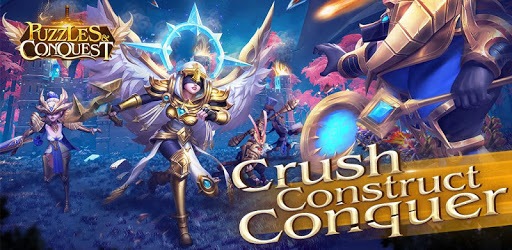
Crush, Construct, Conquer -- A mythology-themed match-3 strategy game!

What's New

Version5.0.184
Size608.0 MB
What's NewNew version released! [New Gameplay] Ice Bay Showdown begins, strategy combat fully upgraded! [Scene Renewal] Main city dressed in New Year snow scene, texture fully enhanced! [Rare Breakthrough] Arcane Keystone limit increased, strength fully advanced! [Experience Optimization] Lord Talent Skill Cooldown adjusted to 23 hours!

Puzzles & Conquest Screenshots

Puzzles & Conquest PC screenshot

About Puzzles & Conquest For PC

Puzzles & Conquest is an Android app developed and published by 37GAMES at Google Play Store on Dec 22, 2019 for Android users. Puzzles & Conquest is so popular that it has gained 6353971 installs so far and growing.

Puzzles & Conquest: A Game That Combines Complexity and User-Friendliness

Are you tired of the same old games that offer no challenge or excitement? Look no further than Puzzles & Conquest, a game that brings complexity and user-friendliness together in a unique and engaging way. Unlike other games, Puzzles & Conquest allows you to build your rating without having to purchase anything or wait for days. It's a refreshing change that has captivated players around the world.

A Game Like No Other

When it comes to gaming experiences, Puzzles & Conquest stands out from the crowd. With its innovative gameplay and plethora of new ways to play, this game offers a fresh and exciting adventure for both new and experienced players. Whether you're a seasoned gamer or someone who's just starting out, Puzzles & Conquest promises to provide endless hours of fun and entertainment.

Unleash Your Strategic Skills

One of the key features that sets Puzzles & Conquest apart is its emphasis on collaboration and interaction among players. This game encourages you to work together with other players, fostering a sense of community and camaraderie. With each player bringing their unique strengths and abilities to the table, you'll be able to conquer challenges and achieve greatness together.

Endless Possibilities

With Puzzles & Conquest, there's never a dull moment. The game offers a wide variety of activities to keep you engaged and entertained. From building your city and troops to engaging in epic battles with enemies, there's always something exciting to do. The developers have put in a tremendous amount of effort to ensure that players have a constant stream of new content and events to look forward to.

A Game for Everyone

One of the best things about Puzzles & Conquest is that it caters to players of all skill levels. Whether you're a casual gamer looking for a fun way to pass the time or a hardcore strategist seeking a challenge, this game has something for everyone. The gameplay may seem complicated at first, but once you get the hang of it, you'll find yourself immersed in a world of endless possibilities.

Frequently Asked Questions

1. Can I play Puzzles & Conquest without spending money?

Yes, absolutely! While paying money can make things easier and faster, it is not necessary to enjoy the game. Puzzles & Conquest offers a fair and balanced experience for all players.

2. How long does it take to progress in the game?

The pace of progression in Puzzles & Conquest depends on your dedication and strategic skills. With the right approach, you can make significant progress in a short amount of time.

3. Is there a strong community in Puzzles & Conquest?

Absolutely! Puzzles & Conquest boasts a vibrant and friendly community of players. You'll have the opportunity to connect with like-minded individuals, form alliances, and work together towards common goals.

4. Are there any limitations in the game?

While Puzzles & Conquest does have certain level requirements for various activities, these limitations do not take away from the overall fun and enjoyment of the gameplay. The game offers a rich and immersive experience that keeps you engaged at all times.

5. Can I unlock all the heroes and items in the game?

Puzzles & Conquest offers a wide range of heroes and items for players to discover and unlock. However, some may be locked behind paywalls. Nonetheless, the game provides plenty of opportunities to acquire powerful heroes and items through gameplay.

So what are you waiting for? Embark on an epic adventure with Puzzles & Conquest and experience a gaming journey like no other. Trust us, it's worth every moment.

Can I run Puzzles & Conquest on PC?

Yes, you can run Puzzles & Conquest on PC, but first, you will need emulator software installed on your Windows or MAC, which you can download for free. In the below video, you will find Puzzles & Conquest in action. Before you install the emulator, check out the minimum and recommended system requirements to run it seamlessly. They may change depending on which version of the emulator you choose. Therefore, we recommend you download the latest version of the emulator. Below you will find three free Android emulators that we have shortlisted based on their popularity:

How to Install Puzzles & Conquest on Windows PC

BlueStacks

Minimum
  • OS: Microsoft Windows 7 and above.
  • Processor: Intel or AMD Processor.
  • RAM: Your PC must have at least 4GB of RAM. (Note that having 4GB or more disk space is not a substitute for RAM)
  • Storage: 5GB Free Disk Space.
  • You must be an Administrator on your PC.
Recommended:
  • OS: Microsoft Windows 10
  • Processor: Intel or AMD Multi-Core Processor with Single Thread benchmark score > 1000.
  • Graphics: Intel/Nvidia/ATI, Onboard or Discrete controller with benchmark score >= 750.
  • Please ensure Virtualization is enabled on your PC/Laptop.
  • RAM: 8GB or higher
  • Storage: SSD (or Fusion/Hybrid Drives)
  • Internet: Broadband connection to access games, accounts and related content.

Up to date graphics drivers from Microsoft or the chipset vendor.

  • To start with, download Bluestacks from its official website. The latest version of BluesStacks is v 5, and it is around 400 MB.
  • Once the download is done, click on the Bluestacks set up file to install it on your Windows PC. Follow the on-screen instructions and install it accordingly.
  • The next step is to launch the emulator using the desktop shortcut and sign in using your Google account.
  • Now, head over to Bluestacks home screen and click on the Google Play Store icon.
  • Hit the search bar in Google Play and search for Puzzles & Conquest.
  • Install Puzzles & Conquest from the Play Store by clicking the Install option, which completes downloading of Puzzles & Conquest on PC.

NoxPlayer

Minimum
  • Operating System: Windows XP SP3, Windows Vista, Windows 7, Windows 8, Windows 10, and DirectX 9.0c
  • Processor: At least dual-core processor, both Intel, and AMD are OK
  • Video: Supports Open GL 2.0 or above
  • Memory: 1.5 GB RAM
Recommended
  • Operating System: Windows 7, Windows 8, Windows 10
  • Processor: Multiple core processors which support VT-x or AMB-V Virtualization Technology, better performance with this function enabled
  • Video: The higher performance, the better
  • Memory: 4 GB RAM

Storage: 1 GB available under installation path, 1.5GB available hard drive space

Internet: Broadband Internet connection

  • Download NoxPlayer from the official website. The latest version of NoxPlayer is v 3, and it is around 600 MB.
  • Now install the emulator using the downloaded setup file. Just go through the on-screen instructions and install NoxPlayer on your computer or laptop.
  • After the installation process, launch the Nox Android emulator and log in using your Google account when it asks you.
  • Click on the Google Play Store icon and head over to the search bar to search Puzzles & Conquest. Once found, click on the Install button to install Puzzles & Conquest for PC.
  • If you do not find Puzzles & Conquest on Google Play Store or if you want to skip logging in to Google, you can sideload APK (download the .APK file from this page and open it with NoxPlayer).
  • Launch Puzzles & Conquest from home-screen and start playing it on PC right away!

MEmu

Minimum
  • 2 cores x86/x86_64 Processor (Intel or AMD CPU)
  • WinXP SP3 / Win7 / Win8 / Win10 (Not recommended to run on Server/Enterprise)
  • Latest Windows DirectX 11 / Graphics driver with OpenGL 2.0
  • Hardware Virtualization Technology (Intel VT-x/AMD-V) shall be enabled in BIOS
  • 2GB of RAM (4GB for x64 system)
  • 5GB of hard disk free space
Recommended
  • OS: Microsoft Windows 10 with VT Enabled
  • CPU: Single Thread PassMark score > 1500 (Intel/AMD Multi-Core).
  • Graphics: Intel/Nvidia/ATI, Onboard or Discrete controller with PassMark score > 750.
  • Latest Windows DirectX 11 / Graphics driver with OpenGL 4.5 or higher
  • RAM: 8GB or higher
  • HDD: SSD, 10GB of hard disk free space
  • Internet: Broadband connection with low latency for FPS games
  • Download MEmu Play from the official website. The latest version of NoxPlayer is v 7.5.
  • When the download is completed, install the MEmu emulator on your PC. Follow the on-screen instructions and keep on clicking the Next button until the final step.
  • Now, using the desktop shortcut, look for the MEmu Play emulator and launch it. Once done, it will ask you to log in using your Google account, proceed with the same.
  • MEmu Play will ask you to log in using your Google account. When you log in, it will sync your Google account to MEmu Play. Launch the Google Play Store by clicking on the icon and search for Puzzles & Conquest.
  • Click on the Install button once you find Puzzles & Conquest from the search results. You can also sideload APK (download the .APK file from this page and open it with MEmu) if you want to skip above step.
  • After the installation of Puzzles & Conquest, you're all set to use the app on PC!

Regardless of which Android emulator you install, the steps to install, configure, and running the Puzzles & Conquest app on PC are the same.
Download Puzzles & Conquest For PC