Guns Girl - Honkai Gakuen for PC

Guns Girl - Honkai Gakuen for PC

Published by miHoYo Co., Ltd.

Updated April 14, 2026

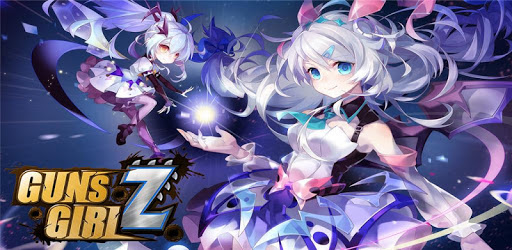
Caution!! A wave of Zombies is coming. WOW.So cute zombie girls, please come in!

What's New

Version8.0.22
Size73.9 MB
What's New·New Event ·New Boss·New Character·New Equipment·Additional stability improvements and bug fixes

Guns Girl - Honkai Gakuen Screenshots

Guns Girl - Honkai Gakuen PC screenshot

About Guns Girl - Honkai Gakuen For PC

Guns Girl - Honkai Gakuen is an Android app developed and published by miHoYo Co., Ltd. at Google Play Store on Jun 17, 2014 for Android users. Guns Girl - Honkai Gakuen is so popular that it has gained 1000000 installs so far and growing.

Guns Girl - Honkai Gakuen: A Memorable Childhood Game

Guns Girl - Honkai Gakuen, a game that has left a lasting impression on many players, holds a special place in the hearts of its dedicated fanbase. With its captivating story, lovable characters, and unique gameplay, this game has managed to create an unforgettable experience for its players.

Reliving Childhood Memories

For those who have been longing to relive their childhood memories, Guns Girl - Honkai Gakuen provided the perfect opportunity. Despite the presence of a few bugs, this game still managed to outshine its counterpart, Honkai Impact, in terms of overall quality and enjoyment.

Many players expressed their deep attachment to this game, reminiscing about the joy it brought them during their younger years. The closure of the game in 2021 left a void in their hearts, and they yearn for its return in 2022. Guns Girl - Honkai Gakuen truly matched their hobbies and became an integral part of their lives.

A Plea for Revival

The love for Guns Girl - Honkai Gakuen is evident in the heartfelt messages from fans. They express their affection for the characters, such as Kiana, Mei, Himeko, and the adorable Bronya. The hope to hear their voices again and the plea to MiHoYo to bring back this beloved game are echoed throughout the reviews.

Players also highlighted the excellent graphics, captivating storyline, and rewarding gameplay of Guns Girl - Honkai Gakuen. The weapon system, although initially puzzling, added depth to the game. The abundance of events and free items further enhanced the overall experience.

Furthermore, the desire for Guns Girl - Honkai Gakuen to become an anime series, similar to Neptunia, showcases the impact this game had on its players. The memories created from Zombiegal Kawaii to Houkai Gakuen are cherished, and players express their longing to play this game once again.

A Potential for Revival

While acknowledging the closure of the global server, players believe that Guns Girl - Honkai Gakuen still holds immense potential. They urge MiHoYo to revive the game, just as they did with Honkai Impact, and make it even better than before. The promise of DLCs and the potential for future content excite the fans, who eagerly await the revival of this beloved game.

The impact of Guns Girl - Honkai Gakuen is evident in the reviews. Players express their gratitude for the game and the company behind it. They hope that future games will capture the essence of this game and continue to provide a similar theme and experience.

A Farewell to Guns Girl

As players bid farewell to Guns Girl - Honkai Gakuen, they reflect on the great memories and experiences they had while playing the game. Despite its eventual closure, the impact it had on their lives will always remain.

Players express their appreciation for the addictive gameplay, generous gacha rates, and the overall experience that surpassed other popular games. Guns Girl - Honkai Gakuen will always hold a special place in their hearts, and they will fondly remember the time spent playing this game.

FAQs

1. Is Guns Girl - Honkai Gakuen still available to play?

No, Guns Girl - Honkai Gakuen has been shut down globally. Players are hopeful for its revival in the future.

2. Can I transfer my progress to another server?

Unfortunately, transferring progress to another server is not currently possible. Players had to bid farewell to their progress when the game shut down.

3. Will Guns Girl - Honkai Gakuen be revived?

While there are no official announcements regarding the revival of Guns Girl - Honkai Gakuen, players remain hopeful and express their desire for the game to be brought back to life.

4. Are there any plans for future content related to Guns Girl - Honkai Gakuen?

As of now, there are no known plans for future content related to Guns Girl - Honkai Gakuen. However, players remain optimistic about the potential for new content in the future.

5. How long was Guns Girl - Honkai Gakuen available?

Guns Girl - Honkai Gakuen was released nearly seven years ago and provided players with countless memories and enjoyable gameplay throughout its lifespan.

Can I run Guns Girl - Honkai Gakuen on PC?

Yes, you can run Guns Girl - Honkai Gakuen on PC, but first, you will need emulator software installed on your Windows or MAC, which you can download for free. In the below video, you will find Guns Girl - Honkai Gakuen in action. Before you install the emulator, check out the minimum and recommended system requirements to run it seamlessly. They may change depending on which version of the emulator you choose. Therefore, we recommend you download the latest version of the emulator. Below you will find three free Android emulators that we have shortlisted based on their popularity:

How to Install Guns Girl - Honkai Gakuen on Windows PC

BlueStacks

Minimum
  • OS: Microsoft Windows 7 and above.
  • Processor: Intel or AMD Processor.
  • RAM: Your PC must have at least 4GB of RAM. (Note that having 4GB or more disk space is not a substitute for RAM)
  • Storage: 5GB Free Disk Space.
  • You must be an Administrator on your PC.
Recommended:
  • OS: Microsoft Windows 10
  • Processor: Intel or AMD Multi-Core Processor with Single Thread benchmark score > 1000.
  • Graphics: Intel/Nvidia/ATI, Onboard or Discrete controller with benchmark score >= 750.
  • Please ensure Virtualization is enabled on your PC/Laptop.
  • RAM: 8GB or higher
  • Storage: SSD (or Fusion/Hybrid Drives)
  • Internet: Broadband connection to access games, accounts and related content.

Up to date graphics drivers from Microsoft or the chipset vendor.

  • To start with, download Bluestacks from its official website. The latest version of BluesStacks is v 5, and it is around 400 MB.
  • Once the download is done, click on the Bluestacks set up file to install it on your Windows PC. Follow the on-screen instructions and install it accordingly.
  • The next step is to launch the emulator using the desktop shortcut and sign in using your Google account.
  • Now, head over to Bluestacks home screen and click on the Google Play Store icon.
  • Hit the search bar in Google Play and search for Guns Girl - Honkai Gakuen.
  • Install Guns Girl - Honkai Gakuen from the Play Store by clicking the Install option, which completes downloading of Guns Girl - Honkai Gakuen on PC.

NoxPlayer

Minimum
  • Operating System: Windows XP SP3, Windows Vista, Windows 7, Windows 8, Windows 10, and DirectX 9.0c
  • Processor: At least dual-core processor, both Intel, and AMD are OK
  • Video: Supports Open GL 2.0 or above
  • Memory: 1.5 GB RAM
Recommended
  • Operating System: Windows 7, Windows 8, Windows 10
  • Processor: Multiple core processors which support VT-x or AMB-V Virtualization Technology, better performance with this function enabled
  • Video: The higher performance, the better
  • Memory: 4 GB RAM

Storage: 1 GB available under installation path, 1.5GB available hard drive space

Internet: Broadband Internet connection

  • Download NoxPlayer from the official website. The latest version of NoxPlayer is v 3, and it is around 600 MB.
  • Now install the emulator using the downloaded setup file. Just go through the on-screen instructions and install NoxPlayer on your computer or laptop.
  • After the installation process, launch the Nox Android emulator and log in using your Google account when it asks you.
  • Click on the Google Play Store icon and head over to the search bar to search Guns Girl - Honkai Gakuen. Once found, click on the Install button to install Guns Girl - Honkai Gakuen for PC.
  • If you do not find Guns Girl - Honkai Gakuen on Google Play Store or if you want to skip logging in to Google, you can sideload APK (download the .APK file from this page and open it with NoxPlayer).
  • Launch Guns Girl - Honkai Gakuen from home-screen and start playing it on PC right away!

MEmu

Minimum
  • 2 cores x86/x86_64 Processor (Intel or AMD CPU)
  • WinXP SP3 / Win7 / Win8 / Win10 (Not recommended to run on Server/Enterprise)
  • Latest Windows DirectX 11 / Graphics driver with OpenGL 2.0
  • Hardware Virtualization Technology (Intel VT-x/AMD-V) shall be enabled in BIOS
  • 2GB of RAM (4GB for x64 system)
  • 5GB of hard disk free space
Recommended
  • OS: Microsoft Windows 10 with VT Enabled
  • CPU: Single Thread PassMark score > 1500 (Intel/AMD Multi-Core).
  • Graphics: Intel/Nvidia/ATI, Onboard or Discrete controller with PassMark score > 750.
  • Latest Windows DirectX 11 / Graphics driver with OpenGL 4.5 or higher
  • RAM: 8GB or higher
  • HDD: SSD, 10GB of hard disk free space
  • Internet: Broadband connection with low latency for FPS games
  • Download MEmu Play from the official website. The latest version of NoxPlayer is v 7.5.
  • When the download is completed, install the MEmu emulator on your PC. Follow the on-screen instructions and keep on clicking the Next button until the final step.
  • Now, using the desktop shortcut, look for the MEmu Play emulator and launch it. Once done, it will ask you to log in using your Google account, proceed with the same.
  • MEmu Play will ask you to log in using your Google account. When you log in, it will sync your Google account to MEmu Play. Launch the Google Play Store by clicking on the icon and search for Guns Girl - Honkai Gakuen.
  • Click on the Install button once you find Guns Girl - Honkai Gakuen from the search results. You can also sideload APK (download the .APK file from this page and open it with MEmu) if you want to skip above step.
  • After the installation of Guns Girl - Honkai Gakuen, you're all set to use the app on PC!

Regardless of which Android emulator you install, the steps to install, configure, and running the Guns Girl - Honkai Gakuen app on PC are the same.

Download Guns Girl - Honkai Gakuen For PC